
TL;DR:
- Pixel-anchored feedback tools like Pinhub allow reviewers to attach comments precisely to design elements, reducing ambiguity. Implementing structured, domain-specific workflows alongside guest access can significantly speed up review cycles and improve collaboration. A short pilot of four weeks helps measure the impact of such tools on review efficiency and revision times.
For product designers, UX teams, and agencies who need precise, pixel-anchored feedback, Pinhub is the tool to try first. It lets reviewers pin comments to exact pixels on screenshots or Figma designs, keeps every thread anchored to the element it describes, and allows guest reviewers to participate without creating an account. If your team loses time to vague feedback like "fix the button area," Pinhub is built to solve that problem directly.
Table of Contents
- What do visual collaboration tools actually cover?
- Why pixel-anchored, threaded feedback speeds up your reviews
- What features must a pixel-anchored feedback tool include?
- How to run an effective design review step by step
- What security and sharing controls should you expect?
- What should teams expect from freemium to team pricing?
- How does Pinhub match the needs of product designers and UX teams?
- How to roll out a pixel-anchored feedback tool in four weeks
- Key Takeaways
- What most teams get wrong about design reviews
- Start your first Pinhub review today
- Useful sources and further reading
- FAQ
What do visual collaboration tools actually cover?
The phrase "visual collaboration tools" covers a wide range of software, but this article focuses on one specific category: pixel-anchored feedback and review platforms. These are tools that let reviewers click on a precise area of a screenshot, design file, or Figma embed and attach a comment directly to that spot.
That definition deliberately excludes digital whiteboards and brainstorming platforms. Those tools serve a different purpose and a different audience. Here, the focus is on annotation and review tools that support:
- Static screenshots (PNG, JPEG, WebP)
- PDF documents and design exports
- Figma embeds and live design frames
- Web page captures via browser extension
- Guest reviewers who comment without signing up for an account
If you are evaluating tools for post-design review, client sign-off, or developer handoff, you are in the right place.
Why pixel-anchored, threaded feedback speeds up your reviews
Vague feedback is the single biggest source of wasted revision cycles. When a stakeholder writes "the header looks off" in a Slack message, the designer has to ask a follow-up question, wait for a response, and then guess which element triggered the comment. That loop can add days to a sprint.
Pixel-anchored comments eliminate that ambiguity by keeping feedback attached to the exact UI element it describes. Threaded replies then keep the conversation organized around that single point, rather than scattering it across email chains or chat threads, benefiting from advanced hybrid-team collaboration technology. Structured, threaded comment systems help teams resolve issues faster by preserving context and reducing discussion noise compared with linear feedback channels.
Pro Tip: Track how many follow-up questions your team asks per review cycle. If that number is consistently above two or three per comment, your current tool is not anchoring feedback precisely enough.
What features must a pixel-anchored feedback tool include?
Not every tool in this category offers the same depth. Before committing to a platform, verify it covers the features below. The first features are essential for team use; the others become more important as your workflow scales.

Non-negotiable for teams:
Important for scaling teams:
- Figma integration or embed: — Design teams working in Figma need feedback that lives alongside the source file, not in a separate tool.
How to run an effective design review step by step
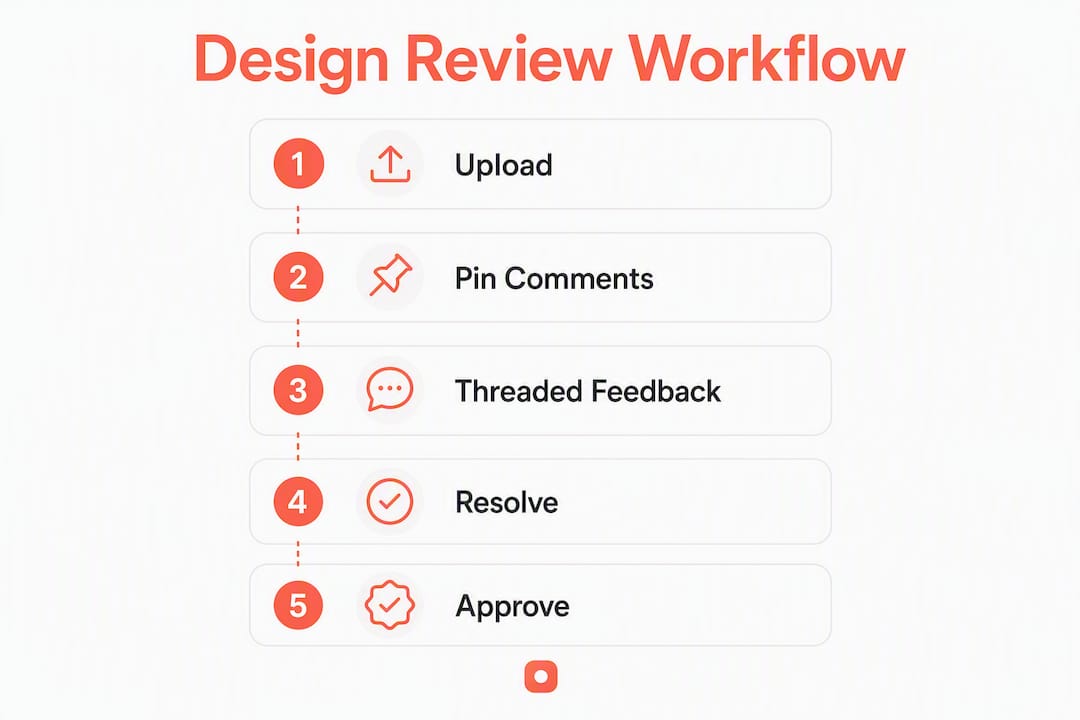
A repeatable review workflow cuts back-and-forth and keeps every comment traceable from pin to resolution. Follow this sequence for any design review, whether it is an internal UX critique or a client sign-off session.
- Prepare the file and define scope — Upload the screenshot, export the Figma frame, or capture the live page. Write a one-sentence brief at the top of the review describing what you want feedback on. Scope prevents reviewers from commenting on elements that are not ready.
- Convert comments to tasks and assign owners. Converting comments to assignable tasks speeds handoffs and reduces ambiguity about who is responsible for each fix.
Pro Tip: Set a firm deadline for all review comments before you open the file for revisions. Open-ended review windows create "open loops" where late comments arrive after fixes are already in progress, forcing rework.
You can find a detailed design review checklist on the Pinhub blog for teams that want a printable version of this workflow.
What security and sharing controls should you expect?
Design assets are often confidential, especially during pre-launch phases. A credible feedback platform should offer the following controls as standard.
- Link-level access: Choose between public, password-protected, and private (invite-only) links for each review.
- Password protection: Add a password to any shared link so only intended reviewers can open it.
- Role-based permissions: Separate view-only, comment, and admin roles so clients cannot accidentally delete threads.
- Snapshots tied to comments: Commenting on design documentation with snapshots preserves the original state at the time of comment, giving teams a reliable audit trail.
- Immutable timestamps: Every comment should carry a timestamp that cannot be edited, so the review history is trustworthy.
Guest access is useful for clients, but it should be scoped carefully. Guests should be able to comment and reply, but not delete threads or access other projects in the workspace.
What should teams expect from freemium to team pricing?
Most pixel-anchored feedback tools follow a three-tier model: a free plan for solo or low-volume use, a Pro plan for individual practitioners, and a Team plan for collaborative workspaces. Here is what typically sits behind each tier.
- Pro plan: — Unlimited screenshots, version history, password-protected links, and Figma integration. Suited to freelancers and solo designers managing multiple clients.
Onboarding a solo reviewer takes under an hour. A full team rollout, including training reviewers on the pinning workflow and setting up folder structures, typically takes one to two weeks. Before committing to a paid plan, run a two-week pilot with one real project and at least one external guest reviewer to verify the workflow fits your team.
How does Pinhub match the needs of product designers and UX teams?
Pinhub covers every feature in the checklist above. The table below maps its capabilities to the core jobs product designers and UX teams need to get done.
| Reviewer job | Feature required | Pinhub support |
|---|---|---|
| Pinpoint a specific UI element | Pixel pinning | Yes, click-to-place pins on any image area |
| Keep discussion organized | Threaded comments | Yes, replies stay anchored to the original pin |
| Include clients without friction | Guest reviewer access | Yes, no account required |
| Track design history | Version control and snapshots | Yes, per-version comment history |
| Work with Figma files | Figma embed and integration | Yes, available on Pro and Team plans |
| Reduce manual summary work | AI-powered summaries | Yes, automated comment summaries |
| Capture live web pages | Browser extension | Yes, screenshot capture without leaving the browser |
| Convert feedback to tasks | Comment-to-task conversion | Yes, with resolution tracking |
Beyond the table, Pinhub's guest reviewer flow stands out. Clients receive a link, open the review, and start pinning comments immediately. No sign-up screen, no email verification. That friction reduction alone tends to increase feedback volume and speed, particularly from non-technical stakeholders.
For agencies managing multiple clients, the folder and workspace organization keeps projects separated and searchable. The Pinhub blog covers agency-specific workflows in more detail.
How to roll out a pixel-anchored feedback tool in four weeks
A short pilot gives your team enough data to measure real impact before committing to a paid plan.
- Week 1: Define scope. Choose one active project, upload the first set of screenshots, and invite two to three pilot reviewers including one external guest.
- Week 2: Run the first structured review. Track how many comments are pinned, how many follow-up questions are asked, and how long it takes to resolve the first thread.
- Week 3: Convert resolved comments to tasks and complete one full revision cycle. Note the round-trip time from comment to confirmed fix.
- Week 4: Compare metrics. Measure average review time, number of unresolved threads at sign-off, and total revision rounds against your pre-pilot baseline.
Measurable outcomes to watch: average time from review open to all threads resolved, number of revision rounds before sign-off, and the ratio of pinned comments to follow-up clarification questions. A well-run pilot typically shows a clear drop in clarification questions within the first two reviews, as reviewers learn to anchor their feedback precisely.
Filtering unresolved versus resolved comments in a sidebar view helps teams track open issues without scrolling through the entire thread history.
Key Takeaways
Pixel-anchored, threaded feedback tools like Pinhub reduce revision cycles by eliminating vague comments and keeping every discussion tied to the exact element it describes.
| Point | Details |
|---|---|
| Pixel pinning eliminates ambiguity | Comments attached to a specific element remove "which one?" questions from every review. |
| Guest access increases feedback speed | Reviewers who skip account creation respond faster and leave more comments per session. |
| Snapshots protect audit trails | Version history tied to comments preserves the design state at the time of each review. |
| Run a four-week pilot | Track review time, revision rounds, and clarification questions to measure real impact. |
| Pinhub covers the full checklist | Pixel pinning, threaded comments, guest access, version control, Figma integration, and AI summaries are all included. |
What most teams get wrong about design reviews
The most common failure in design reviews is not the tool. It is the absence of a defined scope. Teams upload a file, share a link, and wait. Reviewers comment on whatever catches their eye, including elements that are not ready for feedback, placeholder copy, and unfinished states. The result is a thread full of noise that the design lead has to triage manually.
Pixel-anchored feedback tools fix the location problem, but they cannot fix the scope problem on their own. The teams that see the fastest resolution times are the ones that pair precise tooling with a brief written scope at the top of every review. One sentence is enough: "Please review the navigation and hero section only. Ignore the footer, which is still in progress."
The second pattern worth noting is guest reviewer friction. Platforms that require account creation before commenting consistently see lower participation from clients and stakeholders. Reducing that barrier, as Pinhub does by allowing guest pins without sign-up, produces more feedback in less time. That is not a minor convenience feature. It is a structural advantage in any workflow that depends on external input.
Start your first Pinhub review today
Pinhub gives product designers, UX teams, and agencies a direct path from vague feedback to resolved threads. The free plan lets you upload screenshots, pin comments, and invite guest reviewers immediately, with no credit card required. The Pro plan adds version history, password-protected links, and Figma integration for individual practitioners. The Team plan extends those features across your full workspace with AI summaries and advanced organization.

To get the most from your trial, test these four things in your first week: pin a comment on a specific UI element, invite a guest reviewer using a shared link, take a version snapshot after your first revision, and connect a Figma frame to see embedded feedback in context. Start your free Pinhub workspace and run your first structured review today.
Useful sources and further reading
The research and resources below support the claims in this article and offer deeper guidance on specific topics.
- How I Improved My Collaboration Efficiency with Altium 365 — snapshot and version control best practices
- Fabric — for your design files — live Figma embeds and pinned annotation behavior
- Web Design Feedback: A Practical Guide for Agencies — agency-focused feedback process guidance
- Feedback on Website Design: Top Tools and Methods — broader tool and method overview for design teams
- How to Annotate a Website for Better Team Collaboration — step-by-step annotation and guest reviewer flow
FAQ
What are pixel-anchored visual feedback tools?
Pixel-anchored visual feedback tools let reviewers click on a specific area of a screenshot or design file and attach a comment directly to that point. They differ from digital whiteboards by focusing on structured annotation and review rather than open-ended brainstorming.
Do guest reviewers need an account to use Pinhub?
No. Pinhub allows guest reviewers to pin comments and participate in threads without creating an account. They receive a shared link and can start leaving feedback immediately.
What file types does Pinhub support?
Pinhub supports screenshots in common image formats, PDF exports, and Figma embeds. Its browser extension also captures live web pages directly for annotation.
How long does it take to onboard a team onto a pixel-anchored feedback tool?
A solo reviewer can be productive within an hour. A full team rollout, including training and folder setup, typically takes one to two weeks depending on project volume and the number of external reviewers involved.
What is the difference between a Pro and a Team plan?
Pro plans are designed for individual practitioners and include version history, Figma integration, and password-protected links. Team plans add multiple workspace members, AI-powered summaries, and advanced organization features suited to agencies and larger UX teams.