
Use a tool-first, repeatable feedback workflow to capture contextual comments, triage them, and convert them into tracked work. Usepinhub is the recommended platform for this: it lets you pin comments directly onto screenshots, supports guest reviewers without requiring account creation, tracks version history, and converts resolved threads into checklist items that your team can close out. That combination covers the full cycle from raw client input to signed-off implementation.
Three capabilities separate a productive design review from a chaotic email thread:
- Contextual capture: Pin comments to exact screen locations with URL, viewport, and browser metadata attached so developers never have to ask "where exactly?"
- Guest reviewer access: Clients join via a shared link with no account required, which removes the single biggest friction point in client feedback for web design.
- Version control and audit trail: Every round of changes is logged, so approvals are traceable and rollbacks are possible without digging through inboxes.
Mobile usability deserves a dedicated check in every review cycle. Mobile accounts for the majority of first visits on many sites, which means a design that looks polished on desktop can still fail the user experience evaluation that matters most. Build that check into your process from the start, not as an afterthought.
Table of Contents
- What capture features make web design feedback actually useful?
- How do you organize and resolve feedback inside a project?
- How do you install and integrate a feedback tool into your stack?
- How do you give and receive useful design feedback?
- How do you triage feedback and convert it into tracked work?
- What does a research-backed review process look like?
- Key Takeaways
- Why the "just send your thoughts" approach always fails
- Usepinhub gives you a complete feedback workspace from day one
- FAQ
- Useful sources
What capture features make web design feedback actually useful?
The quality of your feedback depends heavily on what gets captured alongside the comment. A note that says "the button looks off" is nearly useless without knowing which page, which device, and which browser the reviewer was using. The right tool closes that gap automatically.
Look for these capture features when evaluating any feedback platform:
- In-page pin comments: Reviewers click directly on the element they mean, anchoring the comment to a pixel location rather than a paragraph description.
- Screenshot annotation: Markup tools (arrows, highlights, freehand) let reviewers mark up exactly what they see before submitting.
- Automatic metadata: URL, viewport size, browser, and OS captured on submission, so developers have the reproduction context without asking.
- File attachments: Figma files, PDFs, and reference images attached directly to a comment thread keep assets and feedback in one place.
- Secure share links: Password protection and expiry dates on review links keep client work private without requiring a full user management setup.
- Guest reviewer flow: Clients and stakeholders submit feedback without creating accounts, which is consistently cited as a deciding factor for agencies evaluating tools.
AI-assisted triage is worth adding to that list. Tools that score a design across categories like UX, copy, mobile, and conversion and surface a prioritized "Top 3 Fixes" give your team a starting frame before the client review even begins. That pre-review audit reduces scope ambiguity and helps you lead the conversation rather than react to it.
Pro Tip: Before your next client review, run an automated audit of the page to identify the top usability and mobile issues. Share the findings with the client as a pre-read so the review session focuses on decisions, not discovery.
Behavioral data from session recordings and heatmaps pairs well with qualitative pin comments. When a client says "the homepage feels confusing," a heatmap showing where users actually stop scrolling gives that comment a measurable foundation and a clearer fix.
How do you organize and resolve feedback inside a project?
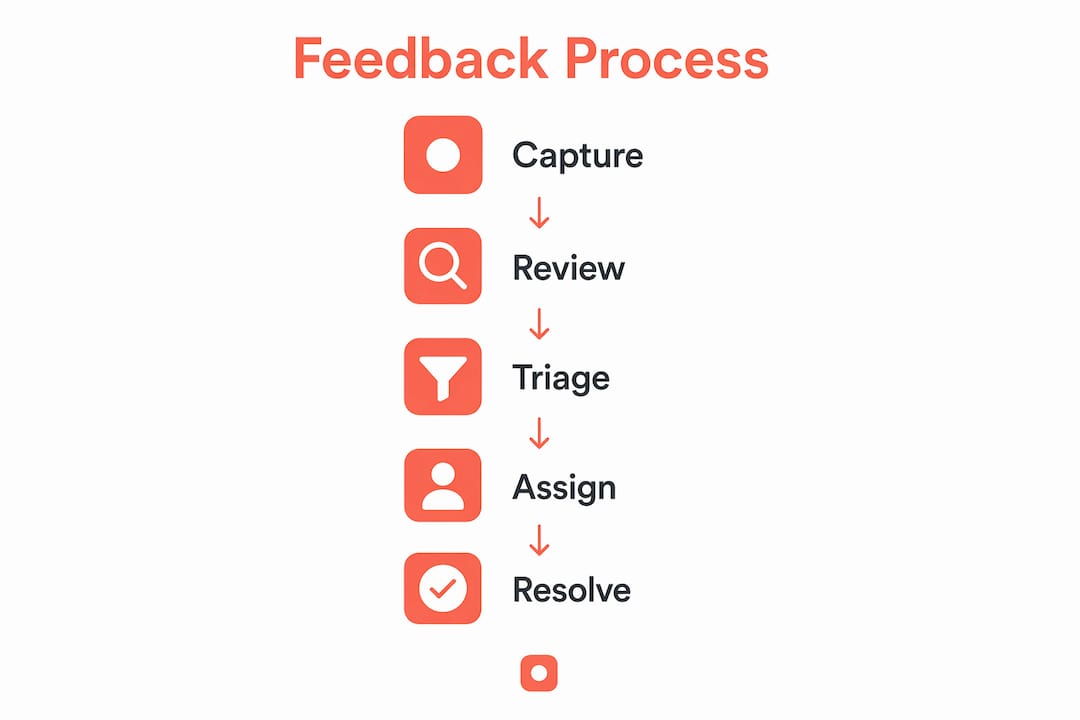
Raw comments are only the beginning. Without a clear workflow, feedback piles up, duplicates multiply, and no one knows what is actually resolved. The stages below give your team a repeatable structure.
- Collect: Reviewers submit pin comments or annotated screenshots through the shared review link. All submissions land in one project workspace.
- Triage: A designated triage owner reviews new comments, removes duplicates, adds labels (bug, content, design, accessibility), and sets initial severity.
- Assign: Each triaged item gets an owner and a target sprint or release. Unassigned items do not move forward.
- Implement: The assigned designer or developer works the item and updates its status. Thread replies keep the conversation attached to the original comment.
- Verify: The triage owner or a QA reviewer confirms the fix against the original comment and the attached screenshot.
- Close: The thread is marked resolved. Resolved threads feed into a checklist the project lead can use for sign-off.
Version history makes this workflow auditable. When a client questions why a design decision changed between rounds, you can pull up the exact comment thread that drove it. That transparency reduces disputes and speeds approvals.
To onboard a team onto this workflow, work through this checklist before the first live review:
- Create a project folder per release or sprint, not per client.
- Define your label taxonomy (bug, content, design, accessibility, performance) and share it with the whole team before reviews open.
- Assign a triage owner for each project. That person is the single point of contact for incoming feedback.
- Set a triage cadence: daily for active sprints, twice weekly for slower projects.
- Archive resolved threads at the end of each sprint so the active queue stays clean.
How do you install and integrate a feedback tool into your stack?
Getting the tool into your workflow is a one-time setup that pays off across every project. The installation path depends on where your team does most of its reviewing.
Choose your capture point first:
- Browser extension: Best for reviewing live or staging sites. Install once, capture screenshots from any page with one click.
- Site widget: Embed a small snippet on your staging environment so clients can submit feedback directly from the page they are reviewing.
- Figma plugin: Connects design files to the same feedback workspace, so comments on mockups and comments on built pages live in one place.
- Page bookmarklet: A lightweight fallback for reviewers who cannot install extensions.
Step-by-step setup for a common agency stack:
- Install the browser extension on every team member's machine.
- Connect the workspace to Slack. New comments trigger a channel notification so the team sees feedback in real time without checking the tool constantly.
- Link the workspace to Jira, Asana, or Trello. Configure the integration so any comment labeled "bug" automatically creates a ticket with the screenshot and metadata attached.
- Set up guest reviewer links for each active project. Apply password protection for client-facing links.
- Map workspace roles: assign "reviewer" to clients, "triage owner" to your project lead, and "assignee" to individual designers and developers.
Learning how to annotate a website effectively is worth a short team session during onboarding. Ten minutes spent aligning on annotation conventions saves hours of clarification later.
Pro Tip: During workspace setup, define which comment labels automatically push to which PM tool. A "bug" label goes to Jira; a "content" label goes to Asana. Automating that routing prevents triage owners from manually sorting tickets.
On permissions: mask sensitive client data (personal information visible in screenshots, unreleased product details) before sharing review links externally. Most platforms let you blur or crop before sharing.
How do you give and receive useful design feedback?
The single biggest source of feedback friction is vague language. "Make it pop," "it feels off," and "I don't love it" are not actionable. They signal a feeling without identifying a cause, which forces designers to guess and iterate blindly.

Interaction Design Foundation guidance is clear on this: leading the feedback process means teaching clients to express intent, not just reaction. When a client says "make it pop," the right response is to ask "Are you concerned about brand recognition, or does the CTA not stand out enough against the background?" That reframe surfaces the real requirement.
Feedback message templates your team can copy:
- Design tweak: "The hero CTA button [element, URL] does not meet WCAG AA contrast on mobile Chrome. Expected: 4.5:1 ratio. Actual: appears lower. Device: iPhone 14, Safari."
- Content change: "The headline on the About page reads as internal jargon. Suggest replacing with a benefit statement. Reference: [attached brief, page 3]."
- Bug report: "Clicking 'Submit' on the contact form [URL] on Firefox 124 returns a blank page instead of the confirmation message. Steps: fill all fields → click Submit."
- Accessibility issue: "The image carousel has no keyboard navigation. Users relying on Tab cannot move between slides."
Dos and don'ts for structured feedback:
- Do tie every comment to a user or business outcome ("this affects conversion on mobile").
- Do include device, browser, and URL in every bug report.
- Do set a word limit for open-ended feedback fields to discourage essays.
- Don't use color or subjective aesthetic language without a reference ("like the approved brand palette, not the current teal").
- Don't submit feedback without a proposed direction, even a rough one.
For review meetings, set a 45-minute timebox, assign one facilitator, and require all comments to be submitted in the tool before the meeting starts. The meeting is for decisions, not for collecting new input.
How do you triage feedback and convert it into tracked work?
Not all feedback deserves the same urgency. A triage matrix keeps your team focused on what actually moves the project forward.

| Severity | High Impact | Medium Impact | Low Impact |
|---|---|---|---|
| Blocking | Fix immediately, halt release | Fix before next sprint | Schedule for backlog |
| Major | Fix this sprint | Fix next sprint | Backlog with priority label |
| Minor | Batch with next design pass | Backlog | Defer or decline |
Impact categories to use: conversion (affects a primary CTA or checkout flow), brand (affects visual consistency or trust signals), usability (affects task completion), and accessibility (affects compliance or inclusion).
When converting a comment into a tracked task, require this minimum information before the ticket is created:
- Reproduction steps (URL, device, browser, steps to trigger)
- Screenshot or screen recording attached
- Expected vs. actual behavior stated
- Effort estimate (quick fix under 2 hours, medium 2–8 hours, large over 8 hours)
- Assigned owner
Auto-conversion rules reduce manual work. Configure your integration so any comment labeled "bug" creates a Jira issue automatically, with the screenshot and metadata pre-filled. That rule alone eliminates a significant share of triage overhead.
Schedule triage cycles rather than triaging on demand. Daily triage during active sprints, twice weekly during slower phases. Ad-hoc triage is where scope creep starts: a client sends a "quick note" on a Friday, it sits unlogged, and by Monday it has become an assumption that the team will handle it.
For a deeper look at evaluating website design against usability and conversion criteria, that framework pairs well with the triage matrix above.
What does a research-backed review process look like?
A repeatable review process treats each feedback round as a project milestone with a deliverable, a timeboxed session, and a sign-off. That structure is what separates agencies that finish projects on schedule from those that are still revising six months later.
Scheduling review cycles with deadlines and defining success criteria up front is the most consistent recommendation across agency-focused process guides. The mechanism is straightforward: when clients know the review window closes on Thursday and the next round opens in two weeks, they consolidate feedback instead of dripping it in daily.
Here is the milestone checklist your team can run for every review cycle:
- Before the review: Prepare annotated assets, run an automated pre-audit, and share the review link with a deadline and a brief on how to submit feedback.
- During the review: Run a 45-minute timeboxed session. Facilitator captures decisions in real time. No new scope is accepted verbally without a corresponding comment in the tool.
- After the review: Triage owner converts all comments to tickets within 24 hours. Project lead sends a summary of accepted, deferred, and declined items to the client for sign-off.
- Verification pass: After implementation, the triage owner checks each closed ticket against the original comment and marks it verified. Reopened items restart the cycle.
Measuring your feedback loop is how you improve it over time. Track four metrics per project:
- Closure rate: Percentage of submitted comments resolved within the sprint.
- Time-to-resolution: Average days from comment submission to verified close.
- Reopen count: Comments marked resolved that were reopened because the fix was incomplete.
- Client satisfaction: A simple 1–5 rating from the client at sign-off.
Those four numbers tell you whether your process is working or where it is breaking down. A high reopen count usually points to a verification gap. A low closure rate usually points to a triage or assignment problem.
Key Takeaways
A tool-first, milestone-driven feedback process is the most reliable way to reduce revision cycles, prevent scope creep, and deliver signed-off designs on schedule.
| Point | Details |
|---|---|
| Capture context automatically | Require URL, device, browser, and viewport on every comment to eliminate developer back-and-forth. |
| Treat reviews as milestones | Set a deadline, run a timeboxed session, and require sign-off after each round to prevent rolling feedback. |
| Triage by severity and impact | Use a severity-by-impact matrix to prioritize blocking and conversion-critical issues first. |
| Automate ticket creation | Configure label-based rules so "bug" comments push directly to Jira, Asana, or Trello without manual sorting. |
| Use Usepinhub for the full cycle | Usepinhub covers capture, guest review, version history, and PM integrations in one workspace. |
Why the "just send your thoughts" approach always fails
The most common mistake agencies make is treating feedback collection as passive. They send a staging link, ask the client to "take a look," and wait. What comes back is a mix of email replies, Slack messages, and a PDF with red circles drawn in Preview. None of it is traceable, none of it is prioritized, and half of it contradicts the other half.
The fix is not a better email template. It is a structured process where the designer leads, the tool captures context automatically, and the client's role is clearly defined before the review opens. When clients understand that feedback submitted outside the tool will not be tracked, they use the tool. When they see their comments resolved and marked verified, they trust the process.
Guest reviewer access without account creation is the feature that makes client adoption actually happen. Asking a client to create yet another account is the fastest way to get feedback via email instead. Usepinhub's no-account guest flow removes that barrier entirely.
Version history is underused by most teams. It is not just a safety net for rollbacks. It is the audit trail that lets you show a client exactly which comment drove which change, which ends the "I never asked for that" conversation before it starts.
The teams that get the most out of structured reviews are the ones that treat the feedback tool as the single source of truth, not one of several channels. That discipline is a process decision, not a technology one. The tool makes it easier to enforce. The team has to decide to enforce it.
Usepinhub gives you a complete feedback workspace from day one
Vague feedback and scattered revision threads cost agencies real time. Usepinhub replaces that chaos with a single workspace where clients pin comments on exact screen locations, your team triages and assigns in one view, and every round of changes is logged with a full version history.

The free plan lets you start immediately with basic features: upload a screenshot, pin a comment, and invite a guest reviewer without requiring account creation — learn more about how AI tools can enhance freelancer productivity in this expert analysis. The Pro and Team plans add Figma integration, unlimited screenshots, password-protected share links, and AI-powered summaries that surface the top issues before your triage session even starts. Connect Slack for real-time notifications and push resolved comments directly to Jira, Asana, or Trello.
Start your free workspace today and run your first structured review in under 15 minutes.
FAQ
How do you write useful web design feedback?
Tie every comment to a specific element, URL, device, and browser, then state the expected versus actual behavior. Avoid vague language like "make it pop" and replace it with a measurable request, such as "increase hero CTA contrast to meet WCAG AA."
What makes a good feedback message example?
A strong feedback message includes the page URL, device and browser, a description of the issue, and a suggested direction. For example: "The contact form Submit button on mobile Safari returns a blank page instead of the confirmation screen. Steps: fill all fields, tap Submit."
How do you give good design feedback in a review session?
Submit all comments in the feedback tool before the meeting starts, assign a facilitator, and timebox the session to 45 minutes. The meeting should focus on decisions, not on collecting new input for the first time.
What are the 7 C's of web design?
The framework covers context, content, community, customization, communication, connection, and commerce. Definitions vary by source; it is a useful checklist for evaluating whether a site addresses each dimension of the user experience.
Does Usepinhub support guest reviewers without an account?
Yes. Usepinhub lets clients and stakeholders submit feedback via a shared link with no account creation required, which is the feature agencies most commonly cite as the deciding factor when choosing a feedback platform.
Useful sources
The sources and tools below support the claims and recommendations in this guide.
| Resource | Why it's worth reading |
|---|---|
| Usepinhub — Design Feedback & Review Tool | Product landing page with feature details, trial signup, and integration list. |
| Feedback on Website Design: Top Tools and Methods | Tool and method overview covering decision criteria for agencies. |
| Feedback for Website Design: A Practical Guide | Structured guidance on managing design reviews and client-facing templates. |
| How to Annotate a Website for Better Collaboration | Annotation techniques and tool setup for team reviews. |
| How to Evaluate Website Design for Better Results | Evaluation criteria covering usability, messaging, and conversion. |
| How to Review Websites: A Guide for Design Teams | Practical walkthrough for team review sessions and checklists. |
| IxDF — How to Get Meaningful Design Feedback | Research-backed guidance on leading client feedback and reducing unproductive edits. |
| The Admin Bar — Website Feedback Process Guide | Agency-focused checklist for scheduling review cycles and managing client expectations. |
| How to Critique Your Own Website | Practical self-review checklist with mobile-first and above-the-fold priorities. |
| AI Tools for Freelancers — Expert Analysis | Analysis of AI-assisted workflows relevant to automated feedback summaries and triage. |