
TL;DR:
- Web annotation involves attaching structured comments and highlights directly on live webpages to provide precise feedback. Effective tools enable element-level annotations that support automation and reduce manual bug documentation, aiding faster development workflows.
Web annotation is defined as the practice of attaching structured comments, highlights, or tags directly onto a live webpage to guide development and design decisions. When teams annotate websites effectively, they replace vague email threads with precise, element-level feedback that developers can act on immediately. Advanced annotation tools export structured data with CSS selectors, bounding boxes, and DOM snapshots, reducing manual bug documentation by over 90% in AI-agent workflows. That number signals a fundamental shift: annotation is no longer just a communication tool. It is a direct input into automated development pipelines.
What tools enable you to annotate a website?
The right tool determines how useful your annotations actually are. Browser extensions are the most accessible entry point. They sit inside Chrome or Firefox, activate on any live page, and let you select elements, add comments, and capture screenshots without leaving the browser. Some extensions go further by integrating directly with Chrome DevTools, letting you select elements and export feedback as markdown for batch sharing with AI agents.

AI-integrated platforms represent the next tier. These tools bind annotations to machine-readable selectors rather than pixel coordinates alone. The difference matters because a pixel coordinate breaks when the layout shifts, while a CSS selector or DOM path stays accurate across screen sizes and code updates.
Key features to look for when choosing an annotation tool:
- Element selectors: The tool should let you click any DOM element and attach a note to its CSS selector, not just its visual position.
- Bounding boxes: Visual overlays that define the exact area under review, exportable alongside the annotation data.
- Comment threading: Replies attached to the original annotation keep context intact without separate email chains.
- Screenshot capture: Visual bug reporting tools that capture screenshots alongside text comments reduce confusion between developers and designers.
- Structured export: Markdown or JSON export with selectors lets AI coding agents process changes without manual interpretation.
- Framework detection: Advanced tools detect source frameworks like React or Svelte and link notes to source code references directly.
Browser compatibility is a practical constraint. Most annotation tools target Chromium-based browsers. If your team uses Firefox or Safari, verify support before committing to a tool.
Pro Tip: Choose a tool with AI-native integration from the start. Retrofitting AI compatibility onto a basic screenshot tool wastes time and produces inconsistent exports.
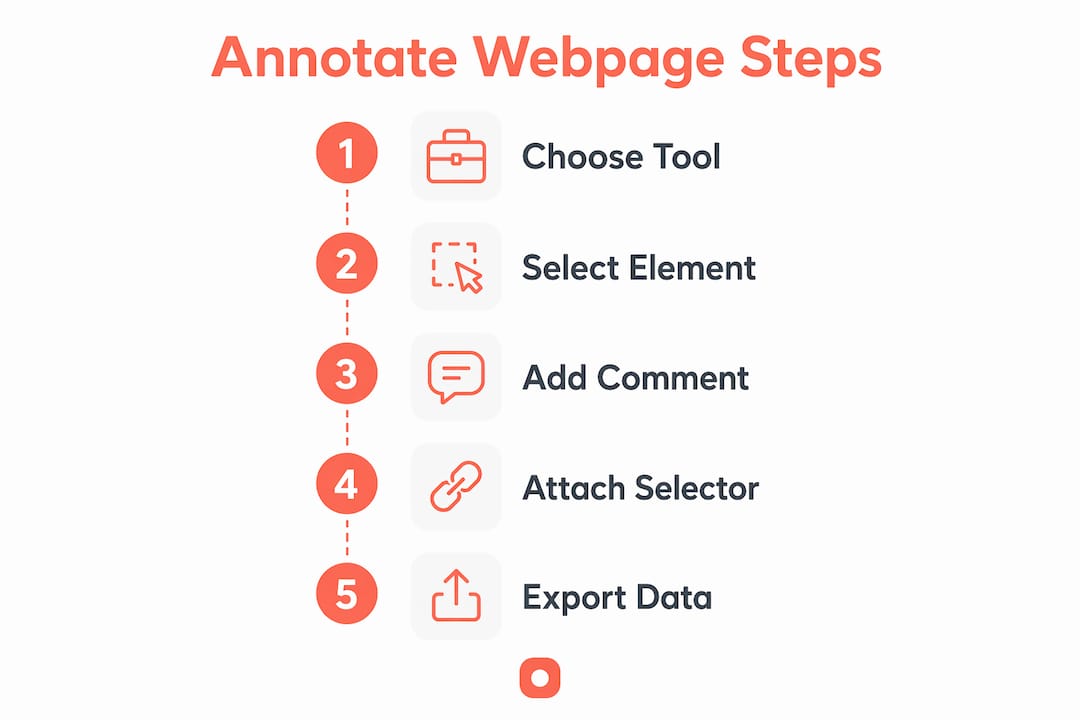
How to annotate a web page step by step
A structured process produces annotations that developers and AI agents can use without follow-up questions. Follow these steps on any live webpage:
- Set up permissions and install your tool. Install your chosen browser extension and grant it access to the target site. If the site requires authentication, log in first so annotations capture the correct authenticated state.
- Activate the element picker. Use the tool's element selector to click the specific DOM node you want to address. This binds your annotation to a CSS selector rather than a raw screenshot coordinate.
- Add your annotation type. Choose the right annotation format for the feedback: a comment for written notes, a highlight for visual emphasis, or a tag for categorization. Tools like vkz/pi-annotate support floating inline notes and HTML attribute capture, giving developers full element context alongside your comment.
- Capture a screenshot. Attach a screenshot to the annotation. This gives reviewers visual confirmation of the issue without requiring them to reproduce it manually.
- Link to the DOM or CSS selector. Confirm the annotation is bound to the element's selector, not just its visual position. This step is what separates machine-readable feedback from a basic image markup.
- Organize and label annotations. Group annotations by type (bug, copy change, layout issue) and assign priority levels. Clear labeling prevents clutter when a page accumulates dozens of notes.
- Export as structured data. Export annotations as markdown or JSON with structured selectors so AI coding agents can process changes without manual interpretation.
The table below contrasts the two main annotation methods and what each produces:
| Method | Output | Best for |
|---|---|---|
| Screenshot markup | Image with drawn overlays | Quick visual reference, no code context |
| Selector-bound annotation | Markdown or JSON with CSS selectors | AI-agent input, developer handoff, persistent review |
Selector-bound annotation takes slightly more setup but produces feedback that requires zero manual translation before a developer or AI agent acts on it.
What are common challenges when annotating websites?
The most common failure in web annotation workflows is vague feedback. A comment that says "fix the button" gives a developer no actionable path. Annotations that map visual elements to machine-readable selectors prevent this ambiguity entirely. The selector tells the developer exactly which element to touch, and the comment explains what to change.
Annotation persistence is the second major obstacle. Many basic tools lose annotations when the page refreshes or the browser restarts. Persistent annotation tools that survive page refreshes and browser restarts improve review continuity and support cross-device teamwork. Without persistence, teams repeat work and lose context between sessions.
Best practices that address these challenges directly:
- Bind every annotation to a selector. Never leave a note attached only to a screenshot coordinate.
- Use shared platforms. Annotation tools with cloud sync let the whole team see the same notes in real time, eliminating version conflicts.
- Avoid duplication. Before adding a new annotation, search existing notes for the same element. Duplicate annotations on one element create conflicting instructions.
- Export regularly. Treat annotation exports as a changelog. Export after each review session and store the file in your project management system.
- Integrate with your pipeline. Connect annotation exports to tools like Jira, Linear, or GitHub Issues so feedback enters the development queue automatically.
Pro Tip: Update your annotation tool at least monthly. Browser updates frequently break extension compatibility, and outdated tools produce incomplete selector data that confuses AI agents.
How does AI-enhanced annotation transform development workflows?
AI integration turns annotation from a communication layer into a direct development input. Modern annotation workflows export component selectors and bounding boxes so AI coding agents can identify and modify source code directly. The result is that a developer no longer needs to read a comment, find the element, and write the fix manually. The AI agent does it from the structured export.
"The future of website annotation lies in seamless human-to-AI agent communication, minimizing ambiguity to speed development cycles. By Q2 2026, automated exports enable teams to move from manual feedback to AI-briefed changes in seconds rather than minutes."
The practical impact is significant. Visual annotation workflows with structured data exports accelerate communication between digital teams and AI agents compared to traditional screenshots or PDF markups. Teams report faster issue resolution and more precise fixes when using integrated annotation tools.
The table below shows how annotation output maps to AI agent input:
| Annotation export field | AI agent use |
|---|---|
| CSS selector | Locates the exact DOM element in source code |
| Bounding box | Confirms visual scope of the change |
| Comment text | Defines the required modification |
| Framework tag | Routes the change to the correct component file |
Tools that detect source frameworks like React or Svelte add another layer of precision. Instead of pointing an AI agent at a generic DOM node, the annotation links directly to the component file. That specificity cuts the time between feedback and deployed fix from hours to minutes.
Key Takeaways
Selector-bound web annotation is the most effective method for teams that want feedback to move directly into development or AI-agent workflows without manual translation.
| Point | Details |
|---|---|
| Bind annotations to selectors | Attach every note to a CSS selector, not just a screenshot coordinate, to prevent ambiguity. |
| Export structured data | Use markdown or JSON exports so AI coding agents can process feedback without manual input. |
| Prioritize persistence | Choose tools that retain annotations across page refreshes to avoid repeated work. |
| Organize before exporting | Label and group annotations by type and priority before each export session. |
| Integrate with your pipeline | Connect annotation exports to project management tools to keep feedback in the development queue. |
What I've learned from watching teams annotate websites badly
Most teams underestimate how much annotation quality affects development speed. I've watched projects stall for days because a designer left a comment saying "this looks off" with no selector, no screenshot, and no priority label. The developer spent more time decoding the feedback than fixing the problem.
The teams that move fastest share one habit: they treat every annotation as a brief for a developer who has never seen the page before. That mindset forces specificity. You include the selector, the screenshot, the expected behavior, and the priority. When that brief goes to an AI agent instead of a human, the same specificity produces near-instant code changes.
Tool selection matters less than workflow discipline. A basic extension used consistently with clear labeling outperforms an enterprise platform used carelessly. That said, once your team has the discipline, upgrading to a tool with structured export and AI integration produces a measurable jump in throughput. The Usepinhub blog covers annotation workflows and feedback strategies worth reading before you commit to a tool stack.
My honest recommendation: start with selector-bound annotations on your next project, export after every review session, and measure how many follow-up questions developers ask. That number will drop fast.
— Pinhub
Pinhub makes website annotation feedback work for your team
Usepinhub is built for exactly the kind of structured, precise feedback this article describes. Teams upload screenshots and pin comments directly onto specific points, creating pixel-anchored feedback that removes the guesswork from review cycles. Guest reviewers can participate without creating accounts, which means clients and stakeholders join the process without friction.

Usepinhub also includes version control and automated summary lists, so your annotation history stays organized across every project iteration. For web developers and digital content teams looking to move faster without losing feedback quality, try Usepinhub and see how structured annotation changes your review process.
FAQ
What is web annotation?
Web annotation is the practice of attaching structured comments, highlights, or tags to specific elements on a live webpage. It gives developers and designers precise, element-level feedback instead of vague descriptions.
How do I annotate a web page without coding skills?
Browser extensions let you click any element on a live page and add a comment without writing code. Tools with built-in element pickers handle the CSS selector binding automatically.
Why does selector-bound annotation matter for developers?
Selector-bound annotations attach feedback to a specific DOM element, so developers know exactly which part of the code to change. This eliminates the back-and-forth that comes from screenshot-only feedback.
Can annotation exports work with AI coding agents?
Yes. Tools that export annotations as markdown or JSON with CSS selectors give AI coding agents like Claude Code enough context to locate and modify source code directly, without manual interpretation.
What annotation tools work best for team collaboration?
Tools with cloud sync, persistent storage, and structured export work best for teams. Look for platforms that support collaborative annotation features and integrate with project management systems like Jira or GitHub Issues.