
The best way to manage feedback rounds is to run one controlled workflow with a single accountable owner, contextual comments tied to exact locations on the asset, short review windows (48 to 72 hours for most rounds), and a required synthesis step at the end. Skip any of those four pieces and rounds drift into email threads, duplicate comments, and scope creep. Tools like Pinhub build this structure into the review itself instead of leaving it to whoever remembers to follow up.
TL;DR:
- Feedback should be managed through a single workflow with clear ownership, contextual comments, short review windows, and a synthesis step to prevent drift.
- Using tools that provide pixel-anchored comments, version control, and automated AI summaries can significantly reduce interpretation time and rework.
- Prioritize feedback based on impact and effort, tagging comments by category and severity to streamline triage and avoid scope creep.
- Define decision ownership and review scope before starting, and keep reviewer pools small to ensure fast, effective rounds.
- Tracking metrics like response time, close-loop rate, and round duration helps identify bottlenecks and improvements in the feedback process.
Table of Contents
- Why Feedback Rounds Break Down in the First Place
- Build One Controlled Feedback Workflow
- Step-by-Step Runbook for a Single Review Round
- What Tools and Integrations Actually Matter
- Set Rules for Stakeholder Alignment Before You Start
- Applying the Model: A Pixel-Anchored Workflow in Practice
- How to Prioritize and Categorize Incoming Feedback
- How to Get Constructive, Actionable Feedback From Reviewers
- Metrics That Show Whether Your Rounds Are Actually Working
- Pitfalls Beyond Bad Communication
- What Successful Feedback Management Looks Like in Practice
- When to Tighten the Process and When to Loosen It
- Run Your Next Review Round in Pinhub
- Sources
- FAQ
Why Feedback Rounds Break Down in the First Place
Most broken review cycles share the same root causes, and they show up whether you're a two-person design studio or a 40-person agency running client work.
- Fragmented channels. Feedback lands in email, Slack, a shared doc, and a screenshot someone texted you. Each channel strips out context, so "make this bigger" could mean the logo, the button, or the whole header.
- No single source of truth. Without version control, reviewers comment on an outdated file while you've already fixed three of their points, and you end up reconciling the same issue twice.
- Conflicting stakeholder input. Three approvers give three different answers, and nobody has named who breaks the tie.
- Hidden scope creep. Vague language like "can we also explore" slips into a revision request and quietly expands the round beyond what was scoped.
- Slow synthesis. The round ends with 40 scattered comments and no actionable list, so the design team spends half a day just figuring out what to do next.
Practical feedback management fixes this with central intake, a regular triage cadence, and visible statuses on every open item, which is the piece most teams skip until the backlog forces the issue.
Build One Controlled Feedback Workflow
A repeatable operating model turns feedback rounds from a scramble into a sequence with defined outputs at every stage. Six stages cover it: intake, synthesize, triage, assign, resolve, and close the loop.
- Intake. Reviewers submit comments through one channel, tagged with asset, page or component, severity, and requestor. Output: a raw, timestamped comment log.
- Synthesize. Someone (or an AI summary tool) converts raw comments into a clean action list, grouping duplicates and flagging conflicts. Output: a synthesized issue list.
- Triage. The loop owner sorts issues by severity and effort. Output: a prioritized backlog.
- Assign. Each item gets one owner and one deadline. Output: an assignment sheet.
- Resolve. The assigned owner makes the change and marks the item resolved. Output: updated asset plus a resolution note.
- Close the loop. The loop owner notifies reviewers what changed, what didn't, and why. Output: a short change log.
This mirrors the SIGNAL framework, which treats scope, gathering, notification, and action as distinct steps with named owners and metrics like time-to-insight and close-loop rate, rather than one blurry "get feedback" phase.
Governance matters as much as workflow. Name one decision owner per round who has final say on disputed comments, and define upfront what counts as in-scope revision versus a new request that needs a separate round.
Pro Tip: Treat the synthesized action list as a deliverable with its own deadline, not an afterthought. If nobody owns synthesis, comments pile up without ever turning into work.
Step-by-Step Runbook for a Single Review Round
Run every round through the same three phases so quality doesn't depend on who happens to be managing that week.
Before the round:
- Prepare final assets and confirm they're the current version.
- Invite only the reviewers who actually need to weigh in, using round-based evaluation setups that assign specific reviewers and windows per round.
- Define scope in writing: what decisions need to be made, what's out of bounds.
- Set an SLA, typically 48 to 72 hours for a short round, longer for full concept reviews.
- Share short instructions so reviewers know how to leave useful comments, not just reactions.
During the round:
- Require pixel-anchored or otherwise contextual comments tied to a specific spot, not general remarks.
- Keep each comment single-threaded: one issue per comment, not a paragraph covering five things.
- Preserve a version snapshot so nobody comments against a stale file.
- Track progress against the SLA so a stalled reviewer doesn't quietly kill the round.
After the round:
- Produce a synthesized action list, either manually or with an AI summary.
- Assign an owner and deadline to every item.
- Mark resolved items and publish a brief change log.
For faster turnaround specifically, closing reviews inside 48 hours usually comes down to smaller reviewer pools and tighter scope definitions upfront, not working faster under pressure.
What Tools and Integrations Actually Matter
Vendor names matter less than whether the tool covers five specific capabilities.
- Contextual capture. Pixel-anchored comments, in-app annotations, or screenshot pinning that ties a comment to an exact spot instead of a vague description.
- Version control. Immutable snapshots so everyone reviews the same file and old comments don't get misapplied to new work.
- Guest reviewer access. Clients and stakeholders should be able to comment without creating an account, since every extra login step is a reason a round stalls.
- Automated synthesis. AI summaries that turn scattered comments into a structured task list cut the manual reconciliation work that usually eats a day per round.
- Integrations that connect to where work happens. Figma for design source files, a project tracker for assigned tasks, and Slack or email for notifications, so the review doesn't live in a silo.
A visual feedback workflow that closes the loop end to end needs all five working together, not just contextual comments in isolation. Pixel-anchored comments and guest access in particular have been shown to cut interpretation time and rework by tying feedback to exact UI elements rather than descriptions of them.
Set Rules for Stakeholder Alignment Before You Start
Alignment problems rarely come from bad intentions. They come from unclear authority.
- Name one decision owner per project who has final say when reviewers disagree.
- For large stakeholder groups, use delegates or a representative subset instead of inviting everyone to comment on everything.
- Standardize comment language with a short rubric: is this a required change, a preference, or just commentary?
- Log every trade-off the loop owner makes so the reasoning is visible later, not just the decision.
Pro Tip: Ask reviewers to label their own comments as "must fix" or "nice to have" before they submit. It cuts your triage time almost in half and reduces disputes about intent.
Applying the Model: A Pixel-Anchored Workflow in Practice
A pixel-anchored feedback tool was built around the exact operating model above, not bolted onto it after the fact.
- Pixel-anchored comments remove the ambiguity that turns a two-line revision request into a 20-minute clarification call.
- Guest reviewer access means a client can comment on a design within minutes of getting a link, no account setup required, which shortens the intake phase of every round.
- Automated AI summaries turn scattered pins into a structured action list, covering the synthesize stage without a manual pass.
- Version control keeps every round anchored to one current file, so resolved comments don't resurface against an old draft.
Configure folders by project phase, set a password on client-facing links for sensitive work, and let the AI summary double as your close-the-loop notification.
How to Prioritize and Categorize Incoming Feedback
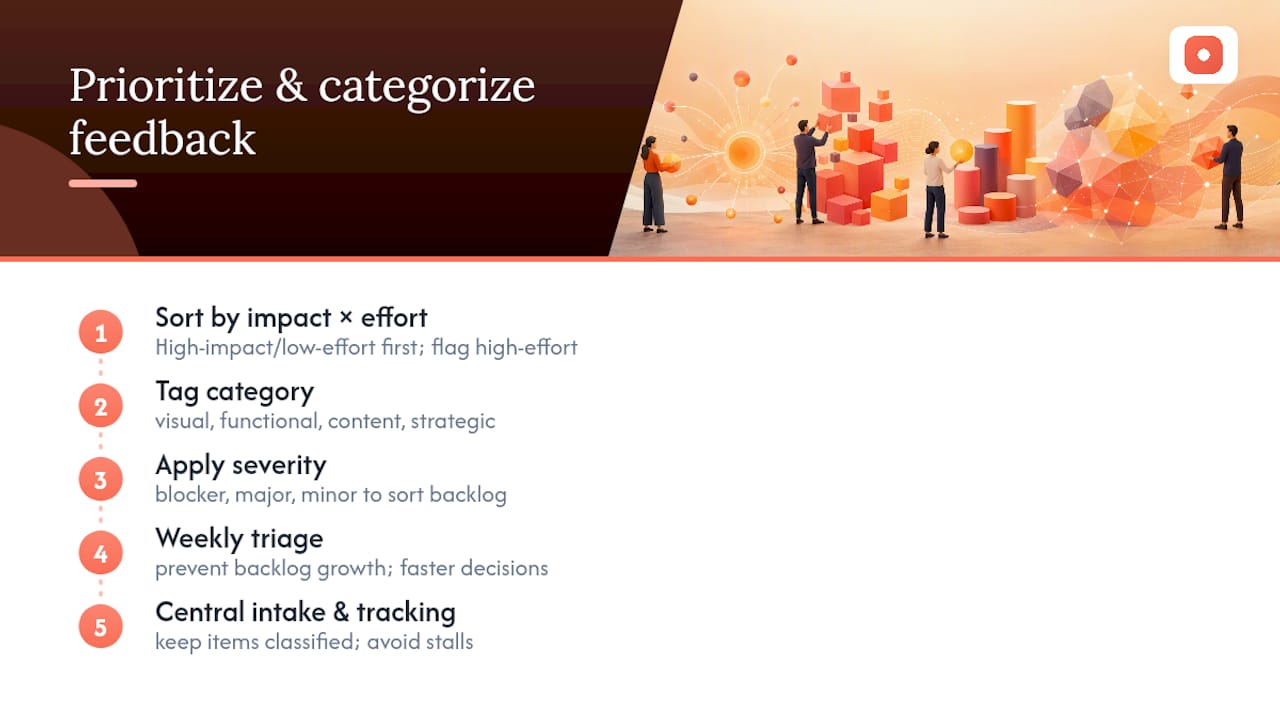
Sort every comment by two axes: impact and effort. High-impact, low-effort fixes go first. High-impact, high-effort items get flagged for the decision owner to schedule deliberately, not squeezed into the current round.
Tag each item by category at intake: visual, functional, content, or strategic. This alone prevents the common failure where a strategic redirection ("should we rethink the whole layout?") gets treated with the same urgency as a typo fix. Severity tags (blocker, major, minor) further sort the backlog so a triage session takes minutes, not an hour of re-reading comments to figure out what actually matters.
Weekly triage, rather than triage only at the end of a round, keeps the backlog from growing past what a single session can clear. Teams that run central intake and consistent status tracking report fewer stalled items simply because nothing sits unclassified long enough to be forgotten.
How to Get Constructive, Actionable Feedback From Reviewers
Vague feedback is usually a byproduct of vague prompts. Give reviewers specific questions tied to the decisions you actually need made, instead of asking "what do you think?"
Ask reviewers to point at something specific and say what's wrong and why, not just react. Best practice guidance consistently points to being specific and timely rather than general and delayed, since feedback loses value the longer it sits between the work and the response.
Open review sessions by naming what's already working before asking for critique. It sounds like a soft habit, but starting with what's going well keeps reviewers focused on genuine issues instead of nitpicking to seem thorough. Document every agreed action item in the room or thread, live, rather than reconstructing it from memory afterward.
Metrics That Show Whether Your Rounds Are Actually Working
Three numbers tell you most of what you need to know: time-to-insight (how long from comment submission to synthesized action item), close-loop rate (percentage of items resolved and communicated back to reviewers), and round duration (calendar days from open to close against your SLA).
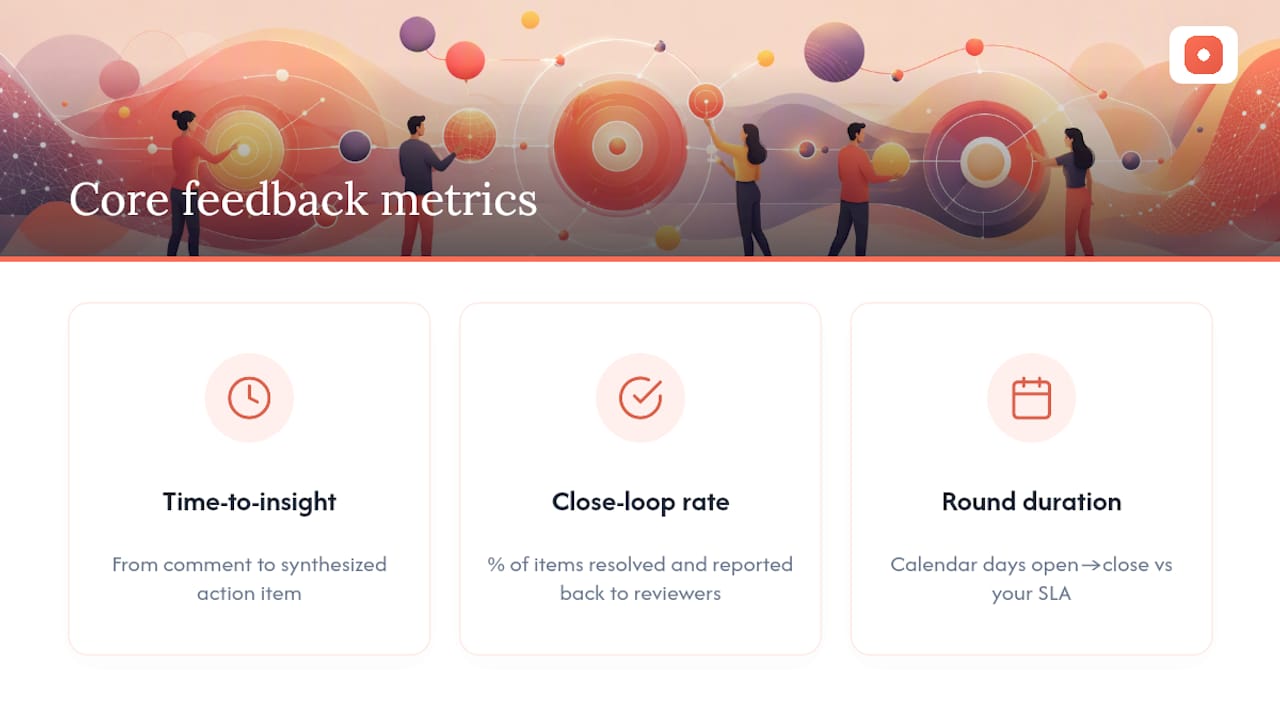
Tracking response rate, time-to-insight, and close-loop rate turns feedback management from a vague sense of "things feel slow" into a number you can actually improve. A round that consistently runs past its SLA points to a scope or reviewer-count problem, not a tooling problem.
Track reopened items too. A high reopen rate usually means comments weren't specific enough the first time around, or synthesis missed something during triage.
Pitfalls Beyond Bad Communication
Some failures have nothing to do with unclear messaging. Running every round with the same rubric regardless of stage wastes reviewer time. Early concept rounds need a light pass/fail check; final approval rounds need a detailed rubric. Using detailed rubrics too early slows everything down for no benefit.
Letting review pools grow unchecked is another quiet killer. Adding "just one more" stakeholder to every round eventually means ten opinions on a button color. A related trap: rounds without a defined mode. Funnel rounds narrow submissions between stages, while parallel rounds evaluate everything at once; picking neither on purpose usually defaults to parallel, which is slower for anything with more than a handful of items.
Finally, skipping the change log after resolution erodes trust fast. Reviewers who never hear what happened to their feedback stop giving detailed feedback.
What Successful Feedback Management Looks Like in Practice
Agencies running production design work at speed tend to converge on the same pattern: short SLAs, small reviewer pools, and a named owner per round. Teams that shift from open-ended email threads to a structured intake and synthesis process typically see rounds shrink from a week or more down to two to three days, mainly because ambiguity stops eating up the first 24 hours of every cycle.
The pattern also shows up in structured recruitment and evaluation processes outside of design entirely. Programs running multi-round evaluations with groups, assigned reviewers, and defined windows for each stage report cleaner handoffs between rounds because nothing advances without a clear decision at the gate. The same discipline, applied to design and content review, is what separates a controlled process from an open-ended feedback funnel that never quite closes.
When to Tighten the Process and When to Loosen It
Use tight, short rounds with strict SLAs for production work and final approvals, where scope is fixed and speed matters. Switch to open, collaborative review with looser governance during early discovery, when the point is generating ideas, not locking decisions. The shift between modes should change your SLA length and reviewer count, not your tools.
— Pinhub
Run Your Next Review Round in Pinhub
Every stage of the runbook above maps to something Pinhub already does. Pixel-anchored comments handle contextual capture during the round. Guest reviewer access lets clients comment within minutes, no account required, which shortens your intake phase. Version control keeps everyone working from the current file. AI-generated summaries turn scattered pins into the synthesized action list your loop owner needs to assign work and close the round.

If you're currently piecing together feedback from email, Slack, and screenshots, moving to one workspace with contextual comments and automated summaries cuts the reconciliation work out entirely. There are Free, Pro, and Team plans available with pricing details listed on the Pinhub website. Usepinhub to start a round and see how contextual feedback changes your next review cycle.
Sources
For configuring rounds, rubrics, and reviewer assignments, see Sessionboard's round-based evaluation guide and Deel's review cycle setup docs.
- How to build a customer feedback strategy in 2026 — Perspective AI
- The complete guide to feedback management: Strategy & tools — KoalaFeedback
- Admin: multi-round evaluation process — Reviewr (Intercom help)
- Setting up round-based evaluations — Sessionboard Learn
- Feedback session best practices — AMS Consulting
FAQ
What Are the Five Steps of a Feedback Loop?
A practical feedback loop runs through intake, synthesis, triage, assignment, and resolution, with a closing notification back to reviewers. The SIGNAL framework frames this as scope, gather, notify, and act, tied to named owners and metrics at each stage.
What Are the Five R's of Feedback?
Definitions vary across sources, and no single canonical "five R's" model applies universally to design or client review rounds. If your team uses one, treat it as a memory aid layered on top of the intake, synthesize, triage, assign, resolve, close structure covered above.
How Can I Effectively Manage Feedback Across Multiple Stakeholders?
Name one decision owner per round, limit the reviewer pool to people who need to weigh in, and require every comment to be tagged with context and severity. Some tools support this with pixel-anchored comments and guest reviewer access, so stakeholders can weigh in precisely without account friction slowing the round down.
What Are the Key Elements of Effective Feedback?
Effective feedback is specific, timely, and tied to a concrete location or example rather than a general impression. Best practice guidance points to preparing the session, being specific, documenting action items, and following up as the core habits that separate useful feedback from noise.
How Much Does Pinhub Cost?
Pinhub offers a Free plan for solo or low-volume use, a Pro plan at $19 per month or $180 per year, and a Team plan at $39 per month or $384 per year. Full plan details are available at Usepinhub.