
The fastest way to reduce feedback cycles is to run automated pre-review checks before anyone opens a thread, then move to an async-first review with a 48-hour shot clock and one named decision owner. Teams that combine these three habits routinely collapse three or four rounds of revision into one. The steps below show you exactly how to set that system up this week.
TL;DR:
- Implement automated pre-review checks for design system compliance, accessibility, and edge states to reduce avoidable questions reaching reviewers.
- Enforce a strict 48-hour window for asynchronous reviews with blind commenting and clear clustering to accelerate decision-making.
- Prioritize feedback by categorizing comments into blockers, important improvements, and opinions, addressing high-impact issues first.
- Assign specific roles—facilitator, note-taker, and decision owner—to streamline review sessions and prevent dominant voices from skewing outcomes.
- Use tools like Pinhub that support pixel-anchored comments, AI feedback summaries, and guest access to uphold the review process and ensure faster closure.
Table of Contents
- What Actually Causes Slow Feedback Cycles?
- How Does an Async-First Review Actually Work?
- How Do You Prioritize Feedback So It Doesn't Multiply?
- What Rituals Close Review Loops Faster?
- Why Culture Beats Tooling Every Time
- How Pinhub Helps You Run This Playbook
- Sources
- FAQ
What Actually Causes Slow Feedback Cycles?
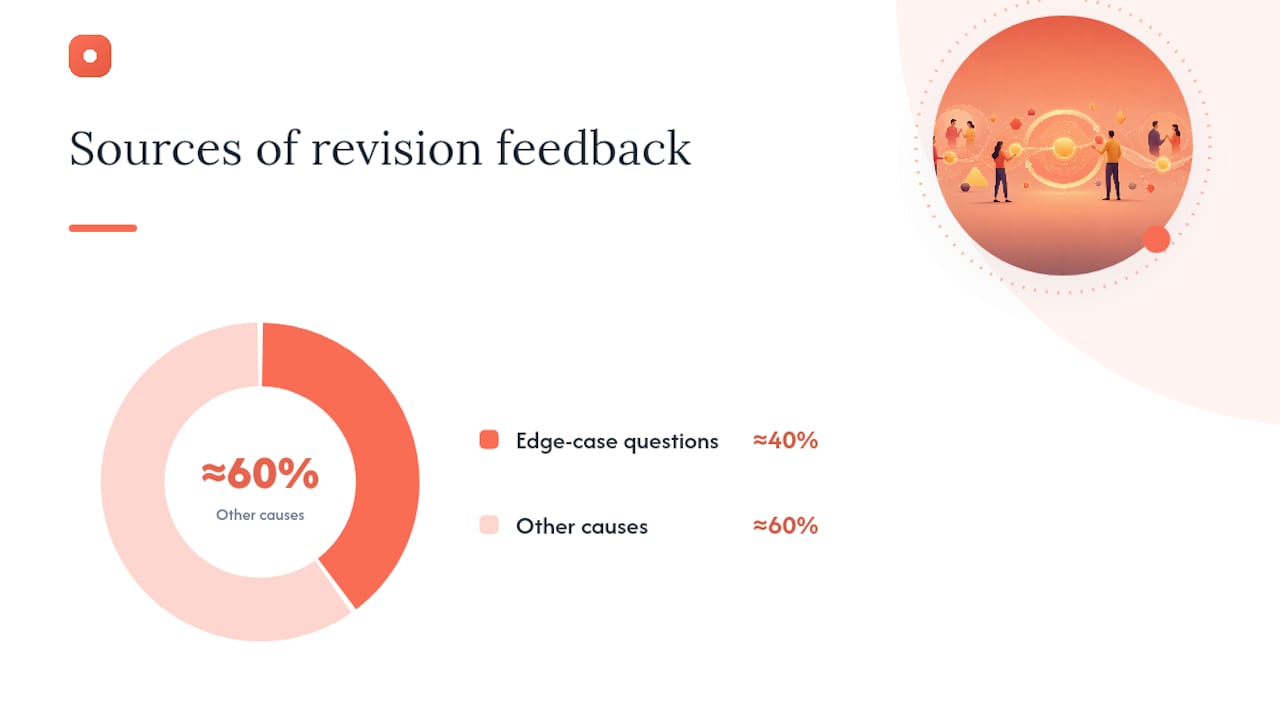
Most delay doesn't come from disagreement. It comes from avoidable questions that never should have reached a reviewer in the first place. Nearly 40% of revision-generating feedback traces back to edge-case questions that a pre-review pass could have caught, according to FigR's design review research. That single statistic explains why so many review rounds feel repetitive: the same gaps (missing error states, inconsistent spacing, unclear empty states) keep resurfacing because no one checked for them before the file went out.
Design-system compliance is the first filter. Before you post anything for review, confirm that the file imports the correct tokens, uses approved component variants, and matches the spacing and typography scale your system defines. This sounds mechanical, and it is, which is exactly why it works: a reviewer who spots a token mismatch will comment on it instead of engaging with the actual design decision, and that comment costs you a full round.
Accessibility checks come next. Run a contrast-ratio check on every text and icon pairing, and confirm touch targets meet a minimum size for mobile layouts. That five-minute pass catches issues a stakeholder would otherwise raise days later.
Edge states are the third and most overlooked category. Every screen needs a documented answer for its empty state, error state, loading state, permission-denied state, and first-run experience. Each one you leave undefined becomes a question in the review thread, and each question restarts the clock.
- Design tokens and component variants match the system library
- Contrast ratios and touch targets pass a basic accessibility pass
- Empty, error, loading, and permission states are all designed
- First-run or onboarding differences are called out explicitly
- Copy and content placeholders are replaced with real or representative text
Pro Tip: Keep this checklist pinned inside your review tool so reviewers can see it was completed. A visible checklist changes reviewer behavior: they stop hunting for gaps and start reacting to the actual decision.
How Does an Async-First Review Actually Work?
An async-first review works because it removes the two biggest time sinks in live critique: scheduling and anchoring. A well-structured async round can close within 48 hours in teams that follow a consistent format according to Coommit's research on async design reviews. That number matters because it gives you a concrete target to hold your team to instead of letting threads drift for a week.
Start every post with a three-part brief: the problem you're solving, the constraints you were working within, and the specific decision questions you need answered. A screenshot with no framing invites scattered opinions. A screenshot paired with "Should the CTA sit above or below the fold on mobile?" invites a decision.
- Post the brief and pixel-anchored screenshots together, never separately
- Require blind-first commenting for the first 24 hours so reviewers can't see each other's notes and anchor on the loudest opinion
- Cluster the comments after the blind window closes to surface where reviewers actually disagree
- Assign a named decision owner who reads the cluster and posts the resolution within the 48-hour window
- Escalate to a short live session only if the clustered comments reveal a genuine strategic disagreement, not a stylistic one
Blind-first commenting matters more than most teams realize. Without it, the first comment posted (often from the most senior voice in the room) sets the frame for every comment that follows, which is a shortcut to consensus theater, not real feedback. Surfacing disagreement through clustering after the blind window gives you a more honest signal, and it makes the decision owner's job clearer because the real points of friction are visible instead of buried in a chat thread.
48-hour shot clock benchmark: Teams that enforce a strict 48-hour window on async threads see meaningfully faster time-to-decision than teams that leave threads open indefinitely per Coommit's practitioner data. Track compliance by logging how many threads actually closed inside the window each month. If a significant portion fail to close timely, the problem is almost always an undefined decision owner, not the format itself.
Hybrid sessions still have a place. When clustered async comments reveal a split on strategy rather than execution, a short 15-minute live call gets the room aligned faster than another round of written back-and-forth.
How Do You Prioritize Feedback So It Doesn't Multiply?
Sort every comment into one of three categories before you touch a single pixel: Blockers, Important improvements, and Opinions. This one habit stops reviews from ballooning because it prevents a personal preference from carrying the same weight as a functional bug.
A blocker is something that breaks the experience or violates a hard requirement: a broken flow, a missing legal disclosure, an accessibility failure. Fix these immediately, before anything else. An important improvement makes the design measurably better but doesn't break anything if it waits: tightening a confusing label, adjusting a hierarchy that tests poorly. Schedule these for the next iteration and say so explicitly in your response. An opinion is a stylistic preference with no measurable backing: "I'd make the button bigger." Acknowledge these without committing to action, and say why.
Once comments are categorized, layer in frequency. If five reviewers independently flag the same section, that's a signal worth weighing even if no single comment reads as urgent. Combine that frequency count with a simple impact/effort view: high-impact, low-effort fixes go first regardless of category, and low-impact, high-effort requests get parked unless a blocker depends on them.
- Blocker: "The submit button doesn't work on Safari mobile." → Fix now.
- Important: "This form has six fields with no visual grouping." → Schedule for next round.
- Opinion: "I personally prefer a darker header." → Acknowledge, no action required.
Pro Tip: Require every comment to follow a simple template: what's the problem, where exactly it appears, and what outcome the reviewer expects. Structured templates convert vague reactions into instructions you can act on, cutting the clarification round most teams don't even realize they're running, a pattern Miro's feedback loop research also backs up.
What Rituals Close Review Loops Faster?
Assign three roles to every review before it starts: a facilitator who keeps the thread on schedule, a note-taker who logs decisions as they happen, and a presenter who owns a tight three-minute brief covering the problem, the constraints, and the open questions. Structured facilitation with a designated facilitator and note-taker measurably improves critique quality and stops the loudest voice from dominating the outcome, a pattern well documented in Jakob Nielsen's guidance on running UX critiques.
- Presenter posts the brief and screenshots (day one, morning)
- Reviewers submit blind comments (day one afternoon through day two morning)
- Facilitator clusters comments and flags disagreement hotspots
- Decision owner posts the resolution and a designer response within 48 hours
- Note-taker pins the final decision as a resolved artifact on the canvas
The designer response template matters as much as the brief. Post it within the 48-hour window and cover three things: what changed, what didn't change and why, and which comments were parked as opinions. Skipping this step is the single biggest reason threads reopen days later.
- Run a 24-hour context share before opening comments so reviewers aren't guessing at intent
- Keep the blind feedback window strict, even for small updates
- Pilot a weekly hybrid cadence: async by default, live only when clustering reveals real disagreement
Version control and AI-assisted summaries do double duty here. A clustering layer that groups comments into themes turns hours of manual synthesis into minutes and reveals recurring organizational problems your team might otherwise never notice, according to The Crit's guide to remote design critique. Pair that with structured critique methods and a meeting kit and duplicate comment threads mostly disappear on their own.
Why Culture Beats Tooling Every Time
Tools without rituals fail. You can install the best review software available and still watch cycles balloon if no one enforces the 48-hour window or actually reads the clustered comments. Adoption, not software, is the real barrier.
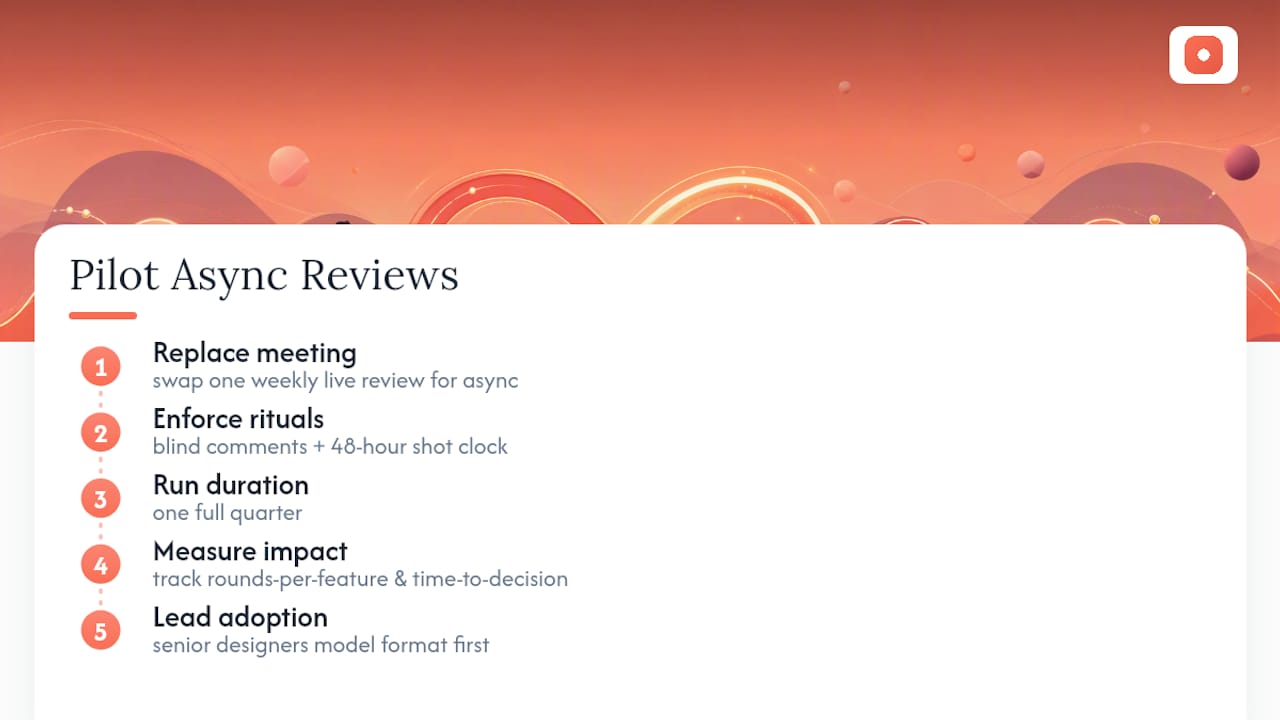
Run a simple pilot: replace one weekly live review with async-first for a full quarter, enforce blind comments and the shot clock, and track rounds-per-feature and time-to-decision before and after. Coommit's case data shows these pilots produce measurable gains fastest when senior designers adopt the new format first and visibly model it, rather than mandating it from a distance.
— Pinhub
How Pinhub Helps You Run This Playbook
Pinhub is built around the exact workflow this guide describes, without asking you to stitch together five separate tools. You post a screenshot or Figma frame, reviewers drop pixel-anchored comments directly on the spot that needs attention, and guest reviewers can weigh in without creating an account, which removes the biggest friction point in client-facing review rounds.

A typical Pinhub workflow mirrors the async-first pattern above almost exactly: a designer posts the brief and screenshots, reviewers pin comments across a defined window, an AI summary clusters the feedback into themes so the decision owner isn't scrolling through dozens of scattered notes, and version history keeps every prior round visible so nothing gets re-litigated. Links can be password-protected to help control access to sensitive work. If your team is still running reviews over email threads or scattered chat messages, Pinhub's review workspace gives you the pixel-anchored comments, guest access, and automated summaries to start closing threads inside a 48-hour window starting with your very next review.
Sources
- Cutting Design Review Cycles by 70%: An AI-First Approach
- Why Async Design Reviews Beat Live Critiques in 2026
- How to Run a UX Design Critique - Jakob Nielsen on UX
- Feedback Loop Design: Run Reviews That Get Results | Miro
FAQ
What Is a 48-Hour Shot Clock in Design Review?
It's a fixed window where reviewers submit comments, a decision owner reviews the clusters, and a resolution posts within 48 hours, preventing threads from drifting for days.
How Do You Reduce Feedback Cycles Without Skipping Steps?
Run automated pre-review checks for design-system compliance, accessibility, and edge states before posting, then use an async-first review with blind commenting and a named decision owner.
Who Should Be the Decision Owner in a Design Review?
It should be one named person, usually the lead designer or product owner, who reads the clustered feedback and posts the final call within the shot clock.
Can Async Reviews Replace Live Design Critiques Entirely?
No. Async works well for routine iteration, but a short live session still helps when clustered comments reveal a genuine strategic disagreement rather than a stylistic one.
How Does Pinhub Support Async-First Feedback?
Pinhub lets reviewers pin comments directly on screenshots or Figma frames, invites guest reviewers without accounts, and generates AI summaries that cluster feedback for the decision owner.