
A design feedback template that captures context, review criteria, pinned comment references, action items, owners, due dates, and approval status will cut revision cycles and speed approvals. Copy the compact starter below, paste it into a Google Doc or Notion page, and fill it in before your next review.
Starter template fields:
- Project/version: [Project name + v1.0]
- Design goal: [What this design must achieve]
- Review criteria: [Accessibility, brand alignment, conversion goal]
- Visual area / pinned comment ID: [Section name or comment link]
- Feedback type: Bug / Suggestion / Question / Praise
- Severity: Critical / Major / Minor
- Requested change or question: [Specific, goal-anchored description]
- Action item: [Exact task to complete]
- Owner: [Name]
- Due date: [Date]
- Approval status: Draft / In Review / Approved with Changes / Approved / Rejected
Pro Tip: Never leave the "Requested change or question" field as a one-liner like "fix the button." Write it as an observation and impact: "The CTA button color fails WCAG 2.1 AA contrast at 2.8:1, which will block users with low vision from completing the checkout flow."
Usepinhub's pixel-anchored comment system maps directly to this template's "pinned comment ID" field, so every comment in your feedback report links back to an exact screen location.
Key Takeaways
A structured design feedback template with named owners, due dates, and approval status fields is the most direct way to convert reviewer comments into completed work.
| Point | Details |
|---|---|
| Use all core fields | Include context, review criteria, pinned reference, severity, action item, owner, due date, and approval status on every entry. |
| Match template to session type | Label each session as Critique (to improve) or Approval (to decide) before sharing the template. |
| Force specificity | Write every comment as observation plus impact tied to a named criterion, not a personal preference. |
| Track versions formally | Use five status values (Draft, In Review, Approved with Changes, Approved, Rejected) and complete a handoff checklist before sign-off. |
| Usepinhub anchors comments to pixels | Pixel-pinned comments on Usepinhub map directly to the visual area field, giving every reviewer a precise, exportable feedback report. |
Table of Contents
- What does a design feedback template need to include?
- Four ready-to-use template variants you can copy today
- How to run a review and collect responses that become real work
- What a filled design feedback template actually looks like
- Which tool format should you use to collect design feedback?
- Best practices for giving and receiving design feedback
- How to track versions and manage approval status
- What teams actually get wrong with design feedback
- Pinhub makes pixel-anchored feedback fast to set up
- Sources
- FAQ
What does a design feedback template need to include?
A design feedback template works only when every field earns its place. Vague fields produce vague answers. Here is what each component does and what a good entry looks like.
Core fields
- Creative brief / context. One or two sentences on the project goal and target audience. Good: "Landing page for a SaaS free trial, targeting mid-market ops teams, goal is 8% trial signup rate." Vague: "Marketing page."
- Scope and out-of-scope. Explicitly list what reviewers should and should not comment on. Prevents off-topic notes about copy when the review is visual-only.
- Review criteria. Named standards the design must meet: brand guidelines, WCAG 2.1 AA, conversion best practices. Anchoring feedback to criteria keeps comments objective.
- Visual area / pinned comment reference. A section name ("hero section"), a Figma frame label, or a pinned comment ID from a tool like Usepinhub. This field is what separates a useful comment from an unlocatable one.
- Feedback type. Bug, Suggestion, Question, or Praise. Labeling type lets the team triage before the next standup.
- Severity / priority. Critical (blocks launch), Major (degrades experience), Minor (polish). Severity drives scheduling.
- Requested change or question. The single most important field. Write it as observation plus impact: what you see, where, and why it matters for the stated goal.
- Action item. The concrete task that resolves the comment. "Increase button contrast to 4.5:1 or above" rather than "fix button."
- Owner. One name, not a team name. A team name means no one is accountable.
- Due date. Without a date, action items drift. Tie it to the sprint or client deadline.
- Approval status. Draft / In Review / Approved with Changes / Approved / Rejected.
- Version reference. v1.0, v1.1, etc. Matches the file in your asset library so engineers pull the right artifact.
Optional fields for specific project types
- Brand work: Brand voice alignment score (1–5), color token reference, logo clearspace check.
- UX flows: User story reference ("As a returning user, I want to…"), flow step number, error state covered.
- Marketing creative: Campaign ID, A/B variant label, legal/compliance sign-off required (Y/N).
Pro Tip: Anchor every feedback entry to one of the stated review criteria. If a comment cannot be tied to a criterion, it is a preference, not a critique. Preferences belong in a separate "nice to have" column, not in the main action list.
Four ready-to-use template variants you can copy today
Different review moments call for different formats. A client sign-off call needs a different structure than an internal QA pass. The design critique template principle holds across all four: every comment must convert into an assigned action.
Asynchronous feedback form
Best for clients and external stakeholders who review on their own schedule. Build it in Typeform or a Google Form with these fields: project name, version, your name, the screen or section you are reviewing, feedback type (dropdown), your comment (observation + impact), and your suggested change. Keep the form to eight fields or fewer. Longer forms get abandoned.
Visual annotation variant
Used with a screenshot or Figma file shared via a visual review platform. Each pinned comment captures: the screen area (auto-anchored by the tool), feedback type, severity, and the requested change. Usepinhub's pixel-anchored comments fill this format natively. When you export the comment list, you get a ready-made feedback summary report with location, text, and status for every pin.

Critique session facilitation template
A structured agenda for a 60-minute live session, following the frame, silent review, structured rounds, designer response, capture and assign format:
- Frame (5 min): Facilitator states the goal, criteria, and what is out of scope.
- Silent review (8 min): Reviewers write individual notes before discussion. This prevents anchoring on the first opinion voiced.
- Structured rounds (30 min): Each reviewer shares one observation at a time, rotating until all notes are surfaced.
- Designer response (10 min): Designer clarifies intent, asks questions, and flags constraints.
- Capture and assign (7 min): Facilitator converts every open item into an action item with an owner and due date.
Quick checklist for internal QA
A fast pass before handoff. Five yes/no checks: (1) Does the design meet all stated review criteria? (2) Are all feedback items from the previous version resolved or formally deferred? (3) Is the version number updated? (4) Are all assets exported at the correct specs? (5) Is the approval status field set?
Pro Tip: If you publish downloadable versions of your templates for clients or partners to reuse, apply a CC BY 4.0 license so recipients know they can copy and adapt the template as long as they credit the source.
How to run a review and collect responses that become real work
The goal of any review is not a list of comments. It is a list of assigned tasks. Here is a step-by-step runbook for both asynchronous and synchronous formats.
Asynchronous review (recommended for client reviews and remote teams):
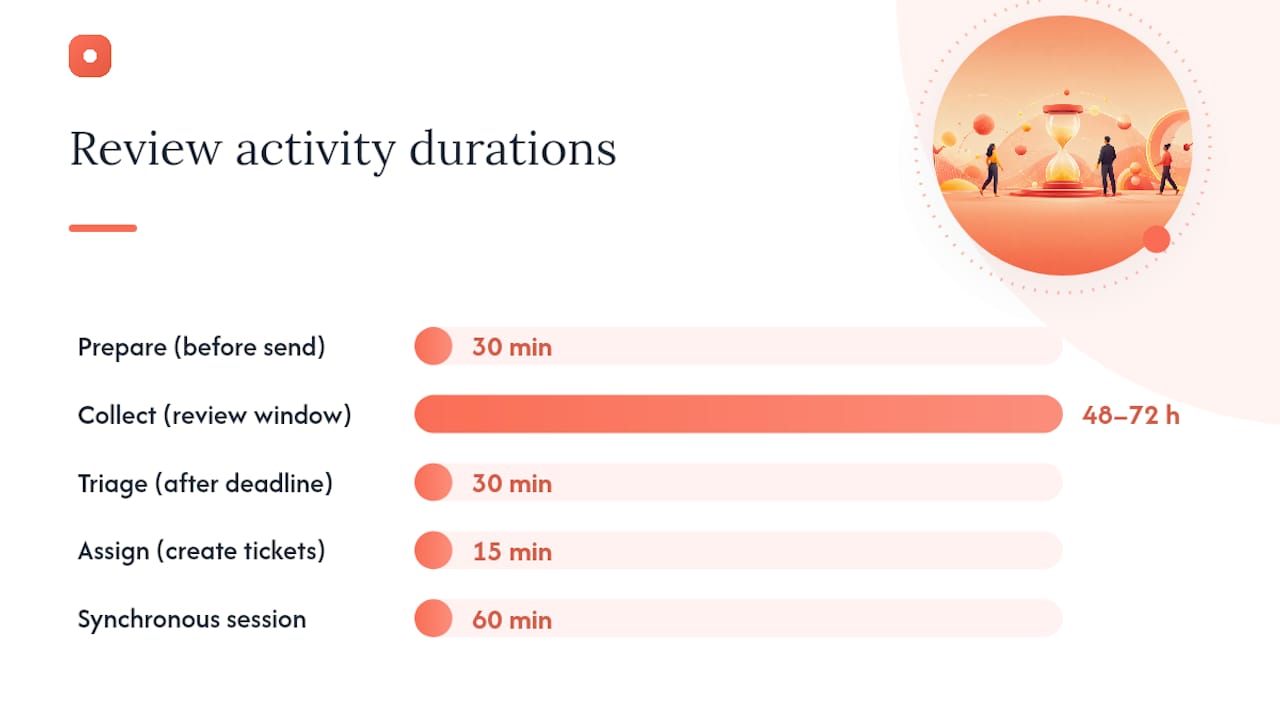
- Prepare (30 min before sending). Fill in the context, scope, and review criteria fields. Upload the design to your review platform and set the approval status to "In Review." Share the link with a clear deadline, typically 48–72 hours.
- Collect (48–72 hours). Reviewers add pinned comments or form responses. Remind once at the 24-hour mark if needed.
- Triage (30 min after deadline). Sort comments by severity. Assign Critical items immediately. Batch Minor items for a future sprint. Mark duplicates as resolved with a note.
- Assign (15 min). Convert every open comment into a ticket in your task tracker (Jira, Linear, Asana). Each ticket gets one owner and one due date.
- Close the loop (after fixes). Update the approval status field, bump the version number, and notify reviewers of changes made.
Synchronous critique session (60 minutes, 3–6 participants):
Following guidance on participant count and session structure, keep critique sessions to 3–6 people. More than six generates noise faster than signal. Rotate disciplines across sessions so you get engineering, product, and design perspectives without any single voice dominating.
Facilitator checklist:
- Review criteria shared with all participants at least 24 hours in advance
- Timer set for each phase
- Shared doc or board open for live capture
- Every action item has an owner and due date before the session ends
Triage rules: Critical items go into the current sprint. Major items are scheduled within two sprints. Minor items enter the backlog. Any comment without a clear criterion reference is flagged as a preference and moved to a "nice to have" list rather than the action queue.
Closing feedback loops consistently is what separates teams that iterate quickly from those that re-litigate the same comments across versions.
What a filled design feedback template actually looks like
Here is a short, filled example for a landing page hero review. The "before" row shows the kind of comment that generates a follow-up email. The "after" row shows what the same observation looks like when it is written to the template standard.
The difference is specificity tied to a criterion. The "before" comment tells the designer something is wrong but not what to measure, what to change, or who decides when it is fixed. The "after" entry maps to WCAG 2.1 AA, names the exact hex value to test, assigns one owner, and sets a date. The designer can act on it without a single follow-up message.
When every row in your feedback report looks like the "after" entry, back-and-forth drops sharply. The reviewer has stated the standard, the observation, and the fix. The designer has a task, not a conversation to decode.
Which tool format should you use to collect design feedback?
The format you choose shapes the quality of feedback you receive. A free-text email thread produces different results than a pinned comment on a screenshot. Here is how the main categories compare.
Tool categories and when to use each:
- Visual annotation platforms (e.g., Usepinhub): Best for pixel-level issues, UI bugs, and any feedback that requires pointing at a specific element. Guest reviewers can comment without creating an account, which removes friction for clients.
- Form builders (e.g., Typeform, Google Forms): Best for structured client preference surveys, brand questionnaires, or any review where you want consistent field-by-field responses across multiple stakeholders.
- Collaborative whiteboards (e.g., Miro): Best for early-stage concept reviews, journey mapping critiques, and sessions where the team needs to cluster and vote on themes.
- In-design annotation tools (e.g., Figma comments): Best for internal design-to-engineering handoffs where all participants already have Figma access.
Selection criteria to apply before choosing:
- Does the tool support guest access without account creation?
- Does it track version history so you can compare v1 and v2 comments side by side?
- Can comments be anchored to a specific location on the screen?
- Can you export a feedback summary report (CSV, PDF, or structured list)?
- Does it integrate with your task tracker so action items sync automatically?
Pro Tip: Choose the simplest format that forces an owner and due date on every actionable comment. A sophisticated tool that lets comments float without assignment is less useful than a plain spreadsheet with an "Owner" column.
For a deeper look at how these tools compare across feature sets, the design feedback tools overview covers selection criteria and integration patterns in detail.
Best practices for giving and receiving design feedback
Good feedback is a skill, not a personality trait. These rules apply whether you are a designer receiving a critique or a product manager giving one.
Do:
- Anchor every comment to the stated goal or a named criterion ("This conflicts with the brand guideline on type scale").
- Use the observation-plus-impact format: what you see, where, and what it affects.
- Start with what is working before moving to what needs to change.
- Ask a question before proposing a solution ("Is the intent here to reduce cognitive load, or to highlight the secondary CTA?").
Don't:
- Frame personal preferences as design mandates ("I don't like blue" is not a criterion).
- Address the designer instead of the design ("You made this too complex" vs. "This flow has seven steps where the user story requires three").
- Submit comments without a severity label. Unlabeled comments force the designer to guess priority.
- Mix engineering feasibility concerns with visual critique in the same comment. Keep them in separate fields or separate sessions.
"Ask questions before offering changes, be specific about where and why, and avoid directives phrased as preferences." This facilitation rule from structured design critique guidance applies equally to written and live feedback. It protects psychological safety and keeps the conversation focused on the work.
For cross-discipline reviews, label each comment with the reviewer's role (Design, Engineering, Product, Legal). This lets the designer separate visual critique from technical constraints and route each comment to the right person.
How to track versions and manage approval status
Version control is not optional once a design has more than one reviewer. Without it, teams approve the wrong file or re-open comments that were already resolved.
Status values and rules
- Draft: Work in progress, not ready for external review.
- In Review: Shared with reviewers; comments are open.
- Approved with Changes: Stakeholder has approved the direction but requires specific fixes before final sign-off. List the required changes explicitly.
- Approved: All review criteria met; ready for handoff.
- Rejected: Does not meet criteria; requires a new iteration before re-review.
Handoff checklist
Before marking a design Approved and handing off to engineering:
- Version number updated (e.g., v2.1)
- All Critical and Major action items resolved or formally deferred with a reason
- Assets exported at correct specs (resolution, format, naming convention)
- Design tokens or style guide references included
- Outstanding Minor items documented in the backlog with owner and sprint target
- Approval record completed (see below)
Approval record format
Approved by: [Name, role] Date: [Date] Version approved: [v2.1] Conditions: [None / List any "Approved with Changes" conditions] Next review trigger: [Launch date / next sprint milestone]
For website and UX projects, the website design review checklist covers handoff specifics in more detail, including asset naming and spec documentation.
What teams actually get wrong with design feedback
The most common failure mode is not a bad template. It is a good template used at the wrong moment. Teams often share a detailed critique form for an approval review, or run a free-form discussion when the goal is a pass/fail decision. The session type determines the template, not the other way around.
Academic proceedings on team processes suggest a correlation between structured feedback processes and improved team decision quality, though the evidence is preliminary. The practical implication is straightforward: a template that separates "critique to improve" from "review to approve" reduces the emotional friction that derails sessions. Labeling the session type at the top of the template, before any comment fields, is the single smallest change that produces the clearest improvement.
Two changes you can make before your next review: (1) Add a "Session type: Critique / Approval" field to the top of your template. (2) Require every comment to reference one of the stated review criteria before it can be assigned to an owner.
Pinhub makes pixel-anchored feedback fast to set up
Vague feedback costs time. Usepinhub is built to prevent it by anchoring every comment to an exact screen location, so your feedback report maps directly to the template fields covered in this guide.

With Usepinhub, you can:
- Upload a screenshot or Figma file and pin comments to specific pixels
- Share a guest reviewer link so clients comment without creating an account
- Track version history and compare feedback across iterations
- Export an AI-generated summary list that maps to your action items and approval status
Getting started takes three steps: create a free workspace at Usepinhub, upload your first screenshot or connect your Figma file, then share the review link with your team or client. The free plan covers solo and low-volume use. Pro and Team plans add unlimited screenshots, Figma integration, version control, password-protected links, and AI summaries.
Sources
- Design Critique Template: Checklist + Rules + Example
- Design Critique Template - OTP
- Design Critique Session Template
- Academy of Management Proceedings (2023)
FAQ
What fields should every design feedback template include?
At minimum: project name and version, design goal, review criteria, visual area or pinned comment reference, feedback type, severity, requested change, action item, owner, due date, and approval status. These fields convert a comment into an assigned task.
What is the difference between a design critique and a design review?
A critique session aims to improve the work; a review session decides whether to approve it. Mixing the two in one session creates role confusion and emotional friction. Label the session type at the top of your template before sharing it.
How many people should participate in a design critique session?
Keep critique sessions to 3–6 participants. Fewer than three limits perspective diversity; more than six generates more noise than signal and makes it harder to reach clear action items.
Can Usepinhub replace a feedback form for client reviews?
Usepinhub's pixel-anchored comments cover the visual annotation use case natively, and guest reviewer links mean clients comment without creating an account. For structured preference surveys or brand questionnaires, a form builder like Typeform or Google Forms is a better fit alongside Usepinhub.
How do you handle feedback from multiple reviewers without losing track of versions?
Assign a version number to every iteration (v1.0, v1.1) and update the approval status field after each review cycle. Usepinhub's version history lets you compare comments across iterations so resolved items from v1 do not reappear as new comments on v2.