
The fastest path to better design iterations is contextual feedback design: add a persistent, on-demand feedback tab, trigger a short post-task micro-survey, and wire both to a triage inbox that creates traceable issues. Start today by doing three things:
- Add a small, right-edge feedback tab that stays visible without interrupting tasks (NN/g's "task, then ask" principle applies here directly).
- Enable a 1–3 question micro-survey that fires after task completion, not during it.
- Route every submission into your issue tracker with auto-captured metadata so nothing gets lost in a Slack thread.
Tools like Usepinhub, frameworks like VizCrit's actionability spectrum, and systems like CAFE give you the vocabulary and the mechanics to build this right.
Key Takeaways
Contextual feedback design works when you combine non-intrusive entry points, automatic metadata capture, and a traceable triage workflow that routes every item to an assigned owner.
| Point | Details |
|---|---|
| Task-first timing | Ask for feedback after task completion, never during, to protect response quality. |
| Metadata enrichment | Auto-capture screen ID, device, recent actions, and version with every submission. |
| Actionability spectrum | Match feedback level (awareness vs. solution-centered) to the reviewer's role and skill. |
| Triage cadence | Route every item to an issue tracker and review weekly; unassigned feedback stalls iterations. |
| Usepinhub | Pin comments, guest access, AI summaries, and version control implement all five principles in one workflow. |
Table of Contents
- Why contextual feedback changes design outcomes
- Five core principles of effective contextual feedback design
- UI patterns and microcopy that work
- How to integrate contextual feedback into your workflow
- Implementation checklist and metadata schema
- How Pinhub maps these principles to a real workflow
- What actually works in practice
- Usepinhub: built for the workflow this guide describes
- Sources
- FAQ
Why contextual feedback changes design outcomes
Contextual feedback reduces ambiguity and turns subjective comments into signals your team can act on in the next sprint. The difference between "this feels off" and "the CTA button on the checkout screen is hard to find on mobile" is entirely a function of when and how you asked.
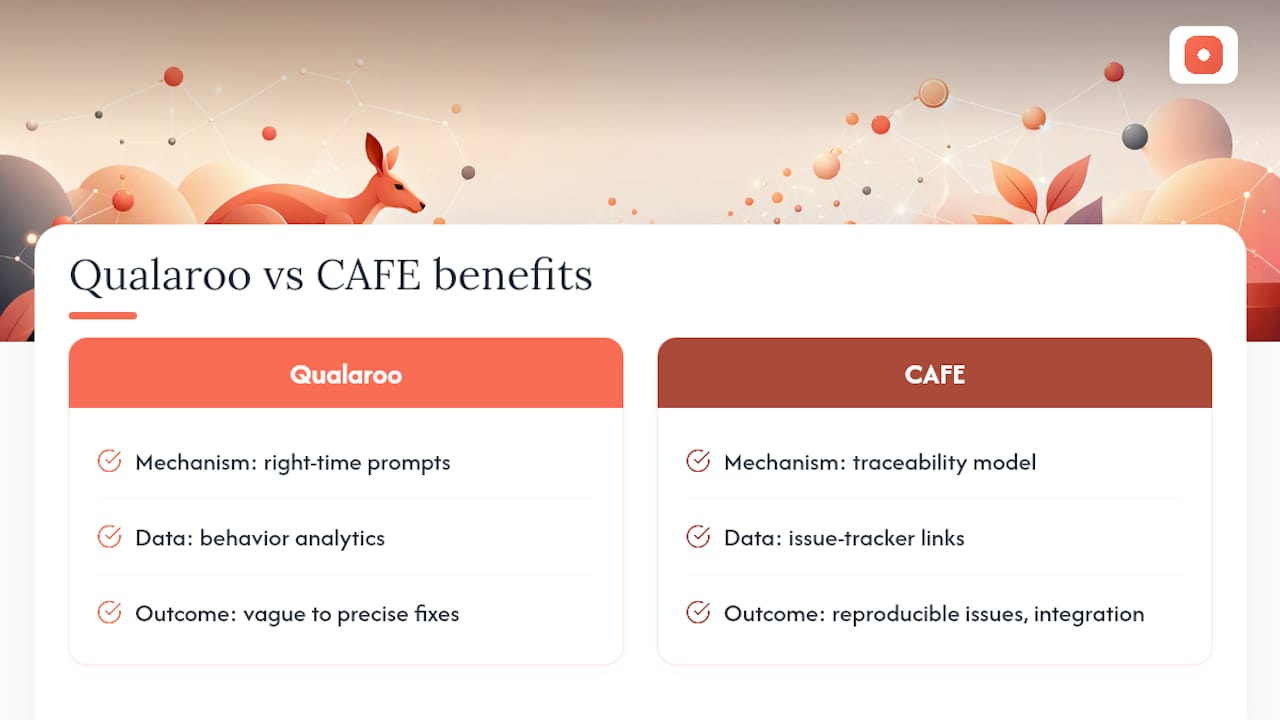
Qualaroo's research on contextual triggers shows that right-time, right-place prompts combined with behavior analytics convert vague opinions into precise fixes. Frequency caps and conditional logic prevent survey fatigue, which is the silent killer of response quality. Separately, CAFE's traceability model demonstrates that linking feedback items to issue-tracker artifacts improves developers' ability to reproduce problems and increases the chance that feedback actually gets integrated into development work.
The practical implication: feedback that arrives without context is noise. Feedback that arrives with a screenshot, a URL, a device type, and a record of the user's last three actions is a reproducible issue.
Five core principles of effective contextual feedback design
Effective contextual feedback design follows five principles: non-intrusive entry, on-demand availability, context-rich capture, a calibrated actionability level, and full traceability into your workflow.
- Task-first prompts. Never interrupt a user mid-task. NN/g is explicit that prompting during tasks reduces response quality and increases frustration. Wait for task completion, then ask.
- Persistent, on-demand entry points. A small feedback tab anchored to the right edge of the screen gives users a way to report issues on their own schedule without feeling surveilled.
- Automatic metadata capture. Every submission should auto-attach the current screen or URL, device and OS, recent interaction history, and a timestamp. CAFE's architecture proves this enrichment is what makes feedback reproducible and developer-ready.
- Calibrated actionability. VizCrit frames feedback on a spectrum: textbook-based (what the rule is), awareness-centered (what the problem is), and solution-centered (what to do). In a between-subjects study of 36 participants, solution-centered feedback produced fewer design issues and higher self-perceived creativity among novices. Match the level to the reviewer's role and skill.
Pro Tip: Use solution-centered prompts for non-expert reviewers and clients, but switch to awareness-centered prompts for senior designers and engineers who prefer to form their own solutions. Mixing levels in the same session creates confusion.
UI patterns and microcopy that work
The design feedback methods that consistently outperform email threads and comment docs share one trait: they meet the reviewer exactly where they are, with minimal friction.
- Persistent feedback tab. Small, right-edge, always visible. Label it "Give feedback" or "Report an issue," not "Survey." Keep it out of the critical interaction path.
- Post-task micro-survey. 1–3 questions maximum. Mopinion recommends combining one quantitative rating with one open-text question to capture both a score and a reason. Trigger it after a defined task event, not on a timer.
- Pin comments on screenshots. Pixel-anchored annotations eliminate the "top-left area" problem. Reviewers click the exact element they mean; designers see precisely what they mean.
- Inline toast confirmations. After submission, a brief toast ("Thanks, your feedback was sent") closes the loop immediately and signals that the input was received.
- Microcopy that explains why. A single line like "Your input helps us fix this screen before the next release" raises response rates by giving the request a reason. Express genuine appreciation in the thank-you state.
LLM-driven plugins for UI mockups take this further by querying a language model with your design's JSON representation and returning guideline-grounded suggestions that designers can accept or dismiss. This is particularly useful for automated first-pass heuristic checks before human review begins.
Pro Tip: Remove account creation requirements for guest reviewers. Forcing a sign-up before someone can leave a comment is the single biggest source of reviewer drop-off. Assign a session token instead so feedback stays traceable without a login barrier.
How to integrate contextual feedback into your workflow
The quickest path to impact is automating feedback routing into your issue tracker and enforcing a consistent "capture → triage → assign → resolve" cadence.
- Capture and enrich. Submission arrives with auto-attached metadata (screen ID, URL, device, recent steps, timestamp, version).
- Auto-create a triage ticket. Push the enriched item into your issue tracker (Jira, Linear, GitHub Issues) with a standard template. No manual copy-paste.
- Tag by theme and impact. Apply labels for area (navigation, checkout, onboarding) and severity. ACM's collaborative design research supports grouping by sentiment and topic to speed prioritization.
- Estimate and prioritize. Score by frequency, severity, and effort. Items that appear in multiple submissions move up automatically.
- Assign an action owner. Every ticket needs a name and a target sprint. Unassigned feedback is unresolved feedback.
- Resolve and notify. Mark the thread resolved and send a brief update to the reporter. Closing the loop increases future participation.
For sprint integration, review your triage inbox weekly to drive revenue growth. Include high-priority items in the next sprint's backlog. Snapshot design versions before and after each change cycle so you can map which feedback drove which iteration.
Track these metrics: feedback-to-issue conversion rate, time-to-first-triage, resolution rate, and iteration speed between design versions.
Implementation checklist and metadata schema
Start with a minimum viable capture set, then expand. For your pilot, choose one feature or flow, instrument it fully, measure for two weeks, then broaden.
Minimum viable metadata per feedback item:
- Screenshot (auto-captured at submission)
- Screen ID or URL
- User action history (last 3–5 interactions)
- Device type and OS
- App version or design version
- Timestamp
- Optional: user-written note, severity self-rating
Rollout phases:
- Pilot one flow with the persistent tab and post-task survey.
- Measure conversion rate and triage time for two weeks.
- Broaden triggers to additional flows based on pilot results.
- Add conditional logic and frequency caps to prevent fatigue.
Consent and prompt microcopy:
- Consent line: "We collect your screen and recent actions to help us fix issues faster. No personal data is stored."
- Prompt: "Quick question about what you just did, takes 30 seconds."
- Thank-you: "Got it, thank you. We review every submission."
CourseArc's instructional design research confirms that explanatory microcopy, telling users why you're asking, increases meaningful engagement with the feedback request.
How Pinhub maps these principles to a real workflow
Usepinhub implements the five principles above across its core feature set. Here is the direct mapping:
- On-demand entry point: shared review links give clients and guest reviewers instant access without account creation.
- Precise context capture: pin comments anchor to exact pixel locations on uploaded screenshots or Figma designs, eliminating ambiguous references.
- Low-friction guest access: reviewers participate without signing up, removing the biggest drop-off point in external review cycles.
- Triage assistance: AI-generated summaries give the design team a first-pass grouping of submitted comments before manual triage begins.
- Snapshot traceability: version control lets teams compare feedback across design iterations and confirm which issues were resolved in which version.
A short workflow example: a designer uploads a new checkout screen to Usepinhub and shares a password-protected link with the client. The client pins three comments directly on the screen, no account needed. The designer reviews the AI summary, creates issues in their tracker for the two high-priority items, and marks the third resolved with a reply. The client sees the resolved thread. One design cycle, fully documented.
Pro Tip: Set a version snapshot at the start of every sprint. When you resolve a comment thread, tag it with the version number where the fix lands. This gives you a clean audit trail that maps feedback to shipped changes.
For teams onboarding external reviewers, this guide to client onboarding covers the setup steps in detail.
What actually works in practice
Small, measurable pilots consistently outperform broad rollouts. The teams that struggle most with contextual feedback are the ones who instrument every screen at once, collect hundreds of submissions, and then have no triage process to handle the volume.
The most common mistakes: using interruptive pop-ups instead of persistent tabs (response quality drops and users feel surveilled), skipping metadata capture (feedback becomes unreproducible), and collecting feedback without routing it anywhere (it piles up and gets ignored, which kills future participation).
What works: role-aware prompts that match the actionability level to the reviewer, a weekly feedback review ritual that includes both a designer and a PM, and light automation for triage ticket creation. Adaptive acquisition research from Bournemouth supports this, finding that mechanisms adapting to usage context and user attitudes increase both willingness to provide feedback and its usefulness to developers.
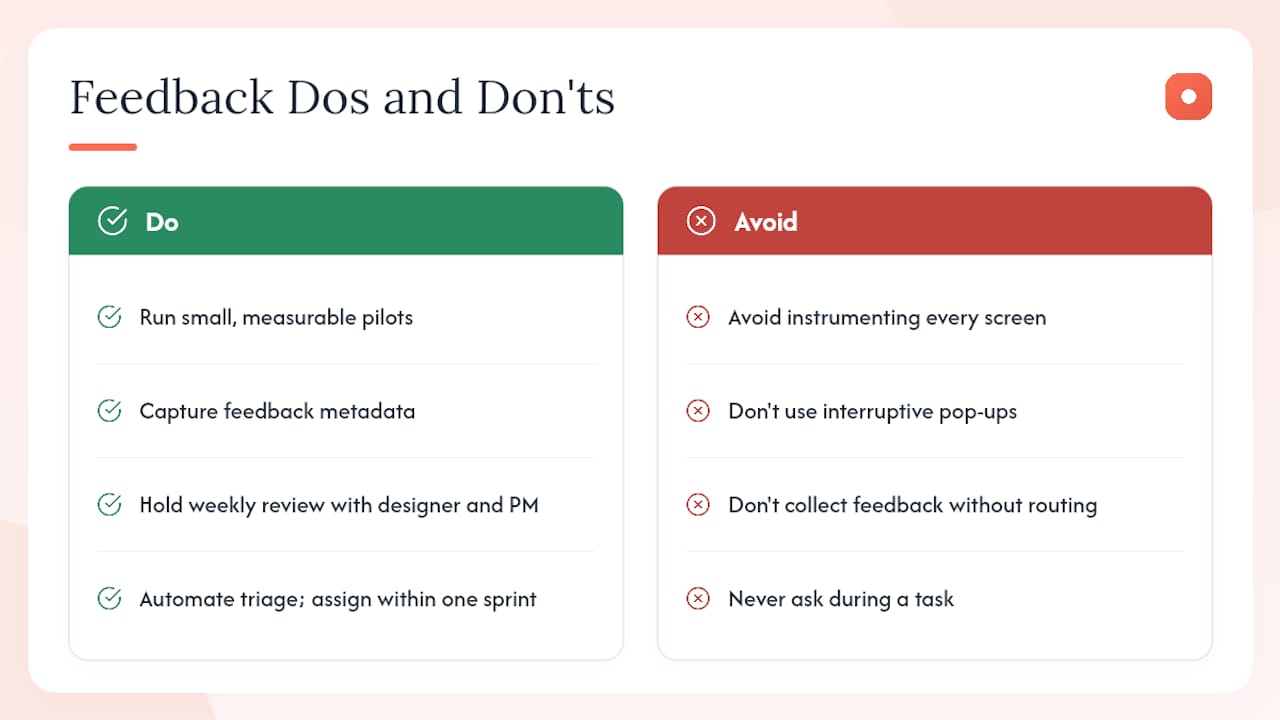
Two concrete rules worth keeping: never ask for feedback during a task, and never let a feedback item sit unassigned for more than one sprint cycle. Both are easy to enforce and both have a measurable effect on the quality of your next iteration.
Usepinhub: built for the workflow this guide describes

Usepinhub is a visual feedback and review platform built specifically for product designers, UX teams, and marketing agencies who need precise, traceable feedback without the overhead of managing accounts for every reviewer. Pin comments land on exact pixels. Guest reviewers participate with a link, no sign-up required. AI summaries give your team a first-pass triage before anyone opens the inbox. Version control ties every resolved thread to the design iteration that fixed it.
The free plan covers solo and low-volume work. Pro and Team plans add unlimited screenshots, Figma integration, password-protected links, and AI summaries. You can Usepinhub and start a free workspace today.
Sources
Further reading on the research and frameworks referenced throughout this guide:
- User-Feedback Requests: 5 Guidelines - NN/G
- VizCrit: Exploring Strategies for Displaying Computational Feedback in a Visual Design Tool
- Contextual Feedback: A Blueprint for User-Centric Experience - Qualaroo
- Best practices for conducting user experience surveys - Mopinion
Prioritize NN/g and the CAFE traceability research when designing organizational workflows. They address the two failure modes that matter most: poor timing and lost feedback.
FAQ
What is contextual feedback design?
Contextual feedback design is the practice of collecting user or reviewer input at the moment of interaction, enriched with usage metadata like screen, device, and recent actions, so the feedback is immediately reproducible and actionable.
When should you trigger a feedback prompt?
Trigger prompts after task completion, not during. NN/g's guidelines show that mid-task interruptions reduce response quality and increase user frustration.
What metadata should every feedback item capture?
At minimum: the current screen or URL, device type and OS, the last 3–5 user actions, app version, and a timestamp. CAFE's architecture adds screenshot capture as a default.
How does Usepinhub support contextual feedback workflows?
Usepinhub lets teams pin comments to exact locations on screenshots or Figma designs, collect input from guest reviewers without account creation, and use AI summaries for first-pass triage, with version control to track which feedback was resolved in each iteration.
What is the actionability spectrum in feedback design?
VizCrit defines three levels: textbook-based (citing the rule), awareness-centered (naming the problem), and solution-centered (prescribing the fix). Solution-centered feedback reduced design issues for novice participants in a 36-person study.