
The fastest way to improve feedback clarity is to use a short structure, anchor every comment to the artifact it describes, and end with one concrete next action. Pin the comment to the exact pixel, sentence, or line in question. Run a 10-minute train the team session using a template like SBI. Then confirm understanding with a teach back question instead of "does that make sense?"
TL;DR:
- Structured guidance, especially when content-specific, roughly doubles feedback quality and reduces review cycles.
- Using common templates like SBI or GAIN ensures comments clearly describe the observed behavior, impact, and next steps.
- Anchoring feedback directly to artifacts with pixel-level pinning minimizes ambiguity and improves response accuracy.
- Short training sessions of 30 to 45 minutes with examples significantly enhance team feedback clarity without lengthy workshops.
- Confirming understanding through teach-back questions, rather than "does that make sense?", ensures actual comprehension of feedback.
Table of Contents
- Why Does Clear Feedback Actually Improve Outcomes?
- What Templates Make Feedback Instantly Actionable?
- Which Workflows Remove Ambiguity From Reviews?
- How Do You Train a Team to Give Clearer Feedback Fast?
- What's a Copy-Ready Feedback Template I Can Use Today?
- How Should Feedback Style Adapt to Different Communication Styles?
- How Do You Phrase Feedback So It Starts a Dialogue Instead of a Defense?
- How Does Active Listening Improve the Way You Receive Feedback?
- How Do You Confirm the Feedback Was Understood?
- Why We Emphasize Pixel-Anchored, Low-Friction Feedback
- Try These Workflows With Pinhub
- Sources
- FAQ
Why Does Clear Feedback Actually Improve Outcomes?
Clearer feedback isn't a soft skill nicety. It changes how fast teams ship and how much rework they do.
A meta-analysis of 32 studies covering 3,806 participants found that instructional support substantially improves peer-feedback quality, with an overall effect size of g = 0.47. When that support was content-specific, meaning it told reviewers exactly what to look for in the artifact at hand, the effect on feedback provision was notably larger. That's a large gap between generic "give good feedback" advice and pointed guidance tied to the actual work.
A randomized controlled study with 95 students backs this up from a different angle. Reviewers who received a concise instructional guide with examples led to longer comments including more desirable feedback traits (specific, actionable, respectful, kind qualities that show up together, not separately).
The evidence in one line: Structured guidance roughly doubles the strength of feedback improvements when it's specific to the content being reviewed, according to the instructional support meta-analysis.
The practical payoff shows up in review cycles. Teams that adopt a shared structure spend less time asking "what do you mean by that?" and more time actually fixing things. Fewer rework loops. Faster handoffs. That's the whole case for investing 20 minutes in a template before your next review round.
What Templates Make Feedback Instantly Actionable?
Vague feedback dies in translation between the reviewer's head and the recipient's next move. Structured formats close that gap by forcing you to name three things every time: what happened, what you saw, and what should happen next.
SBI (Situation, Behavior, Impact) is the workhorse. The SBI model asks you to name the context, describe the observable behavior (not a character judgment), and state the impact. A one-line fill-in version looks like this: "In [situation], you [specific behavior], which resulted in [impact]." Applied to a design review: "On the checkout page, the CTA button color matches the background at 90% opacity, which makes it invisible to colorblind users."
GAIN works better for goal-oriented conversations, especially when you want the recipient to see upside rather than just a problem. The GAIN framework frames feedback around Goal, Actual, Impact, and New action, which reduces defensiveness because the recipient sees where they're headed, not just where they fell short.
Beyond the framework you pick, a few tactical rules make feedback land clearly:
- Limit yourself to three points per review round. More than that and nothing gets prioritized.
- Describe behavior, never intent or character. "This copy is confusing" beats "you weren't thinking about the user."
- Make the impact concrete. Name the metric, the user segment, or the downstream team affected.
- Every point gets a next action, an owner, and a date. No owner means no one does it.
- Keep sentences short. The Quartz style rules on clear writing put it simply: start with the claim, keep subject and verb close together, cut the throat-clearing.
Here are sentence starters you can paste directly into a comment box:
- "In [artifact/screen], I noticed [behavior], which caused [impact]. Can you [next action] by [date]?"
- "The goal here is [X]. Right now it does [Y]. Try [Z] instead."
- "This works well for [use case], but breaks down when [edge case]. Worth testing?"
- "For the client: this section reads clearly, but the pricing table needs a plain-language summary above it."
- "Code review: this function handles the happy path, but doesn't guard against a null response from the API."
- "Can you walk me through how you'd fix this before we mark it resolved?"
Pro Tip: Never end a comment on a question you don't need answered. End it on the action you want taken. "What do you think?" invites a debate; "Update the padding to 16px by Thursday" invites a fix.
Which Workflows Remove Ambiguity From Reviews?
Structure alone doesn't fix feedback if the comment is disconnected from what it's describing. A note in a shared doc that says "the header looks off" forces the reader to hunt for the header in question, guess which version, and reconstruct context that should have traveled with the comment. That's where artifact-anchored workflows earn their keep.
The pattern is simple and repeatable:
- Capture the artifact, a screenshot, a Figma frame, a code diff, at the exact state under review.
- Annotate directly on it, pinning the comment to the specific pixel, line, or region.
- Assign a single owner to each actionable comment.
- Resolve the thread only after the owner confirms the fix, ideally with a quick verification step.
- Follow up on anything left open before the next round starts.
Timestamps and version links matter more than people expect. Without them, "I fixed that" and "which version were you looking at?" become the two most common sentences in any review thread. Pinned comments with a captured timestamp settle that argument before it starts.
For a design review, this looks like uploading the latest screen, pinning three comments to the exact elements in question, and assigning each to a specific designer with a due date. For a cross-functional handoff between product and engineering, it means attaching the annotated screenshot to the ticket itself instead of describing the issue in prose and hoping the engineer finds the right spot.
Pinhub was built around exactly this pattern: pixel-anchored pins keep comments locked to their exact location, guest reviewers can respond without creating an account, automated summaries roll up scattered threads into one list, and version control keeps every round traceable. You can read more about how contextual, content-specific prompts improve feedback quality in Pinhub's own breakdown of the research.
How Do You Train a Team to Give Clearer Feedback Fast?
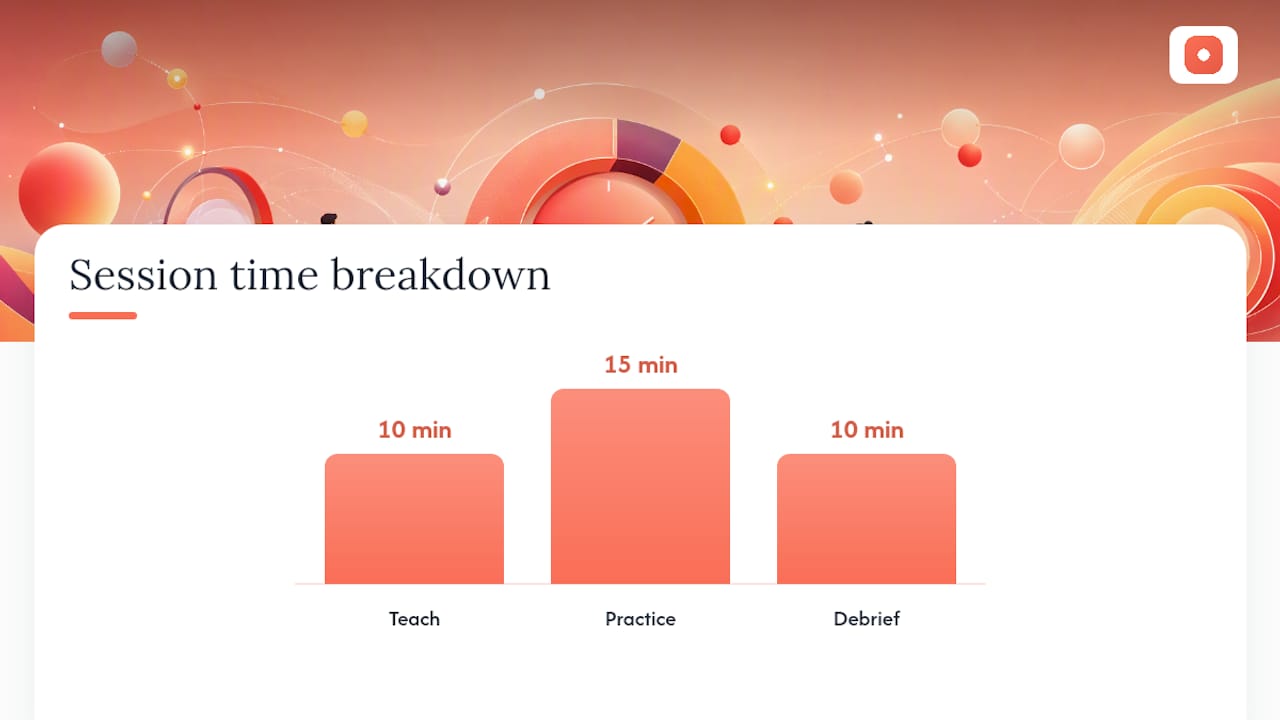
You don't need a multi-week workshop. A single, tightly time-boxed session changes feedback quality faster than most teams expect, because the research shows the lift comes from short, concrete guidance, not lengthy training.
Run it in 30 to 45 minutes:
- 10 minutes teach: Walk through SBI or GAIN with one real example from a past review.
- 15 minutes practice: Have each person rewrite one vague comment from an old thread using the template.
- 10 minutes debrief: Read a few rewrites aloud and discuss what changed.
If a live session isn't practical, an async version works too: a one-page micro-guide plus a small bank of "before and after" examples pinned somewhere the whole team can reference during reviews.
Give people a checklist to work against, whether that's a formal rubric or the S.P.A.R.K. traits (specific, actionable, respectful, kind). Checklists remove the guesswork about what "good feedback" even means on your team.
Measuring the shift doesn't require anything elaborate. Pull a baseline sample of comments from last month, run the training, then pull a new sample four weeks later and compare specificity, action clarity, and turnaround time. The randomized controlled trial on instructional guides found that even a short guide with examples produced longer, more trait-rich feedback almost immediately, so you should see movement fast if the training landed.
For quick channel guidance alongside the template itself, Slack's 3 C's of communication, clear, concise, consistent, gives your team a fast filter for whether a comment is ready to send.
What's a Copy-Ready Feedback Template I Can Use Today?
Paste these directly into a comment box, ticket description, or meeting notes.
SBI template: Situation: [where/when] → Behavior: [what happened, no judgment] → Impact: [the effect]. Example: "In the pricing page, the CTA text overlaps the button border, breaking mobile layout."
GAIN template: Goal: [desired outcome] → Actual: [current state] → Impact: [why it matters] → New action: [what to try]. Example: "Goal: faster checkout. Actual: five steps. New action: merge steps two and three."
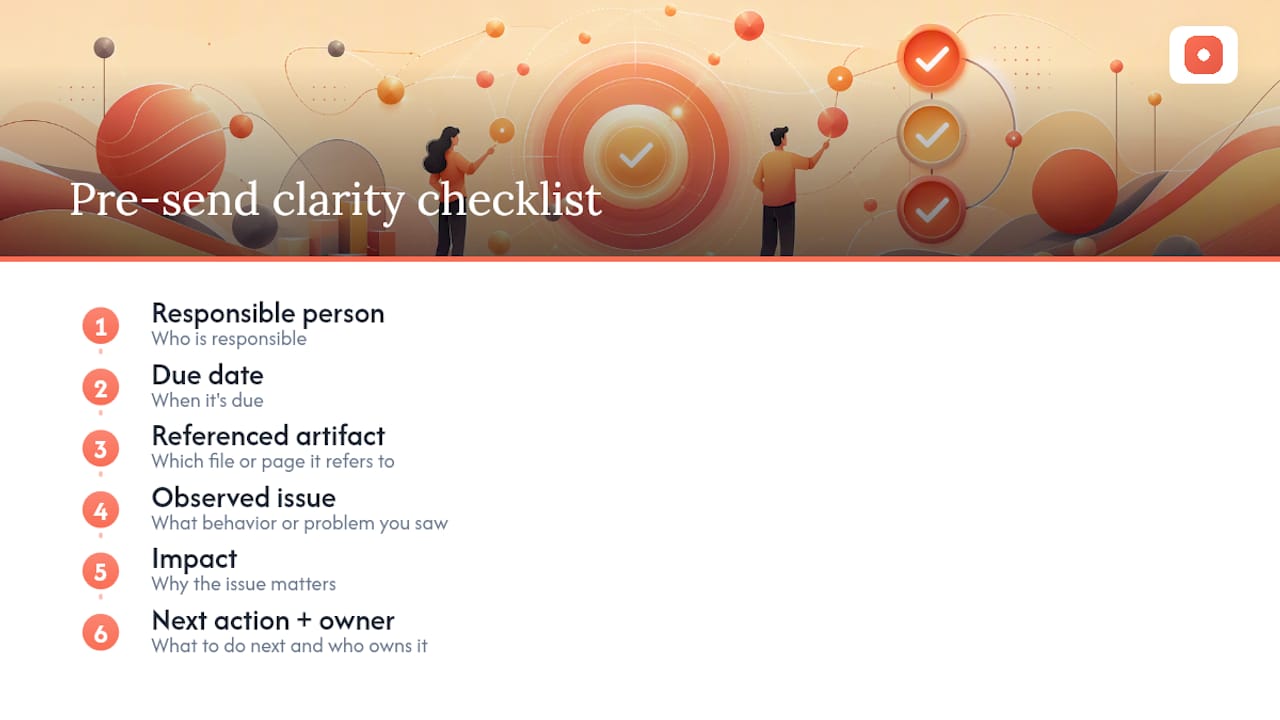
Six-item clarity checklist, run through it before you hit send: who is responsible, when it's due, which artifact it refers to, what behavior or issue you observed, what the impact is, and what the next action is with an owner attached. If any of the six is missing, the comment probably needs one more sentence.
Paste SBI into design reviews and code reviews, where behavior and impact are visual or functional. Save GAIN for retros and planning conversations, where framing around a goal matters more than pinpointing a single behavior. For more copy-paste examples by scenario, see this collection of design feedback templates.
How Should Feedback Style Adapt to Different Communication Styles?
Clear feedback isn't one-size-fits-all. Some people want the bottom line first and the detail only if they ask; others want context before the ask, or they'll feel blindsided. Neither preference is wrong, but mismatching them creates friction that has nothing to do with the feedback's actual content.
A practical fix: ask new collaborators, early in a working relationship, whether they prefer direct or context-first feedback. That single question saves weeks of misread tone.
Cultural context adds another layer. Direct phrasing that reads as efficient in one work culture can read as blunt or even disrespectful in another, where feedback is traditionally softened with more context or delivered privately before being put in writing. When you're working with international teams or client-facing reviewers, default to slightly more context and a clear invitation to respond, rather than assuming everyone reads terseness the same way you do.
Written feedback strips out tone of voice and facial expression, so ambiguity multiplies in text. That's exactly why structure matters more, not less, across cultural and stylistic differences: SBI and GAIN give you a consistent shape that reads the same regardless of directness preference, because the structure itself carries the clarity instead of relying on tone. For non-technical or client reviewers specifically, translating technical detail into plain language is its own skill worth building; this playbook for translating technical feedback for non-technical clients covers that adaptation directly.
How Do You Phrase Feedback So It Starts a Dialogue Instead of a Defense?
The words right before the actual point set the tone for everything that follows. Open with an observation, not a verdict: "I noticed the load time increased on this build" invites investigation. "This build is slow" invites defensiveness.
Tone matters as much as word choice. Feedback framed around a shared goal, using the GAIN structure's Goal and New action fields, tends to land better than feedback that only names what's wrong, because the recipient can see where the conversation is headed rather than feeling stuck defending the past.
A few phrasing habits keep the door open for dialogue:
- Ask a genuine question when you're not certain of the constraint behind a decision: "Was there a reason the padding got tightened here?"
- Separate the observation from the request. State what you saw, then what you'd like to see, as two distinct sentences.
- Avoid absolutes like "always" and "never." They're rarely accurate and they put people on the defensive.
- Close with an invitation, not just an instruction: "Let me know if there's context I'm missing."
None of this softens the substance of the feedback. It just removes the friction that turns a fixable issue into a defensive standoff.
How Does Active Listening Improve the Way You Receive Feedback?
Feedback clarity is a two-way transaction. A precise comment can still get lost if the recipient is half listening while drafting a rebuttal in their head, which is a common reaction to feedback that feels evaluative.
Active listening starts with letting the full comment land before responding. Resist the urge to explain or justify mid-sentence. Once the reviewer finishes, restate what you heard in your own words: "So the concern is that this flow adds an extra click for returning users, not new ones. Is that right?" That single move surfaces misunderstandings before they turn into wasted work.
Asking clarifying questions is the other half of active listening, and it's underused. "Can you point to the specific element?" or "What would this look like if it worked?" turns a vague comment into an actionable one, without putting the burden entirely on the reviewer to have phrased it perfectly the first time.
Body language and tone matter in live conversations, too. Nodding, taking a visible note, or simply pausing before responding signals that the feedback is being processed rather than dismissed, which makes the reviewer more likely to offer detail next time instead of a one-line comment they assume will get ignored.
How Do You Confirm the Feedback Was Understood?
Never close a feedback loop by asking "does that make sense?" It's the single most common comprehension check, and it's also the least reliable one, because most people say yes whether they understood or not.
AHRQ's teach-back guidance, developed for health communication but directly applicable here, recommends the opposite approach: ask the recipient to explain, in their own words, what they're going to do next. "Walk me through how you're going to fix this" reveals a genuine gap in seconds. A confident, specific answer means the feedback landed. A vague or hesitant one means it's time to clarify before anyone spends an hour building the wrong fix.
Written summaries work the same way at scale. At the end of a review round, post a short recap: what was flagged, who owns each item, and the deadline. That summary becomes the reference point when someone later says "I thought you meant something else," and it takes thirty seconds to write compared to the hours lost to a misread comment discovered three days later.
For recurring feedback exchanges, especially with clients, having a bank of ready confirmation questions on hand keeps this step from feeling like an interrogation. This guide to client feedback questions has phrasing you can adapt for exactly that moment.
Why We Emphasize Pixel-Anchored, Low-Friction Feedback
We keep coming back to one idea: feedback fails less because people lack good intentions and more because comments drift away from the thing they describe. Anchoring feedback directly to the artifact, with minimal friction for the person responding, removes more ambiguity than any amount of extra wording. For more on how anchoring choices play out in practice, see our comparison of screenshot versus video feedback.
— Pinhub
Try These Workflows With Pinhub
Every template and workflow in this guide gets easier to run when the comment lives on the exact pixel it describes instead of in a separate doc or chat thread. That's the specific gap Pinhub was built to close: pixel-anchored pins keep SBI and GAIN comments locked to their artifact, guest reviewers can respond without creating an account, version control tracks every round so no one argues about which screen was reviewed, and automated summaries turn a scattered thread into one clear action list.

Teams juggling client rounds, agencies managing external stakeholders, and remote collaborators who can't rely on a quick hallway conversation tend to see the fastest gains, since those are exactly the situations where vague feedback costs the most time. If you want to see how the workflow feels on a real review, start on the free plan at Pinhub and pin your first comment on an actual screenshot. Paid workspaces start at $19 a month for Pro or $39 a month for Team, with annual pricing available on the Pinhub site, but the free tier is enough to test whether pixel-anchored feedback changes how your next review round goes.
Sources
- Enhancing the Peer-Feedback Process Through Instructional Support: A Meta-Analysis
- Enhancing the Peer-Feedback Process Through Instructional Support: A Meta-Analysis (ResearchGate)
- AHRQ teach-back guidance
FAQ
What Is the Fastest Way to Improve Feedback Clarity?
Use a short structure like SBI, anchor the comment to the specific artifact it describes, and assign one clear next action with an owner and a date. Verifying understanding with a teach-back question rather than "does that make sense?" closes the loop reliably, according to AHRQ's guidance.
What's the Difference Between SBI and GAIN?
SBI (Situation, Behavior, Impact) works best for describing a specific observed issue without judgment, while GAIN (Goal, Actual, Impact, New action) works better for goal-oriented conversations where you want the recipient focused on the upside of change. Use SBI for design and code reviews; use GAIN for retros and planning talks.
Does Training Actually Improve Feedback Quality?
Yes. A meta-analysis of 32 studies found instructional support produces a meaningful improvement in feedback quality (g = 0.47), and a separate randomized trial found that even a short guide with examples measurably increased trait-rich, actionable comments.
How Does Pinhub Help Make Feedback Clearer?
Pinhub anchors comments directly to the pixel or region they describe, so feedback never drifts away from context. Guest reviewers can respond without an account, and automated summaries turn scattered comment threads into a single actionable list, features you can explore on the free plan.
How Do I Know If My Feedback Was Understood?
Ask the recipient to explain or demonstrate what they're going to do next, rather than asking if the feedback made sense. This teach-back approach reveals genuine gaps in understanding that a simple yes-or-no question misses entirely.