
TL;DR:
- Concise, structured surveys with six to eight questions improve response rates and gather actionable feedback.
- Positioning the feedback request within 24 to 48 hours of delivery captures clients' fresh insights and preferences.
Here are six client feedback questions you can drop into your next survey today:
- What challenge were you trying to solve when you came to us?
- How well did our process address that challenge? (1 = Not at all, 5 = Completely)
- What specific result or change have you noticed since we delivered?
- What would you tell a colleague who asked whether to work with us?
- Is there a project or area where you'd want our help next?
- May we use your words as a testimonial? Yes / No / Let me review first
This mix works because it pairs one quantitative scale with open prompts that follow the problem → help → results → referral structure, which reliably produces testimonial-ready answers while keeping the form short enough to finish. Present one question per screen on mobile for the best completion rate.
Table of Contents
- Why do short, mixed-type surveys outperform long generic ones?
- The 4-question framework that generates usable testimonials
- Which quantitative metrics should you use, and how do you phrase them?
- When and how should you send feedback requests?
- How do you phrase questions so answers are actually useful?
- Ready-to-paste templates for every project stage
- How does Usepinhub fit into the visual feedback workflow?
- How do you analyze responses and close the feedback loop?
- US privacy and testimonial permission basics
- Key Takeaways
- What most teams get wrong about client feedback
- Usepinhub makes precise visual feedback easier for design teams
- Useful sources
- FAQ
Why do short, mixed-type surveys outperform long generic ones?
Client Savvy reports that concise, focused surveys of six to eight questions can significantly improve response rates compared to longer surveys. Long surveys lose respondents before they reach the questions that matter most.
52% response rate — what Client Savvy found when surveys stayed focused and short, compared to the much lower rates typical of generic, multi-page forms.
Mixing quantitative and qualitative items gives you two things at once: a trackable score you can trend over time and a narrative that explains the number. A Net Promoter Score of 7 tells you something is off; the open answer tells you it was the handoff process, not the design itself.
Pro Tip: Use a one-question-per-screen format with conditional logic. Respondents who see one question at a time report feeling the survey is shorter, even when the total question count is identical.
For visual feedback specifically, mixing a rating scale with a pixel-anchored screenshot comment captures both the emotional reaction and the exact UI element causing it.
The 4-question framework that generates usable testimonials
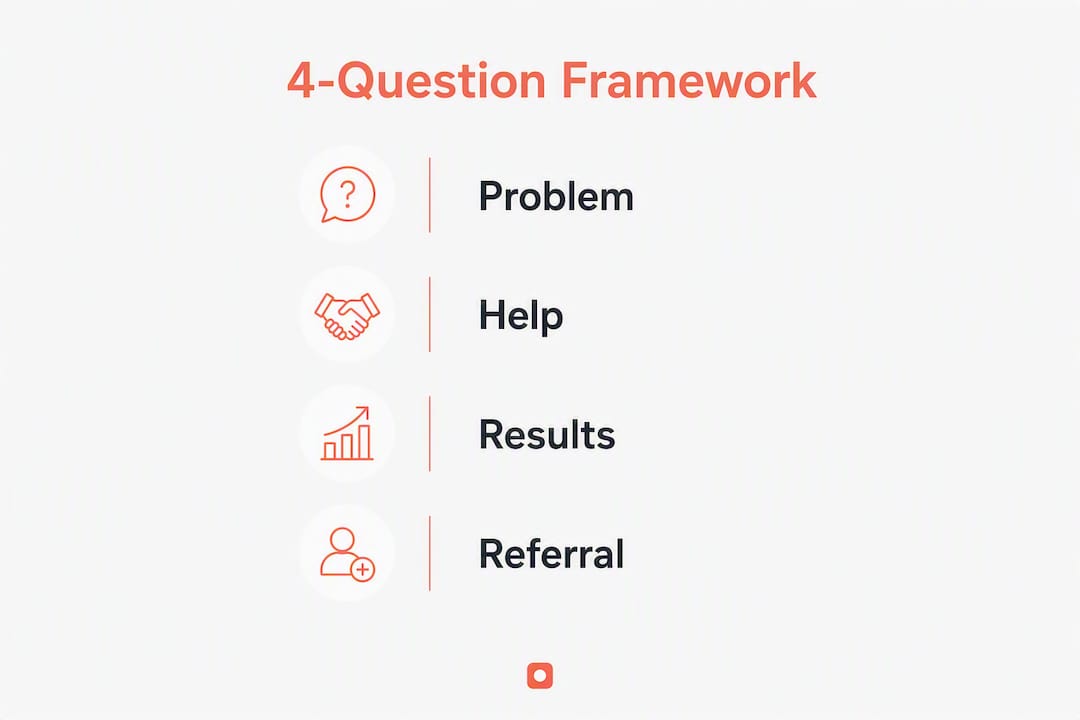
The four questions below follow the problem → help → results → referral arc. Each one has a job:
- Problem: "What challenge were you trying to solve?" — surfaces the before-state clients forget to mention unprompted.
- Help: "How did our process address that challenge?" — focuses on your method, not just the output.
- Results: "What specific outcome or change have you seen?" — forces a concrete, quotable answer.
- Referral: "What would you tell a peer who asked about working with us?" — produces the recommendation line in the client's own words.
That kind of answer comes directly from structured prompts, not from asking "How did we do?" Shoutjar's testimonial question research confirms that before/after framing and specific-results prompts consistently produce transformation stories rather than vague praise.
Pro Tip: Add the permission question ("May we use your words as a testimonial?") immediately after the referral question, while satisfaction is highest. Inline consent at peak satisfaction converts far better than a follow-up email asking for it later.
Which quantitative metrics should you use, and how do you phrase them?
| Metric | Scale | Example phrasing | Best for |
|---|---|---|---|
| CSAT | 1–5 stars | "How satisfied are you with the final deliverable?" | Post-delivery, transactional |
| CES | 1–5 effort | "How easy was it to give feedback during this project?" | Mid-project, process check |
| NPS | 0–10 | "How likely are you to recommend us to a colleague?" | Relationship, quarterly |
| Expectation-centered | Below / Met / Exceeded | "How did the delivery compare to what you expected?" | Any stage, richer context |
The expectation-centered scale captures something the others miss: whether the client's own goals were met, not just whether they liked the output. A client who expected a full redesign and received a component library may rate satisfaction at 4/5 but mark expectations as "below." That distinction changes how you respond.
- Keep scale labels symmetric: "Very dissatisfied" to "Very satisfied," not "Bad" to "Amazing."
- Anchor the midpoint explicitly: label 3 as "Neutral" or "As expected" so respondents don't interpret it differently.
- Avoid even-numbered scales when you want to force a directional answer.
Pro Tip: For agency feedback forms, include NPS as a required field and the expectation-centered question as optional. Required fields protect your trend data; optional ones reduce abandonment.
When and how should you send feedback requests?
Timing determines whether you get a thoughtful answer or silence. Send transactional feedback within 24–48 hours of a review session or delivery milestone, while the experience is still concrete. For retainer accounts, a quarterly relationship check captures drift before it becomes a cancellation.
Triggers that work:
- Design delivery or handoff completed
- Review session ends (same day or next morning)
- Onboarding milestone reached
- Project closes or invoice sent
- Quarterly account date hits
Channel guidance:
- Account manager email (personalized, named sender): personal sends yield 60–80% response rates versus 15–25% for generic blasts.
- In-product prompt: works well for SaaS clients immediately after a key action.
- Post-meeting chat link: paste a short survey URL at the end of a Zoom or Slack thread.
- Guest reviewer link: for visual feedback, send a Usepinhub link that requires no account to open.
A quick email template: "Hi [Name], we wrapped up [project] yesterday and I'd love your honest take. Three minutes, five questions: [link]. Thanks, [Your name]."
How do you phrase questions so answers are actually useful?
Generic questions produce generic answers. Process-focused phrasing produces specific, operational feedback you can act on.
Before and after:
- ✗ "Did you like working with us?" → produces "Yes, it was great."
- ✓ "How effective was our revision process at incorporating your input?" → produces a specific critique or confirmation.
- ✗ "Any comments?" → produces silence or one word.
- ✓ "What's one thing we could do differently on the next project?" → produces a concrete suggestion.
Conditional follow-ups by score:
- Score 1–2 (CSAT): "What was the main issue? We want to fix it."
- Score 3 (neutral): "What would have made this a 5 for you?"
- Score 4–5 (satisfied): "What worked best? We want to do more of it."
- NPS 0–6 (detractor): Route to account manager within 48 hours.
- NPS 9–10 (promoter): Trigger the testimonial permission question automatically.
Ready-to-paste templates for every project stage
Kickoff (3–4 questions)
- What does success look like for you at the end of this project?
- What has frustrated you about similar projects in the past?
- How do you prefer to give feedback: written comments, calls, or annotated screenshots?
- Who else on your team should we keep in the loop?
Mid-project check-in (4–5 questions)
- How well is our process matching your expectations so far? (1–5)
- Is there anything we should adjust before the next milestone?
- How easy has it been to share feedback with us? (CES 1–5)
- What's one thing going well that we should keep doing?
Post-delivery (the 4-question framework + expansion + permission)
Use the six-question set from the opening of this guide. Add: "Is there a related project or area where you'd want our help next?" and the testimonial permission line.
30–60 day results check
- What measurable change have you seen since we delivered?
- Has anything come up that we should address?
- Would you work with us again on a future project? (Yes / No / Maybe)
Pro Tip: Add conditional routing so NPS detractors (0–6) skip the testimonial question and go straight to an open "What went wrong?" prompt. Asking a dissatisfied client for a testimonial damages trust.
How does Usepinhub fit into the visual feedback workflow?
Collecting written survey answers is only part of the picture for design teams. Visual feedback needs a separate, precise channel.

| Workflow step | Usepinhub feature |
|---|---|
| Capture design state | Upload screenshot or Figma file |
| Annotate precisely | Pin comments to exact pixel locations |
| Invite clients | Guest reviewer link, no account required |
| Summarize feedback | AI-generated summary of all pins |
| Resolve items | Comment threads converted to checklists |
| Track versions | Version history across iterations |
| Protect sensitive work | Password-protected share links |
A practical workflow for a design team:
- Upload the latest screen to Usepinhub after each iteration.
- Send the guest reviewer link to the client with a one-line prompt: "Pin a comment on anything that needs to change."
- Review the AI summary to triage pins by priority.
- Resolve each thread as a checklist item and push the next version.
- Send the post-delivery survey (the six-question set above) within 24 hours of final handoff.
Pixel-anchored comments remove the ambiguity that kills design reviews. "The button feels off" becomes a pin on the exact button, with a thread attached. For more on building this into a repeatable process, the web design feedback guide on the Pinhub blog covers agency-specific workflows in detail.
How do you analyze responses and close the feedback loop?
Triage checklist after each survey batch:
- Score 1–2 or NPS 0–6: flag for account manager response within 48 hours.
- Score 3 or NPS 7–8: note the specific friction point; add to product backlog.
- Score 4–5 or NPS 9–10: extract quote candidates; trigger testimonial permission.
- Expansion interest marked "Yes": route to sales or account growth conversation.
Quote extraction template:
Pull the answer to the results question. Edit only for grammar and length. Send back to the client: "We'd like to use this quote: [quote]. Does this accurately represent your experience? Any edits?" Store the approved version with a timestamp.
Follow-up timeline:
- Day 1: Account manager acknowledges detractor feedback personally.
- Day 3: Share what you're changing based on their input.
- Day 14: Check back with a one-line update: "We made the change you mentioned. Does that address it?"
Closing the loop visibly is what drives retention and referrals — clients who see their feedback acted on are far more likely to expand the relationship.
US privacy and testimonial permission basics
You don't need a legal team to handle testimonial consent correctly. A few clear steps cover the essentials.
Inline permission snippet:
"May we use your feedback as a testimonial on our website and marketing materials? Yes / No / I'd like to review it first."
Store the response with a date stamp and the client's name. If they choose "review first," send the edited quote for written approval before publishing.
Privacy checklist (US-focused guidance, not legal advice):
- Collect only the data you need: name, project context, and feedback text.
- Store survey responses in a system with access controls (not a shared spreadsheet).
- Set a retention period: delete raw responses after 24 months unless actively used.
- Never publish a quote without explicit written approval.
- For any client in a regulated industry (healthcare, finance), confirm with your legal counsel before publishing identifiable quotes.
This section is general guidance. Confirm current requirements with a qualified attorney for your specific situation.
Key Takeaways
Short, structured client feedback questions with a clear problem-to-referral arc produce higher response rates, usable testimonials, and expansion signals in a single form.
| Point | Details |
|---|---|
| Use the 4-question arc | Problem → help → results → referral produces testimonial-ready answers and keeps forms short. |
| Keep surveys to 6–8 questions | Client Savvy data shows focused surveys reach up to 52% response rates. |
| Time requests within 24–48 hours | Send transactional feedback requests the day of or after delivery while the experience is fresh. |
| Add an expansion signal | Ask about future project interest at peak satisfaction to surface upsell opportunities naturally. |
| Use Usepinhub for visual feedback | Pixel-anchored pins and guest reviewer links replace vague written descriptions with precise, located comments. |
What most teams get wrong about client feedback
The most common mistake isn't asking too few questions. It's asking the wrong ones at the wrong moment, then doing nothing visible with the answers.
Teams often send a satisfaction survey weeks after delivery, when the client has moved on emotionally. The score comes back mediocre, nobody follows up, and the relationship quietly cools. The feedback loop never closes.
The four-question arc works not because it's clever, but because it forces specificity at the moment the client still remembers the details. And the expansion signal question, placed right after the results question, catches clients at the exact moment they're thinking about outcomes. That's when they're most open to talking about what comes next.
Visual feedback has the same timing problem. Asking a client to describe a layout issue in an email three days after a review session produces vague, frustrating answers. Sending a pixel-anchored link immediately after the session produces a pin on the exact element, with context attached. The tool doesn't replace the question; it makes the answer precise enough to act on.
Start with the six- to seven-question set above. Run it for one quarter. Then look at which answers you actually used and cut the ones that produced nothing. Iteration on your questions is as important as iteration on your designs.
Usepinhub makes precise visual feedback easier for design teams
Getting clear answers from clients is hard enough. Getting them to describe a visual problem accurately in a text box is harder. Usepinhub gives your clients a direct way to show you exactly what they mean.

With Usepinhub, clients pin comments directly onto screenshots or Figma designs, no account required. Every pin anchors to a pixel location, so "the header feels wrong" becomes a comment on the exact element. AI summaries pull all pins into a prioritized list after each review session, and version control keeps every iteration on record. Password-protected links keep sensitive work private.
The free plan covers solo teams and low-volume reviews. Pro and Team plans add unlimited screenshots, Figma integration, and full version history. For agencies running multiple client projects, the Team plan keeps every workspace organized and every review traceable.
Start your first review on Usepinhub and see how much faster a round of revisions moves when feedback is pinned, not paraphrased.
Useful sources
- The Power of Great Questions to Enhance Client Feedback — Client Savvy: Research and expert guidance on why concise surveys outperform long ones, including the 52% response rate finding.
- Free Client Feedback Form Template for Agencies — Antforms: A practical seven-question agency template covering CSAT, NPS, expansion interest, and open feedback, with data on personal send response rates.
- 30 Testimonial Questions That Get Reviews People Actually Read — Shoutjar: Organized library of testimonial question structures with guidance on before/after framing and specific-results prompts.
- Customer Feedback Survey Form Template — Typeform: Template guidance on one-question-per-screen format and conditional logic for higher completion rates.
- What questions should you ask to get a testimonial from a client? — Kai Davis: Practitioner framework for structuring testimonial requests, including objection and hesitation questions.
- Web Design Feedback: A Practical Guide for Agencies — Pinhub Blog: Agency-focused workflow for collecting and acting on design feedback, with templates and process examples.
FAQ
How many questions should a client feedback survey have?
Six to eight questions is the practical range for most client surveys. Client Savvy reports that focused, concise surveys reach response rates up to 52%, while longer forms see sharp drop-off in completion.
When is the best time to send a client feedback request?
Send transactional feedback within 24–48 hours of a delivery or review session, while the experience is still fresh. For retainer clients, a quarterly relationship check catches issues before they affect renewal.
What is an expectation-centered scale?
An expectation-centered scale asks clients whether a delivery fell below, met, or exceeded their specific goals, rather than rating satisfaction on a generic 1–5 scale. It captures whether the client's own definition of success was met.
How does Usepinhub improve the visual feedback process?
Usepinhub lets clients pin comments directly onto screenshots or Figma designs without creating an account. Each pin anchors to a specific pixel location, replacing vague written descriptions with precise, located feedback that design teams can act on immediately.
How do you get permission to use client feedback as a testimonial?
Add a single permission question inline, immediately after the referral question: "May we use your words as a testimonial?" with Yes / No / Review first options. Store the response with a date stamp and send the edited quote for written approval before publishing.