For internal collaborators, use identity-based invites tied to email or SSO. For clients and outside reviewers, use password-protected, expiring private links, or better, a branded client portal. Set these up before you hit send, not after someone forwards the wrong link.
Enable right now:
- Password protection on every external link
- An expiration date, even on "final" deliverables
- Download limits or view-only mode for early drafts
- Audit logging so you can see who actually opened the file
Platforms like Pinhub build these controls into the delivery flow itself, so you're not bolting security onto an afterthought.
TL;DR:
- Use password-protected, expiring links with download limits for external sharing, and configure these controls before sending to prevent leaks.
- Default to private or organization-only visibility for early-stage or NDA projects, reserving public access for fully approved final work.
- Invite collaborators via email or SSO to gain audit trails and role-based access, avoiding shared links for ongoing collaboration.
- Regularly verify access logs, revoke permissions promptly at project completion, and keep ownership inside a central team workspace to prevent control loss.
- Combine watermarking and clear usage agreements for high-sensitivity work, ensuring legal protection and discouraging casual misuse.
Table of Contents
- Understanding Visibility Levels for Private Design Sharing
- How Do Private Links Actually Protect Your Work?
- When Should You Invite by Identity Instead of Link?
- Who Should Own the Files After a Project Ships?
- Can You Stop External Sharing Without Blocking Clients?
- What's the Right Security Checklist Before You Share?
- Why Does the Client Delivery Experience Matter for Security?
- How Do You Verify Your Sharing Controls Actually Worked?
- How Do Watermarking and Usage Agreements Protect Your IP?
- Comparing Private Design Sharing Methods by Security Feature
- What Legal and Compliance Factors Apply to Private Sharing?
- How Should You Organize Files for Easier Access Control?
- How Do You Revoke Access After a Project Ends?
- What Version Drift Costs Design Teams
- Get Password Protection, Guest Access, and Audit Logs in One Place
- Key Takeaways
- Sources
- FAQ
Understanding Visibility Levels for Private Design Sharing
Most design tools give you three visibility tiers, and picking the wrong one is how internal wireframes end up indexed on Google. Private means only people you explicitly invite can see the file. Org-only (sometimes called "team" visibility) opens it to anyone inside your company workspace, but nobody outside it. Public means anyone with the link, or in some cases anyone searching, can view it.
The right default depends on the project stage:
- Early concepts and internal reviews: private, invite-only
- Client preview or stakeholder sign-off: private link with password and expiry
- Finished portfolio pieces or case studies: public, once the client has approved release
A safe rule for anything under an NDA or pre-launch: default to private and only loosen visibility deliberately, never accidentally. Teams that default to "org-only" for convenience often forget contractors and freelancers sit outside that boundary too.
How Do Private Links Actually Protect Your Work?
A private link is just a long, hard-to-guess URL. That's it. It's not encrypted for the recipient, it's not tied to their identity, and if a client forwards it in a group email or Slack channel, anyone in that thread now has access. This is why file-sharing platforms increasingly add password protection, expiry, and download limits on top of the link itself.
Before you send any private link, configure:
- A password separate from the link, sent through a different channel
- An expiration date, typically 7 to 14 days for review cycles
- Download restrictions, especially for source files or high-resolution exports
- Domain-restricted embeds if the design will live inside a client's internal tool
For a quick pitch deck, a short expiry with view-only access is plenty. For an in-progress draft under NDA, add a password and disable downloads entirely. For a final deliverable the client needs to keep, allow one download and log the timestamp.
Pro Tip: Set expiry dates as a default habit, not a one-off decision. A link with no expiration is a link you'll forget about, and forgotten links are the most common way old design work resurfaces years later.
When Should You Invite by Identity Instead of Link?
Anything involving ongoing collaboration, not a one-time view, calls for identity-based invites over shared links. When you invite someone by email or through SSO, you get a real audit trail: you know exactly who commented, who viewed which version, and who to remove when the project ends. A link floating around a Slack channel gives you none of that.
Map roles to actual project needs:
- Reviewers/commenters get pin-and-comment access but can't alter source files
- Editors can modify designs directly, reserved for core team members
- Owners control permissions, billing, and final deletion rights
For agencies juggling multiple clients, isolate each client's project in its own workspace or folder structure like a Graphic Designer London agency would for streamlined client delivery. Never let Client A's reviewers see Client B's design queue, even accidentally. This isolation also protects you if one client asks who else has access, you want a clean, single-client answer every time.
Who Should Own the Files After a Project Ships?
Ownership and editing rights aren't the same thing, and conflating them causes real headaches when a freelancer leaves or an agency contract ends. The owner controls deletion, billing, and permission changes; collaborators, even long-term ones, typically can't transfer ownership without the current owner's sign-off. Many platforms cap how many times ownership can transfer, so check that limit before a team reshuffle catches you off guard.
Practical steps that prevent lost control:
- Keep projects inside a team workspace, not a personal account
- Assign one central owner per project, ideally a manager who outlasts individual contributors
- Archive final assets separately from the active working files once a project closes
At handoff, give clients the finished files and any usage rights specified in your agreement. Retain your working files, version history, and internal comment threads. That history is often what protects you if a dispute over scope or authorship ever comes up.
Can You Stop External Sharing Without Blocking Clients?
Admin-level restrictions exist so one careless team member can't accidentally make an internal project public. Enterprise plans on most design and file platforms let admins control who has permission to create external links at all, and some let you restrict embeds to an allowlist of approved domains rather than the open internet.
Useful policy patterns for agency-client work:
- Only project leads or account managers can generate external share links
- Guest reviewers get scoped, single-project access rather than workspace-wide visibility
- Approved client domains are allowlisted for embeds, everything else is blocked by default
The balance point is exceptions, not blanket restriction. A junior designer shouldn't be able to publish client mockups to a public gallery, but a client's marketing director should still get frictionless access to review the deliverable they're paying for. Build the exception into the policy up front instead of granting emergency access under deadline pressure.
What's the Right Security Checklist Before You Share?
Not every asset needs the same level of protection. A moodboard shared with your own team doesn't need the same treatment as a client's unreleased product design. Here's the order to apply controls, roughly from lightest to heaviest:
- Password-protect any link leaving your organization
- Set an expiration date matched to the review window, not "forever"
- Disable downloads for anything still in draft or under NDA
- Add a visible watermark on high-value or pre-launch visuals
- Require email or SSO verification for repeat collaborators
- Keep version history active so you can always identify which draft leaked, if one does
A quiet risk worth naming: relying on an unguessable "secret link" as your only defense is a common shortcut, and a fragile one. Without logging, you have no way to know a link was forwarded until the damage is already done. Identity-based access and revocable controls should be the baseline for any client-facing work, not an upgrade you add later.
Match the intensity to the stakes: internal sketches get a password, a soon-to-launch product redesign gets the full list.
Why Does the Client Delivery Experience Matter for Security?
A scattered mess of email attachments and outdated Dropbox links doesn't just look unprofessional, it actively creates security gaps, because nobody can tell which version is current or who still has access to old ones. A branded client portal solves both problems at once: it looks polished, and it gives you one place to control permissions.
A solid setup includes:
- One persistent project link instead of a new email thread per revision
- Organized version history so clients always land on the current draft
- Pixel-anchored comments that stay attached to the exact spot on the design, even across revisions, which is how Pinhub structures client feedback
- Guest reviewer access with no account required, layered under a password and expiry so ease of use doesn't come at the cost of control
Pro Tip: Send clients one link for the entire project lifecycle, not a new one per revision. It cuts down "which version is this?" emails and gives you a single point to revoke access when the engagement ends.
How Do You Verify Your Sharing Controls Actually Worked?
Setting permissions is only half the job. Confirming they held is what separates careful designers from lucky ones.
- Check the people-with-access list immediately after sharing, and again anytime a reviewer says they "can't find it" or "someone else sent it to me."
- Review audit logs for views, downloads, and timestamps. A file opened at 3 a.m. from an unfamiliar location is worth a follow-up.
- Revoke access the moment a project wraps or a collaborator changes roles, don't wait for a quarterly cleanup.
- If you suspect exposure, rotate the asset: generate a new link, invalidate the old one, and reissue passwords rather than assuming the leak was harmless.
Logs are the difference between guessing and knowing.
How Do Watermarking and Usage Agreements Protect Your IP?
Passwords and expiring links stop casual access, but they won't stop someone from screenshotting a design and claiming it as their own. That's where watermarking and usage agreements come in, and they solve different problems.

A watermark, whether a visible diagonal overlay or a subtle corner mark with the client's name and date, does two things: it discourages casual misuse, and it gives you traceable proof if a design surfaces somewhere it shouldn't. For pitch decks and speculative work sent to prospective clients who haven't signed anything yet, watermarking is close to mandatory. For approved final deliverables going to a paying client, you can usually drop it, since the usage agreement now governs reuse.
A usage agreement doesn't stop unauthorized use, but it defines what counts as unauthorized and gives you legal footing if it happens. At minimum, spell out: who owns the final files, what the client can and can't do with drafts versus finals, and whether you retain rights to display the work in your own portfolio. Many designers skip this for smaller projects and regret it the first time a client reuses a rejected concept without payment.
For genuinely high-sensitivity work, industrial design, unreleased hardware, anything with real competitive value, consider temporary view-only workspaces with server-side rendering so the recipient never receives the raw file at all, paired with a short NDA covering reuse. This combination is standard in CAD and engineering collaboration for exactly this reason: view access without file transfer removes the biggest IP risk entirely.
Neither watermarking nor a signed agreement is foolproof on its own. Together, they cover the two failure modes that matter: casual misuse and deliberate theft.
Comparing Private Design Sharing Methods by Security Feature
Rather than ranking specific vendors, it helps to compare private sharing methods by what each one actually protects against, since the right choice depends on the asset, not brand loyalty.
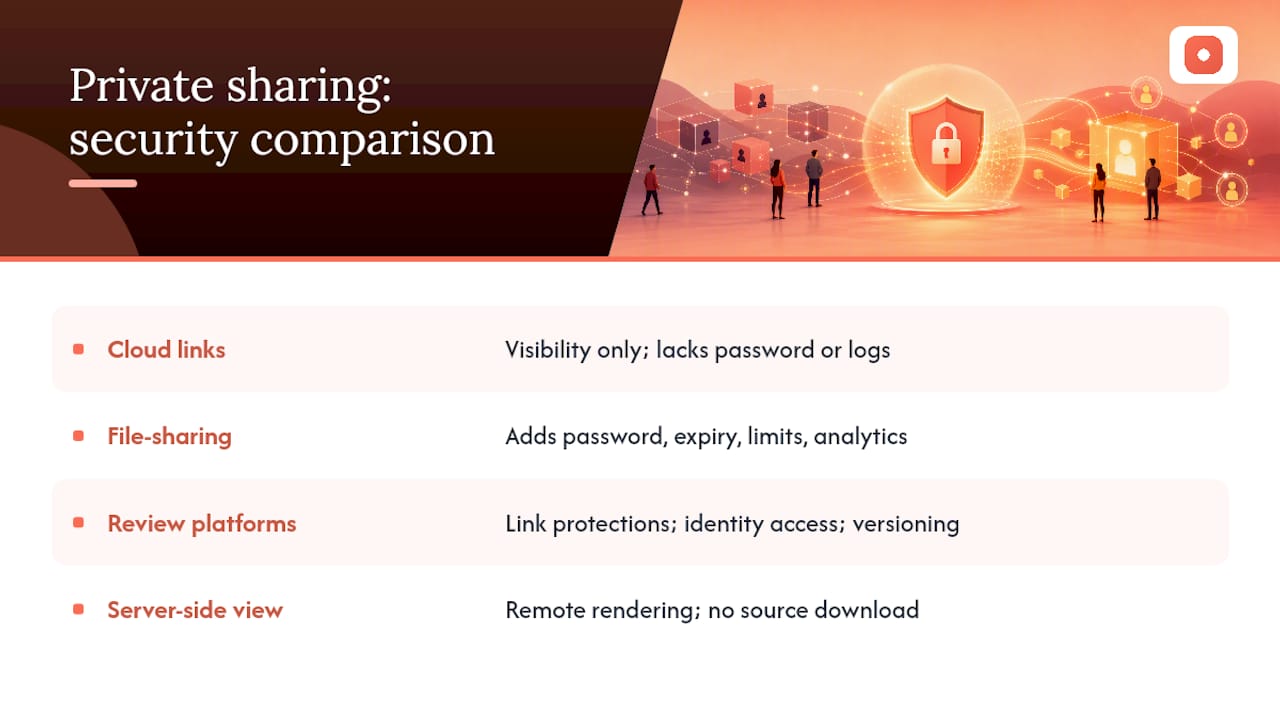
Basic cloud storage links (shared drive folders, generic file hosts) offer visibility control but rarely include password protection, expiry, or download logging by default. They're fine for low-stakes internal files, risky for anything client-facing.
Dedicated file-sharing tools built for creative work typically add password protection, link expiry, download limits, and view analytics on top of the storage layer. This is a meaningful step up for portfolio pieces and one-off deliveries.
Feedback and review platforms like Pinhub go further by combining those link-level protections with identity-based guest access, version history, and pixel-anchored comment threads, so security and collaboration live in the same workflow instead of being bolted together from separate tools.
Server-side, view-only platforms used in CAD and engineering contexts prioritize IP protection above all else, rendering files remotely so the recipient never downloads the source geometry at all. This is the heaviest option, appropriate for the most sensitive assets, but often more setup than a typical design review needs.
The practical takeaway: match the method to the asset. A quick concept share to a teammate doesn't need server-side rendering. A pre-launch product design under NDA probably does.
What Legal and Compliance Factors Apply to Private Sharing?
Private design sharing sits at the intersection of contract law and data handling, and most designers only think about it after something goes wrong. Your client agreement should explicitly state who owns draft files versus final deliverables, since default ownership rules vary and "I designed it, so I own it" isn't always legally accurate once a client has paid for the work.
If your projects involve clients in regulated industries, healthcare, finance, government, expect them to ask about your data handling practices before they'll share sensitive requirements with you. Password protection and audit logs aren't just good practice here, they're often a contractual requirement. Keep records of who accessed what and when; if a client ever asks you to prove a design wasn't shared beyond an agreed group, an audit log is your evidence.
NDAs matter most in the gap between "we're discussing a project" and "we have a signed contract." Speculative pitches, unreleased product concepts, and competitive redesigns are exactly the assets most likely to need one, and exactly the ones designers most often forget to protect before the first share.
None of this is a substitute for a lawyer reviewing your standard client contract, but the baseline habits, clear ownership language, access logging, and NDAs for pre-contract work, cover most of the situations independent designers and small studios actually run into.
How Should You Organize Files for Easier Access Control?
Access control gets exponentially harder when your files are a mess, because you can't restrict what you can't find. A clean structure isn't just tidiness, it's a security control.
Organize by project and client first, not by file type. A folder named "Acme Corp - Homepage Redesign" with subfolders for drafts, feedback, and finals is far easier to permission correctly than a shared drive sorted by "PNGs" and "PDFs."
Label versions with dates or sequential numbers, never "final," "final_v2," and "final_ACTUAL." Ambiguous naming is how outdated drafts get sent to clients by mistake, and how the wrong reviewer ends up with edit access meant for an older stage.
Separate draft and approved folders entirely, ideally with different permission levels attached. Drafts get tighter restrictions, no downloads, shorter link expiry. Approved finals can loosen slightly since the reuse risk is lower once a client has formally signed off.
Tag or note the sensitivity level at the folder level, not just in your head. If a teammate needs to grant access while you're out, they should be able to tell at a glance that a folder needs a password and expiry, not guess based on the project name.
How Do You Revoke Access After a Project Ends?
Revoking access is the step most designers forget, mostly because nothing forces you to do it. Unlike an expiring link, an identity-based invite stays active indefinitely unless someone manually removes it.
Build revocation into your project closeout routine, the same way you'd archive final files. When a project wraps, or a freelancer or contractor's engagement ends, go through this sequence:
- Remove individual collaborators from the workspace or project, not just from active conversations
- Invalidate any standing share links rather than letting them expire naturally
- Reset passwords on portals that will be reused for future projects with the same client
- Check downstream access, embedded links, forwarded invites, browser bookmarks, that might still resolve after the primary link is revoked
For agencies managing multiple concurrent clients, set a calendar reminder tied to project completion dates rather than relying on memory. It's easy to revoke access for the client you're actively annoyed with and forget the one who quietly wrapped up three months ago.
One more habit worth adopting: audit your active collaborator list quarterly, even outside project closeouts. People change roles, leave companies, or simply stop needing access long before anyone remembers to remove them.
What Version Drift Costs Design Teams
Version drift, the slow chaos of five people working from three different file versions, is the quiet failure mode behind most sharing mistakes. It's rarely a security breach in the dramatic sense. It's a client approving the wrong draft, or a reviewer commenting on a version already superseded twice over.
Usepinhub's view is that fragmented feedback channels, email threads, screenshots pasted into Slack, comments buried in a PDF, cause more real damage to design projects than most security gaps do, because they erode trust in the process itself. Locking review to a single source of truth solves both problems at once: it's harder for the wrong version to circulate, and it's harder for access to sprawl unnoticed.
— Pinhub
Get Password Protection, Guest Access, and Audit Logs in One Place
Most of the controls covered here, passwords, expiring links, identity-based invites, audit logs, exist as separate features across separate tools, which is exactly why teams end up cobbling together a workflow that leaks somewhere. Pinhub was built to keep those controls in one place instead of scattered across your file storage, your email, and your review process.

Every project link supports password protection and expiry, so client previews stay locked down without extra setup. Guest reviewers can leave pixel-anchored comments without ever creating an account, which keeps approvals moving without loosening your access controls. Version history stays intact automatically, and audit logs show exactly who viewed or commented, and when. If you're currently managing client feedback across email, Slack, and screenshots, Pinhub's free plan is enough to test whether a single, secured project link actually cuts down your revision cycles. Sign up, upload your next client draft, and send the reviewer link with a password attached before you send anything else this week.
Key Takeaways
Secure private design sharing depends on combining identity-based invites for internal teams with passworded, expiring, logged links for anyone outside your organization.
| Point | Details |
|---|---|
| Choose the right visibility default | Use private or org-only for anything pre-release; reserve public for approved portfolio pieces. |
| Layer link controls | Add a password, expiration date, and download limit before sending any external review link. |
| Use identity-based invites for teams | Assign reviewer, editor, and owner roles based on actual project responsibilities, not convenience. |
| Verify and revoke on a schedule | Check the access list and audit logs after sharing, and revoke access the moment a project closes. |
| Protect IP with watermarks and agreements | Combine visible watermarks on drafts with a signed usage agreement defining ownership and reuse. |
| Centralize delivery through one platform | Pinhub combines password-protected links, guest reviewer access, version history, and audit logs in one project link. |
Sources
- VisShare | Web Collaboration Solution for Secure 3D and 2D CAD Data Visualization and Sharing
- Design Portfolio File Sharing | Share design work securely - Comfyfile
FAQ
What Is the Safest Way to Share Design Files Privately?
For internal teammates, use identity-based invites through email or SSO. For clients or outside reviewers, use a passworded, expiring link, or a branded client portal like the one Pinhub provides.
Is a Private Link Enough to Keep My Designs Secure?
No. A private link is only as secure as the last person who forwarded it. Pair it with a password, an expiration date, and download restrictions rather than relying on the link staying secret.
How Do I Let Clients Review Designs Without Creating an Account?
Guest reviewer access lets clients comment directly on a design without signing up, as long as the link is still protected with a password and expiry. This keeps the review fast without exposing the project to anyone who stumbles across the link.
Should I Watermark Every Design I Share?
Watermark speculative pitches and pre-contract concepts, since those carry the highest reuse risk. Approved final deliverables to a paying client usually don't need one once a usage agreement is in place.
How Often Should I Review Who Has Access to My Design Projects?
Check the access list immediately after sharing and again at project closeout. For ongoing client relationships, audit the full collaborator list quarterly to catch access nobody remembered to revoke.