
The fastest way to secure client design approval is a three-stage workflow: define your approver at kickoff, consolidate all feedback in one visual tool, and lock sign-off with a timestamped record. Teams that follow this pattern consistently close review cycles faster and generate fewer revision rounds than those relying on email threads and scattered comments.
Before you read further, here is the minimum you need in place today:
- Define the approver. One named person has final sign-off authority. Not a committee.
- Set the review window. A 48–72 hour window per round, confirmed in writing at kickoff.
- Centralize feedback and versioning. All comments, annotations, and file versions live in one place.
If you want to act on this immediately, start a free workspace on Usepinhub and invite your client as a guest reviewer. No account required on their end.
Table of Contents
- What does a solid client design approval process look like?
- Who actually signs off, and what is everyone else responsible for?
- How do you keep feedback and file versions in one auditable place?
- Which tool features actually speed up client sign-off?
- How do you limit revision cycles and protect your budget?
- How Usepinhub addresses the blockers that slow client approvals
- Ready-to-use sign-off templates and checklists
- Key Takeaways
- The pattern that keeps showing up in design reviews
- Usepinhub makes client approvals faster and more auditable
- Useful sources
- FAQ
What does a solid client design approval process look like?
A design approval process, sometimes called a creative approval workflow or design sign-off process, is the structured sequence of steps that moves a design from first draft to a documented, binding client decision. It is not just a final "looks good" email. Done correctly, it produces a written record of who approved what, at which version, and when.
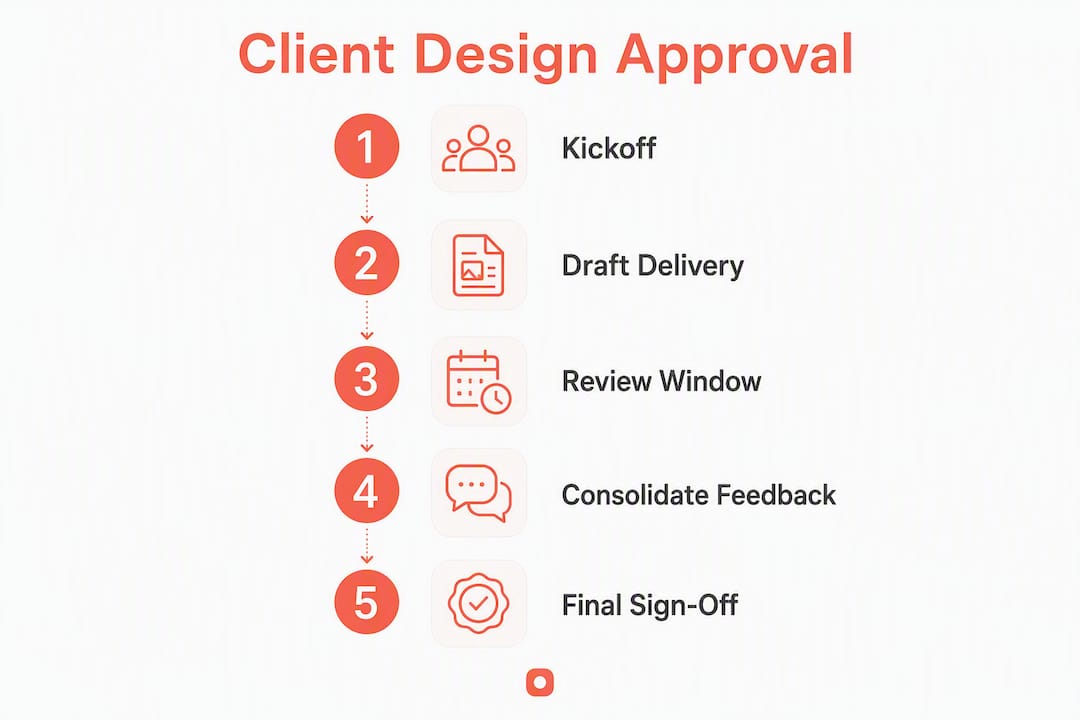
The process has five stages, each with a clear handoff:
- Kickoff. Align on scope, deliverables, acceptance criteria, and the named approver. Document this in a project brief or SOW.
- Draft delivery. Share the first version with context: what decisions were made, what feedback you need, and what is out of scope for this round.
- Consolidated review. Reviewers submit all feedback in one round, in one place. No drip-feeding comments over three days.
- Final sign-off. The named approver confirms in writing: approve, approve with changes, or request changes.
- Freeze. Once approved, the design is locked. Any subsequent change triggers a formal change request.
PMI guidance recommends treating approval gates as formal cross-functional checkpoints rather than ad-hoc creative reviews. That framing matters because it shifts the conversation from "do you like it?" to "does this meet the agreed criteria?"
Typical stage durations
| Stage | Typical Duration | Decision Window |
|---|---|---|
| Kickoff | 1–2 days | N/A |
| Draft delivery | 3–5 business days | N/A |
| Consolidated review | A few days | Reviewer deadline |
| Final sign-off | About one day | Approver deadline |
| Freeze / handoff | Same day | Immediate |

Calendar invites for each review window, sent at kickoff, remove ambiguity. Pair them with automated reminders 24 hours before the deadline. Tools like Wrike show that workflow automation cuts manual follow-up tasks and keeps approvals on schedule.
Pro Tip: Batch all small edits into a single consolidated revision round. Never send a "quick fix" for approval on its own — it resets the review clock and trains clients to drip-feed feedback indefinitely.
Who actually signs off, and what is everyone else responsible for?
Unclear ownership is the single most common reason approval cycles stretch from days into weeks. Industry guidance consistently recommends naming one person with final decision authority in kickoff documentation, backed by a RACI matrix that covers every stakeholder.

A compact RACI for a typical design project looks like this:
| Role | Responsible | Accountable | Consulted | Informed |
|---|---|---|---|---|
| Designer | Produces deliverable | |||
| Project Manager | Manages process | |||
| Creative Director | Reviews quality | ✓ | ||
| Client Lead (Approver) | ✓ Final sign-off | |||
| Legal / Brand | ✓ | |||
| Stakeholders | ✓ |
The Accountable role is the only one who can say "approved." Everyone else feeds into that decision. Record this in your kickoff notes and reference it in your SOW.
Escalation path when approvals stall
Define the escalation path before the project starts, not after a deadline slips. A workable structure:
- Day 1 past deadline: PM sends a written reminder to the named approver.
- Day 3 past deadline: PM escalates to the approver's manager or executive sponsor.
- Day 5 past deadline: Project timeline is formally revised and the client is notified in writing of the impact.
Pro Tip: Add a clause to your SOW that reads: "Failure to respond within the agreed review window will be treated as approval of the current version, unless a change request is submitted." This single sentence changes client behavior faster than any reminder email.
How do you keep feedback and file versions in one auditable place?
Fragmented feedback is a process problem, not a client problem. When comments arrive via email, Slack, a phone call, and a PDF markup simultaneously, no one can track which version a comment refers to or whether it was resolved. Adobe Business guidance recommends a single source of truth: one platform where all feedback is submitted, versioned, and resolvable in context.
Practical rules to enforce this:
- One platform, one thread. If a client emails a comment, redirect them to the review tool. Do not respond to email feedback directly.
- Label every version explicitly. Use a consistent naming convention:
v1.0,v1.1,v2.0. Include a short version note explaining what changed. - One round per review window. Reviewers submit all feedback before the deadline. The designer responds in the next version, not in real time.
- Tag every decision. Each piece of feedback should carry a status: approve, approve with changes, or request changes.
Embedding approval requests into collaboration channels like Slack can reduce friction for internal stakeholders. Wrangle's documentation shows how Slack-integrated workflows route approvals and post status updates automatically, keeping context in team channels.
Pro Tip: Any feedback that changes the scope of work must include a revised timeline and cost estimate before the designer acts on it. Make this a written rule in your kickoff brief.
Which tool features actually speed up client sign-off?
Not every review tool is built for client-facing approvals. The features below are the ones that directly address the bottlenecks that slow sign-off. When evaluating tools, treat these as requirements, not nice-to-haves.
- Pixel-anchored visual annotations. Comments pinned to a specific area of the design eliminate "the button in the top right" ambiguity. Designers know exactly what the client is referring to.
- Guest reviewer access. Clients should not need to create an account to leave feedback. Account friction is one of the most common reasons clients delay reviews.
- One-click approve / decline. A formal approval button creates a clear, documented decision. An email that says "looks fine" does not.
- Threaded comments. Conversations stay attached to the specific design element they reference, not buried in a chat thread.
- File versioning. Every iteration is stored and labeled. Rollback is possible. No one loses work.
- Timestamped audit trail. Every comment, approval, and change is logged with a date, time, and user. This is your legal and contractual record.
- PM integrations. Connections to Jira, Asana, or Trello keep approval status visible in the project management layer without manual updates.
- Password-protected links. Shared review links should be lockable to prevent unauthorized access to pre-approved work.
Measurement studies in product-design contexts show that effective parallel review practices can reduce development cycle time by roughly 30%. The mechanism is straightforward: when reviewers can see each other's comments in real time, they consolidate faster and avoid redundant feedback.
Adobe Business notes that centralized visual annotations reduce ambiguous feedback because designers can directly see the target of every comment. That specificity cuts the back-and-forth that inflates revision counts.
How do you limit revision cycles and protect your budget?
Revision creep is a scoping problem. The fix is contract language and client onboarding, not willpower.
Define a revision round in your SOW before the project starts. A revision round is one consolidated set of feedback submitted within the agreed review window. It is not a series of individual comments sent over several days.
Sample SOW clause: "This agreement includes two (2) rounds of consolidated design review. Each round must be submitted within 48 hours of delivery. Additional revision rounds are billed at $[rate] per round. A revision round is defined as one consolidated set of feedback submitted in a single session. Feedback submitted after the review window closes will be treated as a new revision round."
Walk clients through this language at kickoff, not when the third round of changes arrives. Show them a brief example: two uncontrolled revision rounds on a mid-size project can add 10–15 hours of unbilled work and push a two-week timeline by a full week. That concrete illustration lands better than abstract policy language.
Vizcom guidance recommends using stage-specific review criteria at each gate to prevent ambiguous reviews. Pair that with a pre-approval checklist (covered in the templates section below) and clients have a clear framework for what they are evaluating, which reduces subjective debate.
How Usepinhub addresses the blockers that slow client approvals
Most approval delays trace back to three specific problems: vague feedback that requires clarification, account friction that stops clients from reviewing at all, and no formal record of what was approved. Usepinhub's feature set maps directly to each of these.
- Pixel-anchored pin comments. Reviewers click directly on the design element they are commenting on. The comment is anchored to that exact pixel location, so there is no ambiguity about what it refers to.
- Guest reviewer access. Clients join a review session without creating an account. They click a shared link and start commenting. This removes the single most common source of review delays for non-technical stakeholders.
- Threaded discussions. Each pin comment supports a full conversation thread, so follow-up questions and clarifications stay attached to the specific design element.
- Version history. Every uploaded version is stored and labeled. Teams can compare iterations side by side and roll back if needed.
- AI-generated summaries. Usepinhub can summarize all feedback from a review session, giving the designer a consolidated action list without manually reading every thread.
- Password-protected links. Share review links securely with clients and lock them after sign-off.
- Exportable audit trail. Every comment, resolution, and approval is logged with a timestamp, giving you a documented record for contracts and disputes.
To pilot Usepinhub quickly, run it on two small projects over two weeks. Invite three guest reviewers per project, set a 48-hour review window, and track two metrics: time from delivery to first feedback, and number of revision rounds. Those two numbers will tell you whether the process is working.
For a broader look at how teams evaluate tools for collaborative review, the design feedback tools overview on the Usepinhub blog covers feature comparisons and team evaluation criteria in detail.
Ready-to-use sign-off templates and checklists
Pre-approval checklist
Before requesting formal sign-off, confirm the following:
- Design meets all criteria defined in the project brief
- All feedback from the previous revision round is addressed and documented
- Version label is current and matches the file delivered
- Assets list is complete (fonts, images, icons, export specs)
- Accessibility checks are complete (contrast ratios, alt text, touch targets)
- No open comment threads remain unresolved
Formal sign-off language (client email)
Sign-off request email template
Subject: Final approval needed: [Project Name] v[X.X] — deadline [Date]
Hi [Client Name],
[Project Name] v[X.X] is ready for your final review. Please submit your decision by [Date, Time, Timezone].
Your options are:
- Approve — design is confirmed and will proceed to production.
- Approve with changes — design proceeds with the specific changes noted.
- Request changes — a new revision round begins (note: this may affect timeline and cost).
If we do not receive a response by [Date], the current version will be treated as approved per our project agreement.
[Review link]
For a practical pre-launch checklist that supports the freeze step, the website QA checklist covers 35+ verification checks teams can run before final handoff.
Key Takeaways
A short, enforceable approval workflow — named approver, fixed review windows, and centralized visual feedback — closes client sign-off loops faster and with fewer revision cycles than unstructured email-based reviews.
| Point | Details |
|---|---|
| Name one approver | Assign a single person with final sign-off authority at kickoff to prevent committee delays. |
| Set short, fixed review windows confirmed in writing to reduce approval lag and make escalation predictable. | |
| Centralize all feedback | One platform for comments, versions, and decisions creates an auditable record and prevents fragmented commentary. |
| Require key tool features | Pixel-anchored comments, guest access, and a timestamped audit trail are procurement requirements, not optional extras. |
| Pilot with Usepinhub | Pilot with a small number of projects over a brief period using Usepinhub's guest review and pin-comment features to measure cycle-time improvement. |
The pattern that keeps showing up in design reviews
The same failure mode appears across projects of every size: no one named the approver, feedback arrived in four different channels, and the designer spent more time chasing decisions than making them. The fix is never a better creative brief. It is governance.
What gets overlooked is that the approval process is a communication contract, not a formality. When you define the approver, set the window, and centralize feedback before work begins, you are not adding bureaucracy. You are removing the conditions that produce endless revision cycles.
The trade-off worth acknowledging: tighter governance can feel constraining to clients who are used to informal, iterative feedback. The way to manage that tension is to over-explain the process at kickoff. Show the client the review template, walk them through the sign-off language, and explain what happens when a deadline is missed. Clients who understand the process upfront rarely push back on it mid-project.
Approval gates work best when they evaluate cross-functional criteria, as PMI guidance notes, rather than purely aesthetic judgments. That shift in framing, from "do you like it?" to "does this meet the agreed criteria?", is the single most effective change a design team can make to its review process.
Usepinhub makes client approvals faster and more auditable
Chasing sign-off through email threads and chat messages costs design teams hours of unbilled time every week. Usepinhub gives you a dedicated review environment where clients leave pixel-anchored comments on the exact design element they mean, approve or decline with one click, and never need to create an account.

The practical pilot plan: pick two active projects, share the review link with up to three client stakeholders as guest reviewers, and set a 48-hour review window. Track time to first feedback and number of revision rounds. Most teams see a measurable reduction in both within the first two weeks.
Usepinhub's version history keeps every iteration on record, AI summaries turn a full review session into a consolidated action list, and password-protected links keep pre-approved work secure. The audit trail is exportable, so you have documentation ready for any contract dispute.
Start your free workspace at Usepinhub and run your next client review without a single follow-up email.
Useful sources
| Source | Description |
|---|---|
| PMI — Project gate reviews | PMI guidance on formal approval gates and cross-functional checkpoints for project stability. |
| Project Management — RACI and sign-off | Industry guidance on capturing sign-off authority and using RACI matrices at kickoff. |
| Adobe Business — Design approval from clients | Best-practice guidance on centralized feedback, visual annotations, and review timelines. |
| Vizcom — Design approval process | Stage-specific review criteria, measurement guidance, and parallel review practices. |
| Wrike — Design approval process | Workflow automation, PM integrations, and automated reminders for approval timeliness. |
| Wrangle — Slack approval workflows | Slack-integrated approval routing and status updates for internal and external stakeholders. |
| Usepinhub — Design feedback and review tool | Pinhub product pages covering guest reviewers, pin comments, version history, and audit trail. |
| Usepinhub blog — Design feedback tools | Feature comparisons and team evaluation criteria for collaborative review tools. |
| Usepinhub — Website QA checklist | Pre-launch verification checklist supporting the freeze and pre-sign-off steps. |
For enterprise rollouts, consult your project governance and procurement teams before selecting a platform. Requirements around data residency, SSO, and audit log retention vary by organization.
FAQ
What does client design approval mean?
Client design approval is the formal decision by a named client stakeholder that a design deliverable meets the agreed criteria and can proceed to the next stage. It creates a documented, timestamped record of that decision.
What is the design approval process?
The design approval process is a structured sequence: kickoff to align on criteria and name an approver, draft delivery, a consolidated review round, formal sign-off, and a freeze that locks the approved version. Each stage has a defined outcome and a documented handoff.
What is the client approval process in project management?
In project management, the client approval process is a formal gate review where the client confirms that deliverables meet scope, quality, and acceptance criteria before the project advances. PMI guidance recommends treating these gates as cross-functional checkpoints, not informal sign-offs.
What are the different types of design approvals?
The three standard responses in a design approval workflow are: approve (the design is confirmed as-is), approve with changes (the design proceeds with specific noted modifications), and request changes (a new revision round begins). Defining these options upfront prevents ambiguous responses like "looks good but maybe change a few things."
How do you document a formal design sign-off?
A formal sign-off requires a written statement from the named approver that identifies the project name, version number, delivery date, and scope covered. Usepinhub's timestamped audit trail captures this automatically, giving you an exportable record tied to the exact version that was approved.