
Visual, pixel-anchored feedback tools solve design and review alignment; bug trackers solve confirmed, reproducible engineering problems. This article covers only the visual-feedback side of that split (screenshots, pinned comments, guest reviewers) not defect-logging QA systems. Pinhub is the example we'll use throughout, since it's built specifically for pinning comments to exact points on a screenshot or Figma design.
TL;DR:
- Visual feedback tools like Pinhub are ideal for early design critique but not suitable for managing confirmed bugs requiring reproducibility.
- Keep feedback in the visual tool unless an issue can be reliably reproduced, in which case it should be transferred to a dedicated bug tracker with complete context.
- Escalate items to engineering only if they involve factual failures, steps to reproduce, environment details, and clear expected versus actual behavior.
- Use structured pre-reads, specific questions, and short feedback loops to improve asynchronous design reviews and reduce revision cycles.
- Connect visual feedback tools and bug trackers through disciplined handoff processes, ensuring no outdated or incomplete information reaches engineering.
Table of Contents
- Feedback vs Bug Tracking: What Actually Separates the Two
- When Should You Escalate Feedback to a Bug Tracker?
- How Do You Run an Effective Async Design Review?
- How Do You Hand Off Feedback to a Bug Tracker Cleanly?
- How Pinhub Puts This Workflow Into Practice
- Where Visual Feedback Tools Hit Their Limits
- Which Tool Fits Your Team and Project Phase?
- How Does This Change Team Collaboration?
- How Do You Avoid Feedback Overload?
- Which Tools Combine Feedback and Bug Tracking?
- Why Most Teams Get the Feedback/Bug Split Backward
- Try Pinhub for Your Next Design Review
- Sources
- FAQ
Feedback vs Bug Tracking: What Actually Separates the Two
The core difference comes down to what each system is built to hold. A pixel-anchored feedback tool captures subjective, in-progress judgment: is the spacing right, does the copy land, does this button feel like the primary action. A bug tracker holds confirmed, reproducible defects that engineering needs to fix, complete with steps to reproduce and an expected outcome. Confusing the two is where most teams lose time, either by cluttering a sprint board with "make it pop" comments or by burying a real accessibility bug in a Slack thread that nobody revisits.
Pixel-anchored tools like Pinhub typically include:
- Pixel pins: comments attached to an exact x/y coordinate on a screenshot or design file, not a vague description of location
- Screenshot and Figma uploads: the actual visual artifact under review, not a link someone has to click and load separately
- Threaded comments: replies that stay attached to the pin, so a conversation about one button doesn't bleed into the one about the header
- Guest reviewers: clients and stakeholders who can comment without creating an account, which matters enormously for agencies working with external approvers
- Version control: a history of design iterations so a comment from three rounds ago doesn't get misread as feedback on the current draft
- Automated summaries: an AI-generated list of open items, so nobody has to scroll a whole thread to find what's unresolved
Issue trackers, by contrast, run a ticket lifecycle: a bug gets opened, assigned, prioritized, moved through states like "in progress" and "in review," and closed with a resolution. That structure is exactly right for engineering work and exactly wrong for early design critique, where the point is still moving.
A simple test for where an item belongs: if it requires a design decision, it stays in feedback. If it requires a code fix and can be reproduced the same way twice, it belongs in the tracker.
When Should You Escalate Feedback to a Bug Tracker?
Most items never need to leave your feedback tool. The exceptions are consistent enough to write down as rules.
Keep it in feedback when the issue is about judgment: copy tone, spacing, color contrast that's a preference rather than a violation, or interaction polish that reasonable people could disagree on. Escalate to a bug tracker when the issue is about fact: a button that doesn't fire on click, a layout that breaks at a specific viewport width, a form that submits duplicate entries. The distinguishing question is whether a developer could reproduce the exact same failure twice using the same steps.
Before you send anything to engineering, collect four things:
- Expected vs. actual behavior — what should have happened, and what happened instead
- Steps to reproduce — the exact click path, in order
- Environment details — browser, device, viewport size, and OS
- Screenshot with the pin still attached — not a cropped or re-captured version
Run new items through a short triage flow: does it repeat on a second attempt? Is it a visual judgment call or a functional failure? Does it block other work? If it fails the reproduction test, it's still feedback, not a bug, even if it feels urgent.
Pro Tip: Keep a running "gray area" list for the items your team debates most. Reviewing that list every few weeks usually reveals a pattern, like a specific component that keeps generating ambiguous notes, worth fixing at the design-system level instead of one ticket at a time.
How Do You Run an Effective Async Design Review?
Every review should open with a stated review type. Storyflow's design review framework recommends naming whether you're running a direction review, a craft review, or a decision review, because each expects a different kind of feedback and a different level of detail. A craft review inviting line-by-line notes on spacing looks nothing like a direction review meant to surface big structural disagreement, and mixing the two in one session is a common source of frustrating, unfocused critique.
Send a pre-read before the session. That means the design file, the constraints reviewers should keep in mind, and two or three specific questions you want answered, sent far enough ahead that reviewers can look at it on their own schedule. Atlassian's guidance on design reviews points out that pairing a pre-read with a short Loom walkthrough, where you narrate the reasoning behind a decision, produces clearer and more actionable feedback than a live meeting alone, because reviewers can pause, rewatch, and respond when they actually have something useful to say.
A workable async loop looks like this:
- Prepare a pre-read with context, constraints, and open questions
- Record a two-to-three-minute Loom walking through the key decisions
- Collect pixel-anchored comments over 24 to 48 hours
- Consolidate the feedback into a summary with named owners for each item
- Close the loop by resolving threads once changes ship
Track how long feedback takes to convert into shipped changes and how many rounds a design goes through before approval. Agencies that centralize feedback in one visual tool instead of scattering it across email and screenshots report measurably faster client response times and large cuts to the time spent reconciling comments across channels, according to Designrush's reporting on agency workflows.
How Do You Hand Off Feedback to a Bug Tracker Cleanly?
A ticket that arrives without context sends the developer back to Slack asking questions, which defeats the purpose of tracking it in the first place. The fix is deciding, upfront, exactly what metadata travels with every handoff.
At minimum, a ticket needs:
- The original screenshot with the pin still visible, not a re-cropped substitute
- Expected behavior versus actual behavior, stated in one sentence each
- Steps to reproduce, numbered in order
- Device, browser, and viewport size
- A named owner and a target resolution window
There are three common ways teams route items into a tracker: automated ticket creation triggered directly from a resolved feedback thread, a manual triage template a PM fills out before pasting into the tracker, and channel routing where design and engineering agree on which Slack channel or tracker project catches escalated items. Whichever pattern you use, Revue's design review process guidance recommends keeping one tool as the source of truth for accepted changes and always linking back to the original pinned context, rather than retyping a description from memory.
The two most common failures are stale screenshots (the bug got fixed for one issue but the ticket still shows the old broken state) and missing reproduction steps, which forces a developer to guess at what actually triggered the problem.
How Pinhub Puts This Workflow Into Practice
Pinhub was built around the exact split this article describes. Pixel-anchored pins keep comments attached to the specific element under discussion, so nobody has to write "the button near the top, sort of on the left." Guest reviewers can weigh in without creating an account, which matters most for agencies collecting sign-off from a client who won't tolerate a login wall. Version history keeps every round of a design distinguishable, and automated summary lists turn a long comment thread into a short, actionable checklist.
That centralization is exactly what agencies have reported gets faster client response times and less time lost reconciling scattered comments, per Designrush's data on visual-feedback adoption.
A quick adoption checklist for a first project:
- Upload the current design or screenshot and invite reviewers, including guests
- Set a review type in the invite (direction, craft, or decision)
- Resolve threads as a checklist as changes ship
- Export the summary for anything that needs to escalate to engineering
Pro Tip: Start with one project instead of rolling Pinhub out team-wide. A single review cycle is usually enough to show whether pixel-anchored comments cut your revision rounds before you commit further.
Where Visual Feedback Tools Hit Their Limits
Pixel-anchored feedback isn't built to replace engineering-grade tracking, and pretending otherwise creates its own mess. The clearest limitation shows up at scale: a tool optimized for pinning comments on a handful of screens starts to strain when a project balloons to hundreds of screens across multiple products, especially without folder structures or tagging disciplined enough to keep old feedback from resurfacing.
Complexity management is the second common friction point. Visual feedback tools are intentionally lightweight, they skip the workflow states, assignment rules, and priority fields a tracker uses to manage a backlog of hundreds of open engineering issues. That's the right trade for design critique, but it means a team that tries to run its entire QA process through pinned comments will eventually miss something, because there's no formal mechanism forcing an unresolved item to stay visible.
There's also a governance gap if nobody owns the handoff. Feedback tools don't enforce escalation, a team has to build that discipline itself, deciding who reviews open threads and moves qualifying items into the tracker. Skip that step and you end up with reproducible bugs sitting in a design tool where engineering never sees them.
None of this argues against visual feedback. It argues for treating it as the front half of a two-stage system, not a replacement for the second stage.
Which Tool Fits Your Team and Project Phase?
Tool choice should follow project phase and team structure more than personal preference.
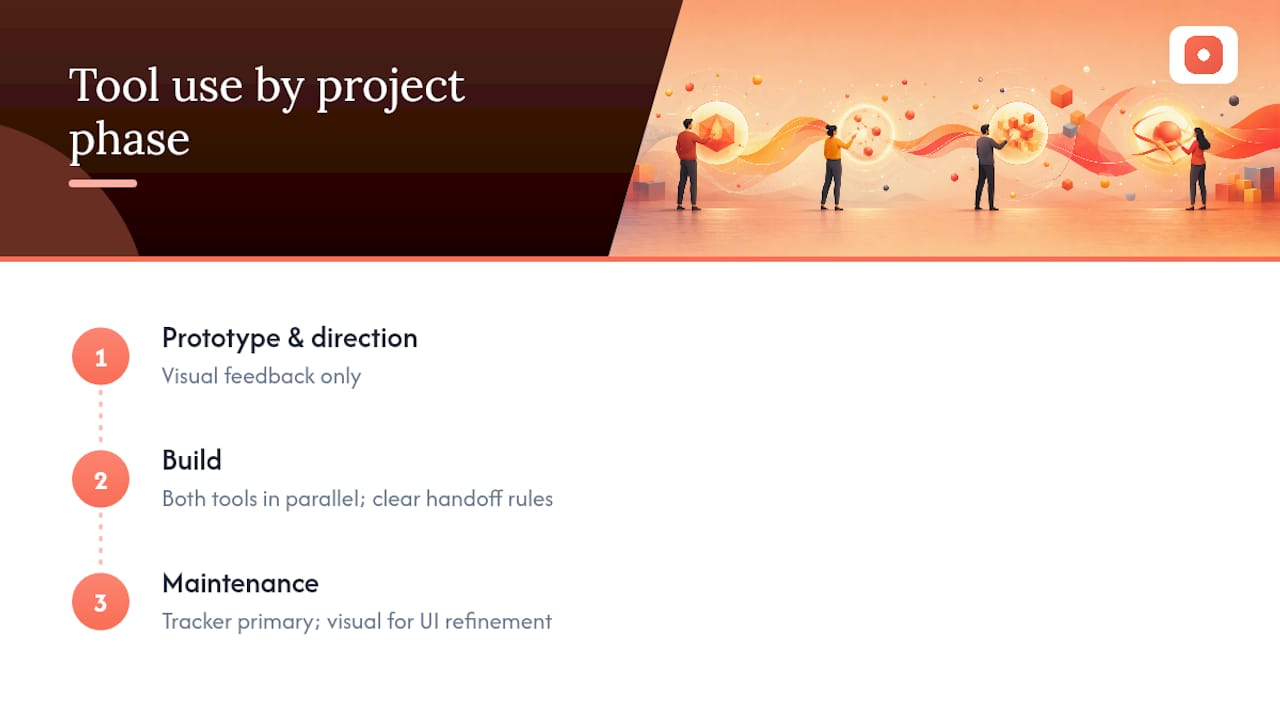
Early-stage design work, wireframes, concept exploration, direction reviews, belongs almost entirely in a visual feedback tool. There's nothing to reproduce yet, so a bug tracker adds structure with no payoff. As a project moves into build and QA, the mix shifts: visual feedback stays useful for UI polish, but confirmed functional issues need to flow into the tracker where engineering already works.
Team size changes the calculus too. A solo designer or a two-person team can often manage everything, feedback and light bug tracking, inside one visual tool and a shared spreadsheet, without the overhead of a dedicated tracker. Larger teams with a separate engineering function need the split enforced deliberately, usually with a named owner responsible for moving qualifying items across the boundary on a set cadence.
Agencies juggling multiple clients face a third variable: external reviewers. If clients need to comment without friction, a tool that supports guest reviewers becomes close to mandatory, since forcing a client to create an account is a reliable way to get fewer, lower-quality comments back.
A rough guide: prototype and direction phase, visual feedback only. Build phase, both tools running in parallel with clear handoff rules. Maintenance phase, the tracker becomes primary and visual feedback handles only ongoing UI refinement.
How Does This Change Team Collaboration?
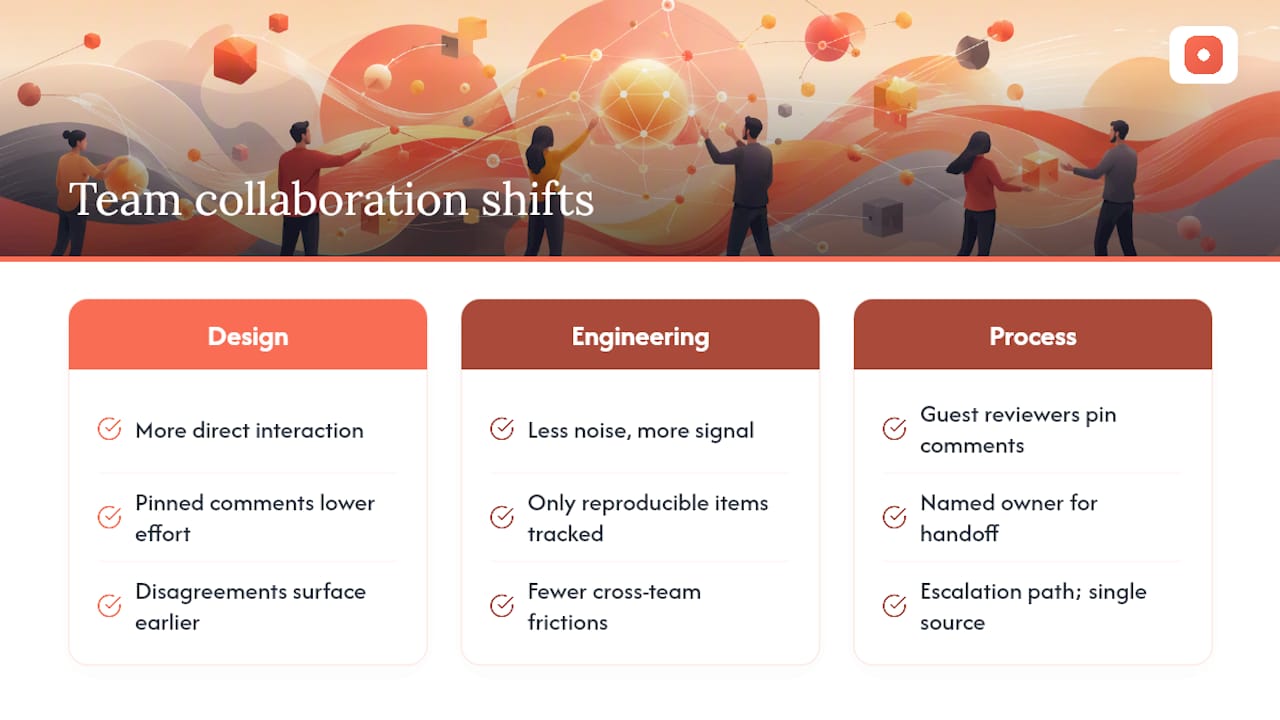
Switching from scattered channels to a dedicated feedback tool changes who talks to whom, not just where comments live. Design and stakeholders interact more directly and more often, because pinned comments lower the effort required to leave a specific note, compared to writing a paragraph describing where on the page an issue sits.
Engineering conversations shift the opposite direction: less noise, more signal. When only reproducible, escalated items reach the tracker, developers stop wading through subjective design debates to find the handful of items that actually need code changes. That separation tends to reduce friction between design and engineering, since each group sees primarily the category of item relevant to their job.
There's a cultural effect too. Guest reviewer access changes how clients and external stakeholders experience the process, they go from passive recipients of a deck to active participants pinning comments directly on the work. That shift often surfaces disagreements earlier, before they've been baked into a build, which is far cheaper to fix than after handoff.
The risk is fragmentation if the two systems operate with no connective tissue, design feels like it's shouting into one tool while engineering works from a different set of priorities entirely. The fix is the handoff discipline described earlier: a named owner, a consistent escalation path, and one source of truth for anything that's been accepted as final.
How Do You Avoid Feedback Overload?
Feedback quality degrades fast once a thread gets crowded, and crowded threads are the default outcome of skipping structure. The first defense is naming the review type before comments start, since a craft review inviting detailed notes on every pixel will always generate more volume than a decision review focused on a single yes-or-no call, per Storyflow's review framework.
Duplication is the second problem, and it's usually a symptom of reviewers not seeing what's already been said. Threaded, pinned comments help here because a second reviewer looking at the same element sees the existing thread before adding a redundant note, unlike a shared document where comments pile up in chronological order regardless of location.
Resolving threads as you address them matters more than most teams realize. An unresolved thread from two rounds ago sitting next to fresh comments makes it nearly impossible to tell what's still open, which is exactly the ambiguity a design feedback template is meant to prevent by giving reviewers a consistent structure to work from.
Set a rough cap on review rounds, too. If a design is still generating major structural feedback after three rounds, the problem usually isn't the design, it's that the review type was wrong from the start and needs to shift back to a direction conversation before craft-level notes make sense again.
Which Tools Combine Feedback and Bug Tracking?
A handful of platforms attempt to bridge both categories, usually by adding lightweight ticket-style fields (status, assignee) on top of a comment thread. That hybrid approach works reasonably well for small teams that don't want to manage two separate tools, but it tends to compromise on both ends: the feedback side loses some of the pixel-level precision a purpose-built visual tool offers, and the tracking side lacks the workflow depth a dedicated engineering tracker provides once a backlog grows past a few dozen items.
The more durable pattern, and the one this article recommends, is running a dedicated visual feedback tool alongside a dedicated tracker, connected by a clear handoff process rather than a single tool trying to do both jobs adequately. Pinhub's approach fits this model: it handles the feedback side with pixel-anchored pins, guest access, and version history, while staying deliberately out of the ticket-lifecycle business, leaving that to the tracker your engineering team already uses.
If you're evaluating your current stack, our comparison of bug reporting tool alternatives walks through how visual-feedback-first platforms differ from traditional bug reporting software, and where the line between the two typically falls in practice. For teams earlier in the process, a structured product scoping framework can help decide which category of tool a given project phase actually calls for before you commit to either one.
Why Most Teams Get the Feedback/Bug Split Backward
Most teams don't fail at this because they pick the wrong tool. They fail because they let the tool that's easiest to open, usually a chat app, become the default home for everything, regardless of whether the item is a design opinion or a reproducible defect.
The trade-off worth accepting: visual feedback tools will never enforce escalation for you. That's a feature, not a gap, because forcing every comment through ticket fields would kill the speed that makes design critique useful. What it means practically is that governance has to be a human decision. Assign one person to own the handoff, set a deadline for moving qualifying items into the tracker, and revisit that rule if items start slipping through.
Run a two-week pilot on a live project before rolling this out broadly, and track the metrics mentioned earlier: revision rounds and time to resolution.
— Pinhub
Try Pinhub for Your Next Design Review
Pinhub gives you pixel-anchored clarity on every comment and lets guest reviewers, including clients, weigh in without creating an account, which removes the single biggest friction point in agency review cycles. Pinhub works whether you're uploading a screenshot, a Figma file, or a captured webpage, and threads resolve as a checklist so nothing gets lost between rounds.

The free plan is enough to run a real pilot on a live project, no long setup process, no procurement cycle. If you've been meaning to test whether centralizing feedback actually cuts your revision rounds, this is the moment to find out: create a workspace, upload your next design, and invite reviewers, including any client who's never needed an account to leave a comment before.
Sources
- How to run a design review (Atlassian blog — Loom)
- How visual feedback tools help agencies cut revisions (Designrush)
- How to run a design review (Storyflow)
FAQ
What Is the Main Difference Between Feedback and Bug Tracking?
Visual feedback tools capture subjective design judgment through pinned comments on screenshots or designs, while bug trackers manage confirmed, reproducible engineering defects through a formal ticket lifecycle.
When Should a Comment Move From Feedback to a Bug Tracker?
Move it once you can reproduce the same failure twice using the same steps. If the item is still a matter of design opinion, it stays in the feedback tool.
Does Pinhub Replace a Bug Tracker?
No. Pinhub handles pixel-anchored design feedback and review workflows, and is meant to run alongside, not replace, a dedicated engineering tracker for confirmed bugs.
How Do Guest Reviewers Work in a Visual Feedback Tool?
Guest reviewers can open a shared link and leave pinned comments without creating an account, which speeds up client and stakeholder approval in agency workflows.
What Metadata Should Travel With a Ticket During Handoff?
Include the screenshot with the pin intact, expected versus actual behavior, numbered reproduction steps, device and viewport details, and a named owner.