
The design approval process is a gated workflow that moves an asset from concept to signed-off final by applying clear criteria, assigned approvers, and a single source of truth for feedback. The fastest, most reliable version of this process pairs formal sign-off gates with centralized comments tied directly to the design itself, not scattered across email and chat. Designers, project managers, and creative teams all benefit: fewer revision rounds, faster launches, and a documented trail showing exactly who approved what.
TL;DR:
- Formal sign-off should include clear version labels, explicit acceptance criteria, completed QA checks, and documented approval with date and signer’s name.
- Assigning a single or limited group of approvers with a backup helps prevent conflicting decisions and project delays.
- Using centralized, pixel-anchored comments, guest reviewer access, and automated feedback summaries accelerates review cycles and reduces confusion.
- Tracking key metrics like time to first review, revision rounds, and first-try approval rate can identify bottlenecks and improve approval speed over time.
- Combining waterfall and agile approval methods allows teams to streamline formal gates at major milestones while encouraging iterative feedback during development.
Table of Contents
- What Are the Stages of a Design Approval Process?
- Who Owns Design Approvals? A RACI Blueprint
- How Do You Request and Complete a Design Approval?
- Why Design Approvals Stall (and How to Fix Each One)
- What Features Actually Speed Up Design Sign-Off?
- How Do You Measure and Improve Your Approval Cycle?
- Build a Sign-Off Checklist That Actually Works
- What Documentation Do You Need for Formal Sign-Off?
- What Legal and Compliance Issues Come Up in Design Approvals?
- How Does Design Approval Differ in Agile vs. Waterfall Projects?
- How We Approach Design Feedback at Pinhub
- A Faster Way to Replace the Approval Email Chain
- Sources
- FAQ
What Are the Stages of a Design Approval Process?
Most design approval processes move through four checkpoints, and knowing what each one evaluates keeps a project from stalling at the wrong gate. Vizcom frames this as a gate-based structure where reviewers greenlight or halt progress at fixed points rather than approving continuously as work happens.
- Discovery and concept. Stakeholders confirm the problem, audience, and constraints. Deliverables are usually mood boards, rough sketches, or wireframes. The acceptance criteria here is directional: does this concept solve the stated problem?
- Design iteration. The concept becomes a working draft. Feedback is exploratory, and this is the stage where informal comments (quick reactions, gut checks) work fine. Formal sign-off is premature here.
- Detailed design and specs. Layouts, copy, colors, and interactions get locked. This is where formal sign-off starts to matter, because changes after this point cost more in time and rework.
- Pre-launch and QA. The final asset is checked against specs, accessibility standards, and brand guidelines before it ships. This gate should always be formal, with a documented approval, since it is the last checkpoint before something goes live.
Vizcom's research also points to a practical fix for teams that feel every stage takes too long: front-loading manufacturability and technical constraints during the concept stage, particularly for physical products, avoids late-stage rework that no amount of polish at the QA gate can undo.
Who Owns Design Approvals? A RACI Blueprint
Vague ownership is the fastest way to stall a project, and it usually shows up as five people replying to the same thread with five different opinions. A simple RACI structure fixes this before it starts.
- Requester initiates the review and provides context, deadlines, and acceptance criteria.
- Reviewer gives feedback but does not have final say. Multiple reviewers can weigh in at this stage.
- Approver makes the final call. This role should be one person, or at most two, for any given asset.
- Implementer (often the designer) makes changes based on consolidated feedback, not every individual comment.
- Subject matter expert (SME) weighs in on specific concerns, like legal or accessibility, without holding approval authority.
Keeping the approver group small is not a personal preference. Guidance from nibusinessinfo and SitePoint both point to the same conclusion: a single decision-maker, or a tightly limited group, avoids the contradictory direction that comes from design-by-committee.
Pro Tip: Assign one backup approver for every project. When your primary approver goes on vacation mid review cycle, a named backup keeps the project moving instead of sitting in someone's inbox for a week.
For guest reviewers, like a client who needs to weigh in but should not have approval authority, treat them as reviewers by default. Give them visibility into the design and a way to comment, without handing them the final decision.
How Do You Request and Complete a Design Approval?
A predictable sequence removes the guesswork from every new project. Here is a version you can adapt directly into your own workflow.
- Intake. Collect the brief, deadline, target audience, and specific acceptance criteria before any design work starts. A short intake form reduces the clarification questions that otherwise eat into review time.
- Package the assets. Group related files under one shared link, labeled with a clear version number (v1, v2, and so on), so reviewers never confuse an old draft with the current one.
- Invite reviewers. Send the link to the named reviewer and approver group only, with a firm deadline. Avoid CC'ing the whole department by default.
- Annotate feedback. Reviewers leave comments directly on the specific area of the design they are reacting to, rather than in a general reply thread.
- Consolidate into one revision task. The designer reviews all comments together and builds a single prioritized list of changes, rather than reacting to each comment as it arrives.
- Resolve and re-share. Once changes are made, the designer marks each comment resolved and shares the updated version, clearly labeled.
- Sign-off. The approver reviews the final version against the original criteria and gives documented approval, in writing, tied to the specific version number.
Wrangle's research backs the value of defining revision rounds upfront, along with routing status updates through the tools a team already uses, so nobody has to ask "where are we on this?" in a separate channel.
Why Design Approvals Stall (and How to Fix Each One)
Most broken approval processes share the same handful of symptoms. Conflicting feedback from multiple reviewers, no clear decision-maker, and scope that keeps shifting mid-review are the three most common. Each has a specific fix.
- Conflicting feedback: Assign one approver with final say, and treat everyone else's input as advisory.
- Missing decision-maker: Name the approver before the review starts, not after feedback comes in.
- Unclear scope: Attach the original brief and acceptance criteria to every review request.
- Lost or duplicated comments: Use a single source of truth for feedback instead of splitting it across email, Slack, and a shared doc.
- Vague feedback like "make it pop": Ask direct questions tied to requirements instead of open-ended ones.
SitePoint's guidance on this last point is worth repeating: direct questions and a documented process reduce vague responses and scope creep far more reliably than asking reviewers to "share their thoughts."
Pro Tip: Set a hard cap of two revision rounds before a project escalates to a decision-maker conversation. Unlimited rounds are how a two-week project becomes a two-month one.
What Features Actually Speed Up Design Sign-Off?
Not every feature marketed as a "collaboration tool" moves the needle on approval speed. A few specific capabilities consistently remove friction, and it is worth testing for them directly during a trial rather than taking a features list at face value.
- Pixel-anchored annotations. Comments tied to an exact spot on the design, instead of a general thread, eliminate the "which button are you talking about?" back-and-forth.
- Guest reviewer access. Clients and stakeholders who need to comment but shouldn't need an account remove a real adoption barrier, especially for external approvers.
- Version history. A visible record of every draft, with clear labels, prevents someone from approving an outdated file by mistake.
- Automated feedback summaries. Consolidating scattered comments into one prioritized list saves the designer from manually cross-referencing five separate threads.
- PM tool integrations. Routing approval status into the project management tool a team already uses keeps status visible without a separate check-in meeting.
Revue's research on this is direct: centralizing feedback and formalizing sign-off gates prevents lost comments and makes sure the version that gets approved is the one that actually ships. When trialing a tool, run one real project through it end to end. Check whether reviewers actually use the annotation feature, whether guest links work without friction, and whether the version history stays clean after a few rounds of edits. For a broader look at feature tradeoffs across design feedback tools, compare based on your team's specific bottleneck, not a generic checklist.
How Do You Measure and Improve Your Approval Cycle?
Three metrics tell you almost everything you need to know: time to first review, number of revision rounds, and percentage of designs approved on first submission. Track these by asset type, since a landing page and a packaging design have very different acceptable cycle times, a point Vizcom's research makes directly when it recommends segmenting metrics by complexity rather than applying one deadline to everything.
Vizcom's analysis also found that development cycle time can fall by roughly 30% when teams actively track approval-cycle metrics and act on what they find in quarterly retrospectives.
- Run a short retro every quarter: which stage took longest, and why?
- Look for repeat bottlenecks, like the same approver being slow every time.
- Adjust the workflow based on what the data shows, not on a hunch.
Build a Sign-Off Checklist That Actually Works
A sign-off checklist should force specificity, not just collect a signature. Copy these fields directly into your next review request.
- Version number and date, so there is no ambiguity about which file is being approved.
- Acceptance criteria, listed explicitly, not just referenced.
- Deliverables included, itemized rather than bundled as "final assets."
- QA checks completed, including accessibility and brand guideline review.
- Approver name and date, recorded in writing.
Pair this with reviewer prompts that force actionable answers instead of impressions. SitePoint's approach recommends tying every question to a specific requirement, such as "Does this meet the accessibility contrast requirement?" instead of "Any thoughts?" Archive every completed checklist alongside the final files, so a dispute six months later has a paper trail instead of a memory. Templates like the one in this client design approval guide are a good starting structure to adapt.
What Documentation Do You Need for Formal Sign-Off?
Formal sign-off is not complete once someone says "looks good" in a chat message. It needs a written record tied to the specific version approved, the date, and the name of the person with authority to approve it. Without that record, disputes about what was actually agreed to become nearly impossible to resolve.
At minimum, keep four things on file for every approved design: the final version of the asset itself, the acceptance criteria it was measured against, the reviewer comments that led to the final revisions, and the signed approval statement. Revue's research recommends pairing this with a pre-launch QA check to confirm the asset that actually gets implemented matches the one that was approved, since a last-minute swap or a missed file update is a common way approved work never makes it to production correctly.
For teams working with external clients, this documentation matters even more. A signed-off proof, dated and version-labeled, is the difference between "you approved this" and a drawn-out argument about what was agreed to weeks earlier. Store these records somewhere durable and searchable, not buried in an email thread that gets archived and forgotten. A shared folder tied to the project, with the sign-off artifact clearly labeled by version number, works better than relying on someone's memory of a meeting.
What Legal and Compliance Issues Come Up in Design Approvals?
Design approvals carry real legal weight in a few specific situations, and teams that skip this step often find out the hard way. Brand guideline compliance, licensing for stock images or fonts, and accessibility standards are the three areas that show up most often.
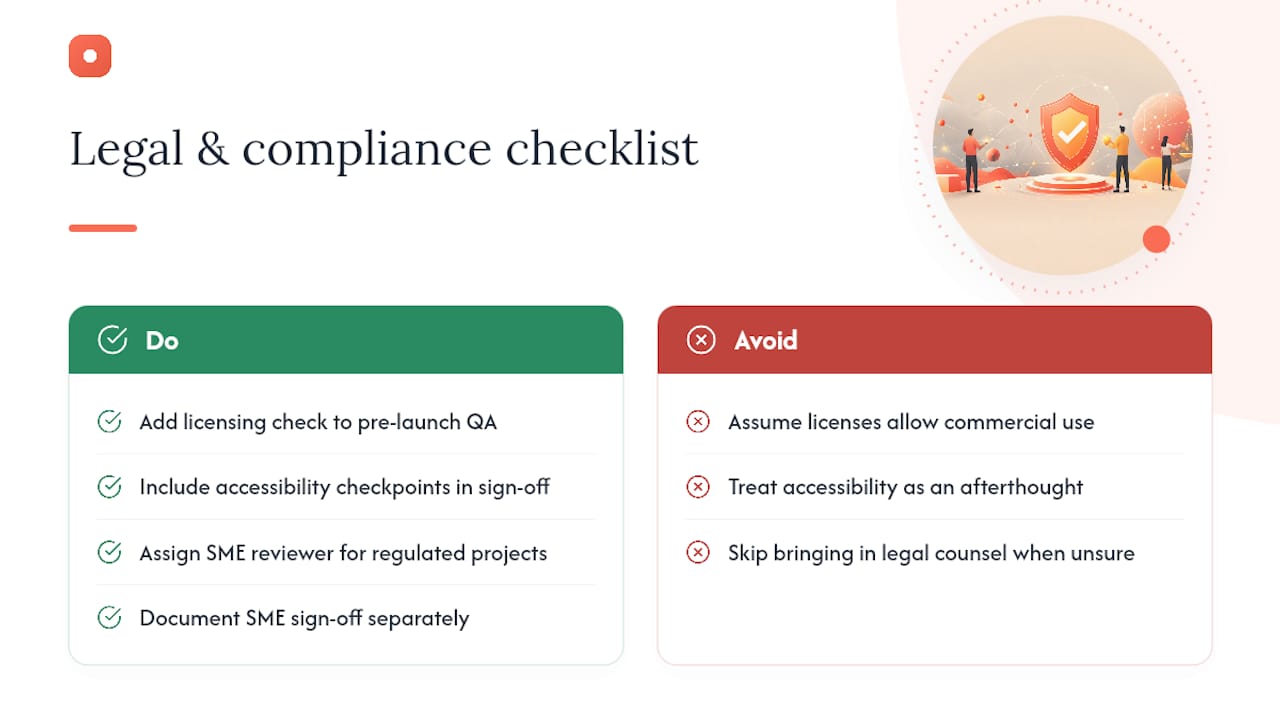
Licensing is the most common trap. A designer pulls a font or an image that looks free, and it turns out the license only covers personal use, not commercial distribution. Building a licensing check into the pre-launch QA gate, rather than assuming the designer already verified it, catches this before it becomes a legal problem after launch.
Accessibility is a growing compliance concern, particularly for digital products and public-facing marketing. Color contrast, alt text, and keyboard navigation are common checkpoints that belong in the sign-off checklist itself, not treated as a separate afterthought.
For regulated industries, like healthcare, finance, or anything involving children's products, an SME reviewer with specific legal or compliance knowledge should sit in the RACI structure for that project, distinct from the general approver. Their sign-off should be documented separately from the design approval itself, since compliance issues and creative quality are different questions that deserve different scrutiny. None of this replaces qualified legal counsel for a specific project. Treat any legal or regulatory question that comes up during a review as a signal to bring in the right professional rather than guessing.
How Does Design Approval Differ in Agile vs. Waterfall Projects?
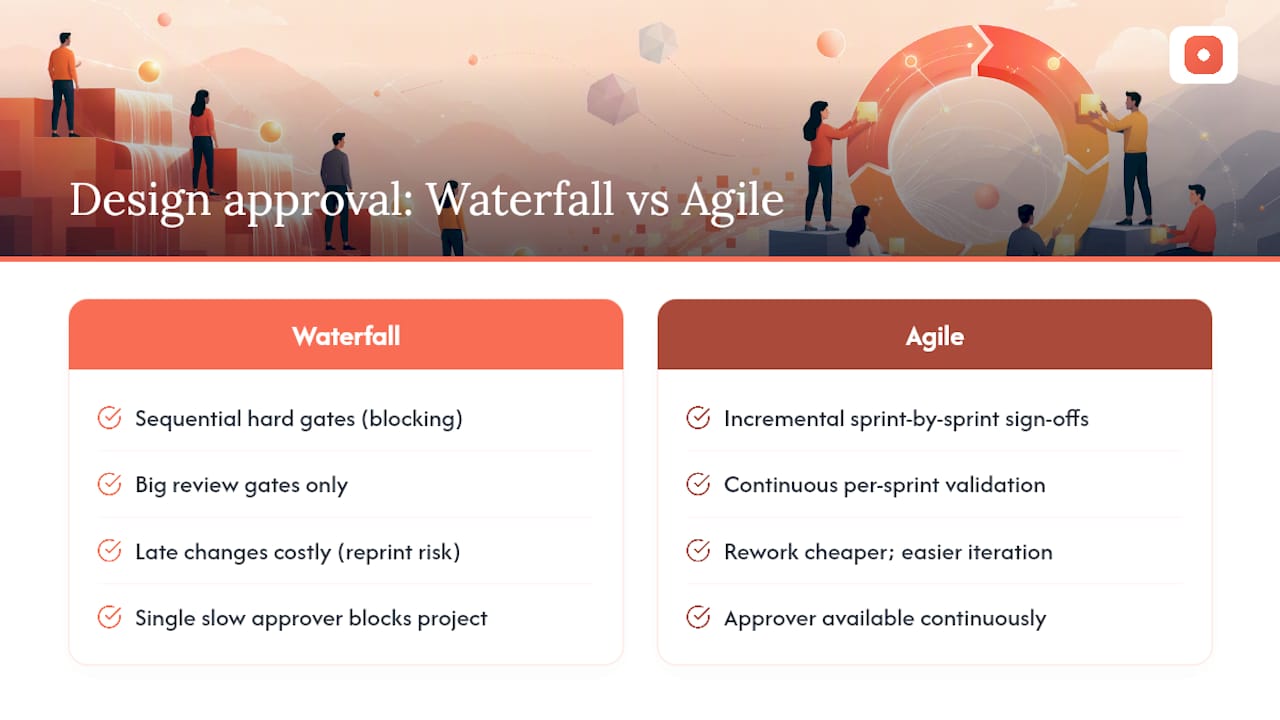
Waterfall projects treat design approval as a sequence of hard gates: concept approved, then detailed design approved, then final QA approved, each one blocking the next stage from starting. This works well when requirements are stable and the cost of late changes is high, like packaging or print materials that are expensive to reprint. The tradeoff is speed. A single slow approver can hold up an entire project.
Agile projects handle approval differently, spreading smaller sign-offs across sprints rather than saving everything for one big review. A design element might get approved incrementally as it is built, with the team validating direction every sprint instead of waiting for a single detailed design gate. This suits digital products where requirements shift and rework is cheaper.
The practical difference for your team: in waterfall, invest heavily in getting the detailed design gate right, since changes after that point are costly. In agile, keep your approver available continuously rather than scheduling one big review meeting, since the whole point is fast, incremental feedback. Teams running hybrid projects, common in marketing and product design, often benefit from applying waterfall-style formal gates only at major milestones (final campaign assets, production-ready files) while treating everything in between as agile-style informal iteration.
How We Approach Design Feedback at Pinhub
We built Pinhub after watching the same pattern repeat: a client says "the button in the top section" and three people interpret "top section" differently. Pixel-anchored comments remove that ambiguity entirely, and guest reviewer access means a client can weigh in without creating an account first. For more on structuring this kind of workflow, our blog covers templates and guides in more depth.
— Pinhub
A Faster Way to Replace the Approval Email Chain
If your team is still routing design feedback through email threads and screenshot attachments, you already know where the confusion comes from: comments with no context, outdated versions circulating alongside the current one, and a client who has to create an account just to leave feedback. Pinhub fixes each of those specific problems. Pixel-anchored comments pin feedback to the exact spot on the design, guest reviewers can comment without signing up, version history keeps everyone looking at the current file, and automated summaries turn scattered comments into one prioritized list.

These features map directly to the fixes covered earlier: a single source of truth instead of fragmented feedback, a clear version label instead of guesswork, and a documented resolution trail for every comment. If your team is running client reviews, internal design sign-off, or both, start a free trial on Pinhub and run your next review through it before your next email chain starts.
Sources
- 5 Tips to Improve Your Design Sign-Off Process — SitePoint
- What Is the Design Approval Process? And How To Make It Go Faster — Vizcom Blog
FAQ
What Are the Stages of a Design Approval Process?
Most teams use four stages: discovery and concept, design iteration, detailed design and specs, and pre-launch QA. Formal sign-off typically applies from the detailed design stage onward, while earlier stages allow more informal feedback.
What Are the Steps in a Design Sign-Off Process?
The core steps are intake, packaging assets with clear version labels, inviting reviewers, collecting anchored feedback, consolidating comments into one revision task, and documenting final sign-off. Each step reduces a specific source of confusion, from unclear scope to duplicated comments.
What Types of Design Approvals Exist?
Approvals generally fall into informal feedback (used during early iteration) and formal sign-off (used at detailed design and pre-launch gates). Formal sign-off requires documented approval tied to a specific version, while informal feedback does not.
How Many Revision Rounds Should a Design Approval Allow?
There is no universal number, but capping revisions at two rounds before escalating to a decision-maker conversation prevents open-ended cycles. Defining the number upfront, during intake, avoids disputes later.
How Can Tools Speed Up the Design Approval Process?
Features like pixel-anchored comments, guest reviewer access, and automated feedback summaries remove the most common sources of delay: vague feedback, account friction, and scattered comments. Platforms like Pinhub build these directly into the review workflow rather than requiring separate tools stitched together.