
TL;DR:
- Web requirements specify a website's necessary functional, technical, and strategic standards before development begins. Proper documentation in these areas helps prevent scope creep, delays, and costly mistakes while aligning project goals and technical choices.
Web requirements are defined as the full set of functional, technical, and strategic specifications a website must meet to perform correctly, comply with standards, and serve its business purpose. The industry standard term for this documentation is a Functional Specification Document (FSD) or Software Requirements Specification (SRS). Getting these specifications right before a single line of code is written separates projects that ship on time from those that spiral into scope creep and budget overruns. This guide covers every category of web project requirements your team needs, from WCAG 2.1 accessibility standards to MoSCoW prioritization, tech stack selection, and Core Web Vitals performance benchmarks.
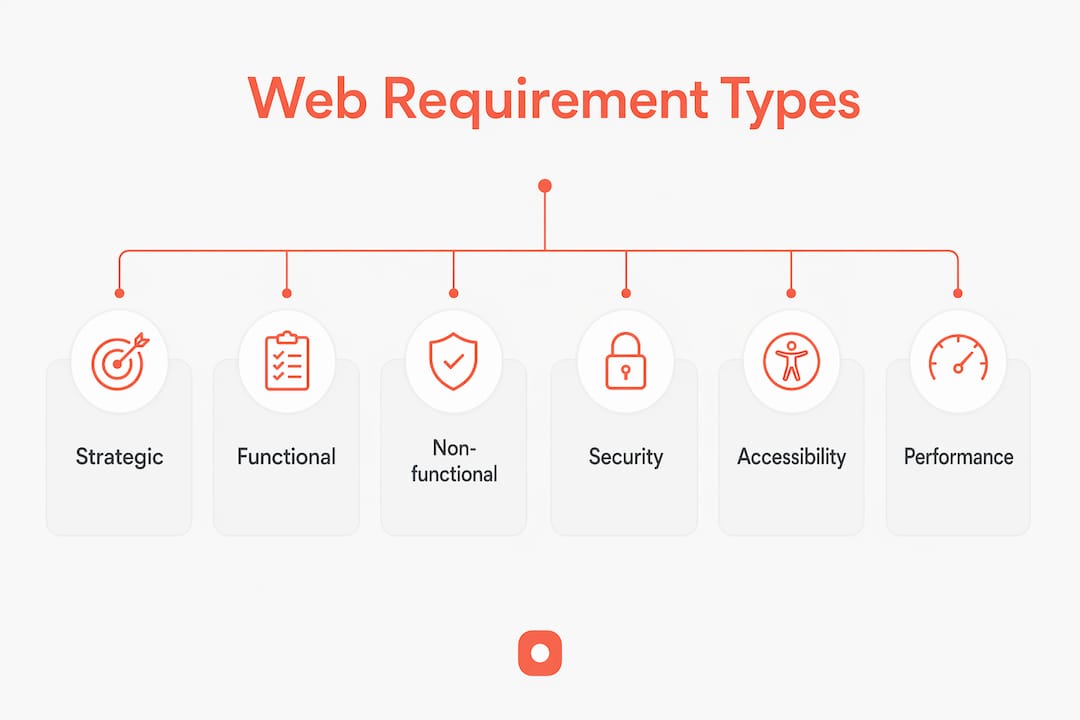
What are the core categories of web requirements?
Web requirements fall into three categories: functional, non-functional, and strategic. Each category answers a different question about what the site must do, how well it must do it, and why it exists.
Functional requirements define what the system does. They cover user interactions, system behaviors, and specific features. Examples include:
- User registration and authentication flows
- Search and filtering functionality
- Payment processing and checkout logic
- Content management system (CMS) access and publishing rules
- API integrations with third-party services such as CRMs or analytics platforms
Non-functional requirements define how well the system performs. These are the quality standards your site must meet regardless of which features you build. Technical specifications should limit page load times to under 3 seconds. That threshold directly affects bounce rates and conversion. Non-functional requirements also cover SSL certificates, protection against SQL injection, role-based access controls, and uptime targets.
Strategic requirements connect the website to business goals. A website is a primary business asset that serves as the first sales conversation. That means the specification must address user psychology and marketing goals before the UI design phase begins. Strategic requirements include SEO configurations such as XML sitemaps, robots.txt files, canonical tags, and schema markup. They also define user experience flows that guide visitors toward conversion actions.
Treating these three categories as separate but connected layers gives your specification document a clear structure. Teams that skip strategic requirements often build technically sound sites that fail to generate leads or rank in search.
How to structure and document web requirements effectively
A requirements document functions as a contract of truth. Explicit scope definition is the single most effective tool for preventing scope creep and budget overruns. Without it, developers make assumptions, stakeholders add features mid-build, and costs multiply.
Structure your document using these steps:
- Define the project scope. List what is in scope and what is explicitly out of scope. A feature not listed is a feature not built. This protects both the client and the development team.
- Write user stories. Format them as "As a [user type], I want to [action] so that [outcome]." User stories translate business needs into developer tasks without prescribing technical solutions.
- Apply MoSCoW prioritization. The MoSCoW method categorizes features into Must have, Should have, Could have, and Won't have. This helps vendors give accurate quotes and removes developer guesswork about what matters most.
- Include a glossary. Glossaries prevent costly misunderstandings over terms like "lead," "header," or "admin." They are high-impact, low-effort additions to any specification document.
- Detail technical architecture. Spec documents should cover API integrations, data models, database schema, and role-based access controls to guide secure backend development.
Pro Tip: Involve your lead developer in the requirements phase, not just the build phase. Developers who help write the spec catch technical conflicts early, before they become expensive change requests.
Collaboration between business stakeholders and developers is not optional. Misalignment leads to guesswork and budget overruns. Schedule at least two joint review sessions before the document is finalized. One session to draft, one to validate.

Which tech stack should you choose based on your business stage?
Technology stack selection is a direct output of your website specifications. The wrong choice at the wrong stage costs more to fix than it would have cost to choose correctly from the start.
The table below maps business stage to appropriate stack approach:
| Business stage | Recommended approach | Key consideration |
|---|---|---|
| Early validation / MVP | No-code or low-code tools | Speed to market over custom features |
| Growing startup | Mainstream frameworks with small dev team | Balance of flexibility and hiring ease |
| Scaling business | Dedicated team, custom stack | Long-term maintainability and performance |
| Enterprise | Modular architecture, microservices | Resilience, security, and team specialization |
Choosing technology stacks aligned with business stage avoids costly mistakes. No-code tools work for early validation. Full teams and scalable frameworks serve growth. The gap between those two stages is where most teams make expensive errors.
Mainstream tech stacks such as Next.js, React, and Node.js ensure long-term maintainability and easier hiring compared to obscure frameworks. That matters because the developer who builds your site will not always be the developer who maintains it. Choosing a niche framework to save money in year one often doubles maintenance costs by year three.
Python with Django remains a strong backend choice for data-heavy applications. For frontend rendering and SEO performance, Next.js has become the default for teams that need server-side rendering without sacrificing developer experience. The key principle is this: tech stack choices must consider your hiring pipeline and community support, not just current team preference.
Pro Tip: Start with a monolith architecture for your MVP. Splitting into microservices too early adds complexity without adding value at small scale. Refactor when the load actually demands it.
Which accessibility, security, and performance standards are essential?
These three areas represent the non-negotiable floor of any professional web development specification. Skipping them creates legal exposure, security vulnerabilities, and poor search rankings.
Accessibility
WCAG 2.1 compliance is increasingly mandatory and improves SEO. Retrofitting accessibility is expensive. Build it in from the start. WCAG 2.1 Level AA covers contrast ratios, keyboard navigation, screen reader compatibility, and alt text for images. In the United States, the Americans with Disabilities Act (ADA) has been applied to websites in federal court cases, making compliance a legal risk management issue, not just a best practice. You can review how to evaluate website design against these standards before launch.
Security
Every production website needs SSL as a baseline. Beyond that, your specification must address:
- Protection against SQL injection and cross-site scripting (XSS)
- Input validation on all forms
- Regular dependency updates to patch known vulnerabilities
- Role-based access controls for CMS and admin panels
- Data encryption for any stored user information
Security requirements belong in the specification document, not in a post-launch audit. Fixing a security gap after a breach costs orders of magnitude more than building it correctly the first time.
Performance
Performance optimization, including Core Web Vitals, is now a fundamental requirement, not optional. Core Web Vitals directly impact Google search rankings and user experience. Your specification should set measurable targets: Largest Contentful Paint (LCP) under 2.5 seconds, Cumulative Layout Shift (CLS) below 0.1, and Interaction to Next Paint (INP) under 200 milliseconds. Achieving these targets requires image optimization, caching strategies, and efficient JavaScript loading built into the development plan from day one.
Modern SEO and AI-driven search require extensive technical optimization in the specification phase, including structured data and generative engine optimization. Teams that treat SEO as a post-launch task consistently underperform against teams that build metadata, canonical tags, and schema markup into the original specification.
Key Takeaways
Comprehensive web requirements, documented before development begins, are the single most effective way to control cost, quality, and delivery timelines.
| Point | Details |
|---|---|
| Define all three requirement categories | Functional, non-functional, and strategic requirements must all appear in your specification document. |
| Use MoSCoW prioritization | Categorizing features by Must/Should/Could/Won't have keeps scope and budget aligned from the start. |
| Choose mainstream tech stacks | React, Next.js, and Node.js reduce hiring risk and long-term maintenance costs. |
| Build accessibility in from day one | WCAG 2.1 compliance is a legal requirement and an SEO factor; retrofitting it is expensive. |
| Set measurable performance targets | Core Web Vitals benchmarks belong in the spec, not in a post-launch review. |
Why rigorous requirements are the real competitive advantage
The teams I see succeed consistently share one habit: they treat the requirements phase as the most important phase of the project, not a formality before the "real work" begins. Most project failures trace back to a vague or incomplete specification, not to bad code.
The uncomfortable truth is that most development teams are handed requirements documents that were written by someone who has never shipped a web product. The document lists features but skips performance targets, omits security protocols, and says nothing about accessibility. The developer fills in the gaps with assumptions. The client fills in the gaps with expectations. Those two sets of assumptions rarely match.
Successful web projects rely on disciplined requirements combined with strong collaboration between business and technical teams. That means involving developers in the specification phase, not just handing them a finished document. It means using structured methods like MoSCoW to force honest conversations about what the budget actually supports. And it means writing down what is out of scope just as clearly as what is in scope.
The teams that skip this discipline pay for it twice: once in rework, and once in the opportunity cost of a delayed launch. The teams that invest in it ship faster, spend less, and build products that actually perform.
— Pinhub
How Usepinhub supports clearer web project communication
Keeping web project requirements clear across a distributed team is one of the hardest parts of the development process. Feedback gets lost in email threads. Annotations on screenshots get misread. Stakeholders describe problems in words when a pinned comment on the actual design would take three seconds.

Usepinhub solves this by letting teams upload screenshots and pin comments directly onto specific points in the design. Every piece of feedback is anchored to an exact location, so developers know precisely what needs to change and why. Guest reviewers can participate without creating accounts, which removes friction for clients and external stakeholders. Version control and automated summary lists keep the full feedback history organized. For teams managing website annotation and collaboration, Usepinhub replaces scattered feedback with a single, structured record. Try the design feedback tool and see how much faster your next review cycle moves.
FAQ
What are web requirements in simple terms?
Web requirements are the documented specifications that define what a website must do, how well it must perform, and what standards it must meet before launch. They cover functionality, security, accessibility, performance, and SEO.
Why does the MoSCoW method matter for web projects?
MoSCoW categorizes features into Must have, Should have, Could have, and Won't have, which keeps project scope aligned with the available budget and prevents feature creep during development.
What is WCAG 2.1 and why does it belong in a specification?
WCAG 2.1 is the Web Content Accessibility Guidelines standard that defines how websites must perform for users with disabilities. Including it in the specification from the start avoids expensive retrofitting and reduces legal risk.
How do Core Web Vitals affect web project requirements?
Core Web Vitals are Google's performance benchmarks covering load speed, visual stability, and interactivity. They directly affect search rankings, so measurable targets for each metric belong in the specification document.
What is the difference between functional and non-functional requirements?
Functional requirements define what the website does, such as user login or payment processing. Non-functional requirements define how well it performs, covering speed, security, uptime, and accessibility standards.