
TL;DR:
- Effective client onboarding accelerates the process from contract signing to project launch within seven to fourteen days. It relies on structured phases, clear communication, and automated portals to reduce client churn and build trust early. Tools like Usepinhub enhance feedback collection, ensuring smooth, organized project initiation and ongoing collaboration.
Client onboarding is the systematic process of transitioning new clients from a signed contract to an active, engaged working relationship through structured intake, clear communication, and aligned expectations. The industry term is "client onboarding," and it covers everything from the welcome email to the first deliverable. Done well, it is the single greatest driver of early client retention. Done poorly, manual email threads result in 25–35% client loss within the first 90 days. The top 20% of service businesses complete the full process in five days or fewer, reducing churn to under 8%. Your process determines which group you fall into.
What are the essential phases of an effective client onboarding process?
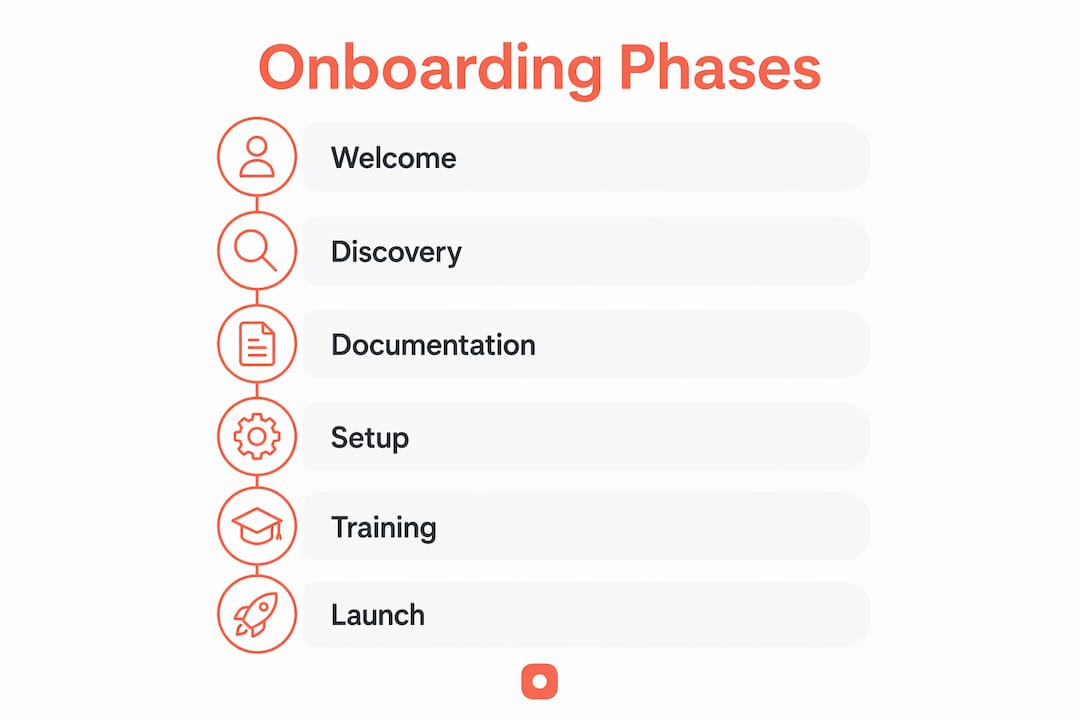
A structured client onboarding process follows seven distinct phases. Each phase has a clear owner, a defined output, and a measurable "done" state. Skipping or rushing any phase creates gaps that surface later as scope disputes, missed deadlines, or client frustration.
-
Welcome and portal setup. Send a branded welcome email within 24 hours of contract signature. Include login credentials or a magic link to a client portal where all onboarding steps live. This sets the tone and signals professionalism from day one.
-
Discovery and intake. Collect the information you need to do the work. Use a structured intake form that covers goals, timelines, brand assets, and decision-makers. Structured intake before kickoff prevents project delays caused by incomplete data and scope misalignment.
-
Document collection. Request specific named documents, not open-ended asks. Name each file you need ("Q4 brand guidelines PDF," "approved logo files") so clients know exactly what to upload. Vague requests create back-and-forth that stalls progress.
-
Credentials and access. Gather logins, API keys, or platform access before the kickoff call. Waiting until after kickoff to collect credentials wastes days and breaks momentum.
-
Kickoff call. A kickoff call is an alignment meeting with measurable objectives and documented agreements, not a status update. Confirm scope, success metrics, communication channels, and escalation paths. End the call with a shared summary of what was agreed.
-
Internal handoff. Brief your delivery team fully before they touch the account. Failure to conduct a deliberate handoff from sales to delivery causes inefficiencies and forces teams to rely on fragmented email histories. The handoff document should include client goals, sensitivities, agreed scope, and key contacts.
-
First-week review. Check in at the end of the first week to confirm the client has everything they need and that internal work is on track. This is a low-stakes touchpoint that catches problems before they compound.
Pro Tip: Target a 5–7 day window from contract signature to first deliverable. The full onboarding lifecycle should close within 7–14 days, and automation can compress intake alone to 2–3 days.
How to use technology to speed up onboarding new clients
Technology does not replace good process. It enforces it. The difference between tracking and enforcement is critical. Tracking tells you a step is incomplete. Enforcement prevents the client from advancing until the step is done.

Portals vs. email threads
A single client portal outperforms email threads on every measurable dimension. Clients complete steps inside one place rather than hunting through inboxes. Magic-link portals without login increase compliance and reduce friction compared to traditional login portals. The client clicks a link, lands in their onboarding hub, and sees exactly what is pending.
What effective onboarding tools do
The best purpose-built onboarding platforms share four core features:
- Named document requests. Each upload slot has a specific label so clients know exactly what to provide.
- Intake form enforcement. The form must be completed before the client can advance to the next phase.
- Automated reminders. The system follows up on incomplete steps without requiring manual intervention from your team.
- Automated gating. Enforcement software requires clients to complete mandatory steps before advancing, eliminating manual follow-up entirely.
Pro Tip: Automation of routine onboarding steps frees account managers to focus on relationship-building conversations rather than chasing documents.
When to use purpose-built platforms vs. adapted tools
| Situation | Best fit |
|---|---|
| High client volume, repeatable service | Purpose-built onboarding platform |
| Low volume, highly custom engagements | Adapted CRM or project management tool |
| Design or creative review workflows | Pixel-anchored feedback tools like Usepinhub |
| Mixed team with remote clients | Single portal with guest access, no login required |
Usepinhub fits naturally into creative onboarding workflows. Clients can pin comments directly onto uploaded screenshots without creating an account, which removes a common friction point during early project reviews.
What best practices ensure clear communication during onboarding?
Misalignment on communication channels is a leading onboarding friction point and should be addressed immediately after contract signature. Poorly aligned channels cause project friction in 60% of cases. Fixing this early costs nothing. Fixing it mid-project costs time, money, and trust.
The following practices build a communication foundation that holds through the entire engagement:
- Send a welcome email within 24 hours. Speed signals reliability. A delayed welcome creates doubt about your team's responsiveness before the work even starts.
- Book the kickoff call with a direct calendar link. Do not leave scheduling open-ended. Send a link with available slots so the client can confirm in one click.
- Confirm communication channels on the kickoff call. Decide whether your team uses email, a project management tool, or a dedicated channel. Write it down and share it.
- Send a kickoff summary email within 24 hours. Document every agreement made on the call. This prevents the "I thought we agreed" conflicts that derail projects weeks later.
- Schedule the 30-day check-in before the kickoff call ends. A 30-day check-in scheduled before the kickoff ends captures early feedback and prevents mid-project scope creep. Book it while everyone is in the room.
"Well-defined onboarding boosts perceived professionalism and client confidence. Structured onboarding processes with clear success criteria reduce silent questions during early project phases and increase client trust from the start."
The 30-day check-in is the most underused tool in client onboarding. Most teams schedule it reactively, after a problem surfaces. Booking it proactively signals that you plan for the long term, not just the launch.
What common onboarding mistakes undermine client success?
Most onboarding failures trace back to a small set of repeatable mistakes. Recognizing them is the first step to fixing them.
- No documented process. Lack of a standard, repeatable checklist leads to inconsistent client experiences and increased churn. Every client gets a different version of onboarding based on who handles the account.
- Rushing the kickoff before intake is complete. Running a kickoff call without completed intake forces your team to make assumptions. Those assumptions become scope disputes.
- Skipping the internal handoff. Delivery teams who receive no briefing rely on fragmented email histories. They miss client sensitivities, agreed constraints, and key contacts.
- Measuring completion by tasks, not client value. A checklist of completed tasks does not mean the client feels confident. Measure whether the client understands the next step and trusts your team to deliver it.
- Delaying the welcome communication. Every hour between contract signature and first contact is an hour the client spends second-guessing their decision.
- Ignoring the 30-day check-in. Skipping this milestone removes your only structured opportunity to catch misalignment before it becomes a formal complaint.
Pro Tip: Build your client onboarding checklist as a living document. Review it after every new client engagement and update it based on what caused friction. Visit the Usepinhub blog for workflow guides that support this kind of continuous improvement.
The most expensive mistake is treating onboarding as an internal admin task rather than a client-facing product. Clients experience every delay, every vague request, and every missed follow-up. They form their opinion of your team during onboarding, and that opinion is hard to change.
Onboarding as a product: what I've learned from working with service teams
Treating client onboarding as a product changed how I think about professional services entirely. A product has a defined user experience, a clear flow, and measurable outcomes. An admin task has none of those things.
The teams that get this right build their onboarding portal the same way a product team builds a feature. They map the client's experience step by step, remove every unnecessary click, and test it with real clients. When a client portal uses magic links instead of login credentials, completion rates go up noticeably. That is not a coincidence. Friction kills momentum, and momentum is everything in the first two weeks of a new engagement.
The harder lesson is that automation does not replace relationship-building. It creates space for it. When your system handles document reminders and intake enforcement automatically, your account managers can spend that time on a genuine check-in call or a thoughtful response to a client question. That is where trust is built, not in the checklist.
Documenting and enforcing scope before the kickoff call is non-negotiable. Every project that starts without complete intake data will hit a wall. The wall just appears at different times for different teams. The 30-day review is equally non-negotiable. It is the moment you find out whether the client's experience matches your internal view of how things are going. Those two conversations rarely align perfectly, and that gap is where long-term relationships are won or lost.
— Pinhub
How Usepinhub supports your client onboarding workflow
Efficient onboarding depends on clear feedback and fast review cycles, especially in the early project phases when clients are forming their first impressions of your team.

Usepinhub gives your team a structured way to collect and organize client feedback from the first deliverable onward. Clients upload screenshots and pin comments directly onto specific points, so feedback is always tied to a precise location rather than a vague description in an email thread. Guest reviewers can participate without creating an account, which removes a common barrier during onboarding. Version control and automated summary lists keep every review cycle documented and easy to reference. If you want to see how pixel-anchored feedback fits into your onboarding workflow, Usepinhub is worth exploring for your next client engagement.
Key takeaways
A structured, documented client onboarding process is the single most reliable way to reduce early churn and build lasting client trust.
| Point | Details |
|---|---|
| Complete onboarding in 5–7 days | Top-performing teams close the full cycle within this window to maintain momentum and reduce churn. |
| Use portals, not email threads | A single client portal with magic links reduces drop-off and keeps all steps visible in one place. |
| Send a kickoff summary within 24 hours | Documenting agreements immediately after the kickoff call prevents scope disputes later. |
| Book the 30-day check-in at kickoff | Scheduling this review proactively captures early misalignment before it becomes a formal problem. |
| Enforce intake before kickoff | Requiring completed intake forms before the kickoff call prevents assumptions that lead to scope creep. |
FAQ
What is client onboarding?
Client onboarding is the process of transitioning a new client from a signed contract to an active working relationship through structured intake, communication, and aligned expectations. It typically spans 7–14 days and covers welcome communication, document collection, kickoff, and first-week review.
How long should the client onboarding process take?
The full onboarding lifecycle should close within 7–14 days from contract signature to first deliverable. The top 20% of service businesses complete it in five days or fewer using structured portals and automation.
What goes on a client onboarding checklist?
A client onboarding checklist covers seven phases: welcome email and portal setup, discovery intake, document collection, credentials access, kickoff call, internal handoff, and first-week review. Each item should have a named owner and a clear completion state.
Why do clients churn during onboarding?
Manual email-based onboarding results in 25–35% client loss within 90 days, primarily due to slow communication, incomplete intake, and misaligned expectations. Structured portals and clear communication protocols reduce this significantly.
How does Usepinhub support client onboarding?
Usepinhub supports early project reviews by letting clients pin comments directly onto screenshots without creating an account. This removes friction from the feedback phase and keeps review cycles organized from the first deliverable onward. You can also explore user acceptance testing tools that complement onboarding milestone tracking.