
A marketing asset review is a time-boxed audit that produces an inventory plus a prioritized "reuse, refresh, reshoot, or retire" action plan for every piece of marketing collateral your team owns. It is not a redesign project and it is not a quarterly cleanup you keep pushing to next quarter. It is a defined sprint with a clear output.
Marketing ops usually owns this process, though a designated asset owner on a smaller team can run it just as well. Either way, the minimum deliverable after one sweep is simple: a complete inventory list and a triaged action plan for your highest-priority assets.
You can start today. Here's what to do in the next 24 to 72 hours:
- Run an inventory export. Pull every asset from your DAM, shared drive, or campaign folders into one spreadsheet or database, even if it's messy at first.
- Flag your top 10 hero assets. Identify the highest-traffic landing pages, most-used sales decks, or most-viewed ads, and mark each one for an immediate reuse, refresh, or retire decision.
Pro Tip: Don't wait for a perfect taxonomy before you start the export. A messy spreadsheet with everything in it beats a clean folder structure with half your assets missing.
Key Takeaways
A marketing asset review succeeds when a reusable scoring rubric, a defined approval workflow, and consistent metadata combine to make every reuse, refresh, or retire decision fast and defensible.
| Point | Details |
|---|---|
| Start with a scoped inventory | Capture title, owner, usage rights, version, and performance signals for every asset before scoring anything. |
| Score on four axes | Rate brand fit, strategic fit, performance potential, and production quality from 0 to 5 each. |
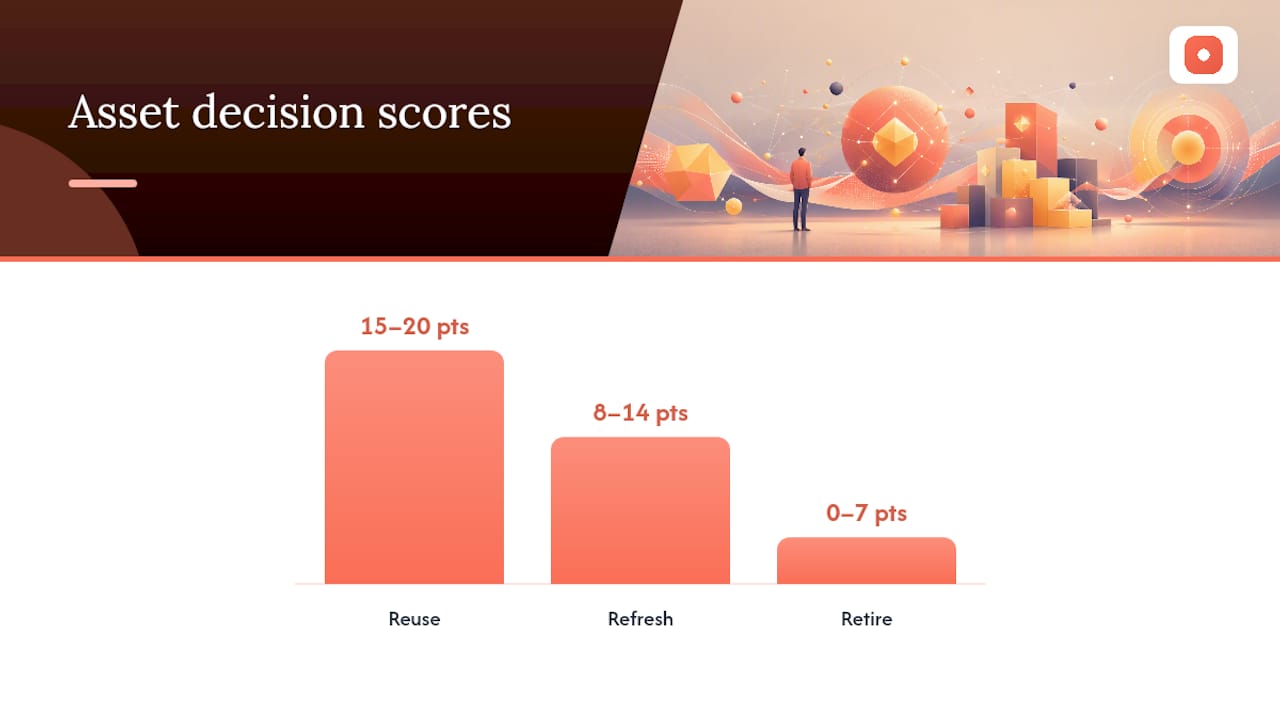
| Map scores to action | Use 15 to 20 points for reuse, 8 to 14 for refresh, and 0 to 7 for retire or reshoot. |
| Build a real workflow | Define intake, roles, decision states, and retention rules so every approval leaves an audit trail. |
| Use anchored feedback tools | Platforms like Usepinhub cut review ambiguity by pinning comments directly to the asset and letting guest reviewers weigh in without an account. |
Table of Contents
- What Belongs in a Marketing Asset Review
- Building a Scoring Rubric for Reuse, Refresh, or Retire
- Setting Up a Review and Approval Workflow
- How to Organize Assets So People Can Actually Find Them
- Measuring Whether Your Asset Review Actually Paid Off
- A 12-Week Roadmap for Rolling Out Your Asset Review
- Why Anchored Feedback Changes How Fast Audits Move
- What the Data Actually Supports About Asset Reviews
- Run Your Next Asset Review Without the Email Chain
- Sources
- FAQ
What Belongs in a Marketing Asset Review
Scope creep kills more asset audits than any other single mistake. Teams start with "let's review our ad creative" and three weeks later they're arguing about a sales deck from 2023 nobody remembers approving. Define the boundary before you touch a single file.
The scope of a marketing review is broader than most teams initially assume. It should cover any content that touches a prospect or customer, not just the obvious ad units. That means your audit list needs to include:
- Paid ads across every channel (social, search, display, connected TV)
- Landing pages and their component templates
- Email templates and automated sequence content
- Video assets, including raw cuts and platform-specific edits
- Social media post variants and stories
- Influencer and creator-partnership content
- App store screenshots and listing copy
- Sales collateral: decks, one-pagers, case studies, battle cards
Once you know what's in scope, the harder question is what to record about each item. A well-built inventory captures enough metadata that someone six months from now can find the asset, understand its status, and know whether they're legally allowed to reuse it.
At minimum, capture these fields for every asset:
- Title and associated campaign name
- Channel or platform where it's deployed
- Owner (the person or team accountable for the asset, not just whoever uploaded it)
- File type and format
- Creation date and most recent update
- Version number
- Current status (live, in review, archived, expired)
- Usage rights and license expiry date
- Last-used date
- Performance signals (click-through rate, conversion rate, engagement, whatever's relevant to that asset type)
- Storage path or direct link
An asset audit template built around ownership, usage rights, and performance impact gives you the governance backbone you need when legal or compliance asks who approved something and when.
With the inventory built, classify every asset into one of three priority tiers before you move to scoring:
- Brand-critical: logos, primary templates, hero landing pages, anything that represents the company at first touch.
- High-use: assets deployed across multiple campaigns or channels, where a fix has outsized reach.
- High-risk: anything with expiring usage rights, outdated compliance language, or discontinued product claims.
This triage step matters because you cannot score 4,000 assets with the same rigor in the same week. Prioritize the tiers above and let lower-risk, low-use assets wait for a second pass.
Building a Scoring Rubric for Reuse, Refresh, or Retire
Every asset review eventually hits the same wall: opinions. One person thinks the video is dated, another thinks it's fine, and the debate eats an afternoon. A scoring rubric ends that debate before it starts.
A practical rubric for asset decisions scores each item across four axes: brand fit, strategic fit, performance potential, and production quality. Each axis gets a 0 to 5 score, for a maximum total of 20 points.
- Brand fit: Does the asset match current visual identity, voice, and messaging guardrails?
- Strategic fit: Does it still support an active campaign goal or product positioning?
- Performance potential: Is there evidence (past or projected) that this asset drives engagement or conversion?
- Production quality: Is the resolution, copy, and craft still up to current standards?
Add the four scores together and the decision becomes almost mechanical:
- 15 to 20 points: Reuse. The asset works as-is. Republish it, extend its usage rights if needed, and move on.
- 8 to 14 points: Refresh. Something salvageable is there, but it needs work, whether that's a caption rewrite, a resize for a new placement, or an updated CTA.
- 0 to 7 points: Retire or reshoot. The asset is either fundamentally off-brand, strategically irrelevant, or too poor in quality to fix cheaply. Archive it and plan new production if the underlying need still exists.
The refresh category is where most of your team's time will actually go, and it's worth breaking it into concrete actions rather than leaving it as a vague bucket:
- Recut video assets to fit new aspect ratios or shorter attention spans
- Resize static ads for placements they weren't originally built for
- Refresh captions and CTAs to match current offers
- Update legal disclaimers or compliance language on anything customer-facing
- Swap outdated product screenshots or pricing
Pro Tip: Score in batches by asset type, not chronologically. Scoring 20 landing pages back to back builds pattern recognition that makes each subsequent score faster and more consistent than jumping between a video, an email, and a sales deck.
Once you have scores, roll the results into campaign lanes rather than a flat list. Group everything scored "reuse" into an immediate deployment lane, group "refresh" items by production type so a single photo shoot or editing session can address multiple assets at once, and route "retire" items straight to archive. This clustering approach turns your audit into an actual production roadmap instead of a spreadsheet nobody opens again.
Setting Up a Review and Approval Workflow
An audit tells you what you have. A workflow determines what happens to it next, and it's here that most teams lose credibility with legal, compliance, or leadership. A defensible workflow needs a single intake path, defined roles, and a state machine that leaves an audit trail.
Start with intake. Every new asset request, whether it's a fresh creative brief or a resubmission after a refresh, should go through one form, not five different Slack channels depending on who's asking. That form should capture the classification metadata from your inventory schema: campaign, channel, priority tier, and usage rights, right at the point of submission. Routing decisions (who reviews, who approves) get automatic once that metadata exists.
Assign roles clearly and consistently:
- Requester — submits the asset and provides campaign context
- Creative owner — makes the first-pass edits and incorporates feedback
- Reviewer — checks brand fit, messaging accuracy, and craft
- Approver — has sign-off authority, typically a marketing lead or director
- Compliance or legal — required for regulated claims, financial products, healthcare content, or anything with a legal disclaimer
Not every asset needs every role. A social caption tweak might only need a creative owner and a reviewer. A new landing page with pricing claims needs the full chain, compliance included.
Define your decision states explicitly, because ambiguous states are where assets get stuck for weeks:
- Intake — submitted, awaiting assignment
- In review — actively being evaluated by a reviewer
- Needs work — sent back with specific, anchored feedback
- Approved — signed off, ready for publication
- Published — live in market
- Archived — retired from active use, retained for record
A review-and-approval workflow needs to produce three specific outputs for every asset: a clear approve, revise, or reject decision, an auditable trail of who reviewed it and when, and an archived copy of the final approved version. Skip any one of those three and you've built a workflow that looks organized but can't survive an actual compliance question. Set service-level expectations for each state, too. Reviewers should acknowledge intake promptly and return a decision within a few days for standard assets; regulated content gets a longer window built into the SLA.
Recordkeeping ties the whole system together. Keep the original draft, every round of comments, the approval sign-off, and the final published asset in one linked record. Adobe's guidance on approval workflows points to notification triggers and reusable templates as the two features that most reduce approval cycle time, since reviewers stop hunting for context and start acting on it immediately. Retain that full record for at least as long as the asset stays live, and longer for anything with regulatory exposure.
How to Organize Assets So People Can Actually Find Them

An audit that ends in a well-scored spreadsheet but a chaotic file system solves nothing. Organization is the layer that determines whether your team finds the approved hero image in ten seconds or ten minutes.
Metadata does the heavy lifting here. Every asset needs a controlled set of tags, not free-text descriptions that six different people will phrase six different ways. Build a shortlist of approved values for campaign name, product line, channel, and asset type, and enforce it at upload.
Naming conventions matter more than most teams admit. A file named Q3_Landing_v2_FINAL_edited.jpg tells you nothing useful six months later. A structured convention like campaign-channel-assettype-version-date gives you searchable, sortable information embedded directly in the filename, which matters even when your metadata fields fail to sync properly.
Decide early whether you're tag-first or folder-first. Tag-first systems (where assets live in one pool and get surfaced through search and filters) scale better for large libraries with frequent reuse. Folder-first systems work fine for smaller teams with simple campaign structures, but they break down fast once you're running more than a handful of concurrent campaigns.
Version control deserves its own discipline:
- Maintain one clearly marked "approved" link per asset that downstream teams can trust without double-checking
- Record the reason for each new version (compliance update, resize, messaging change), not just a version number
- Kill duplicate published files immediately. Two live versions of the same landing page is how conversion tracking breaks
Archive policy closes the loop. A common and workable rule is to move assets to an archive rather than deleting them outright, typically after about a year of inactivity, preserving the reference and legal record while clearing it out of active search results. Regulated industries, including financial services and healthcare, typically need longer retention windows tied to their specific compliance requirements rather than the standard one-year default, so confirm your retention period with legal before applying a blanket rule.
Measuring Whether Your Asset Review Actually Paid Off
An audit without measurement is just a cleanup exercise you'll repeat from scratch next year. Track leading indicators that show whether the system is working day to day, and outcome metrics that prove value to leadership.
Leading metrics tell you whether the workflow itself is functioning:
- Time-to-find — how long it takes a team member to locate an approved asset
- Asset reuse rate — the percentage of campaigns built using existing approved assets versus new production
- Duplicate asset count — how many redundant versions exist across your storage
- Approval cycle time — average days from intake to approved status
Outcome metrics connect the audit to business results:
- Campaign speed-to-launch — how much faster a new campaign goes live when it draws from a governed asset library
- Conversion lift from refreshed creative — the performance delta between an old asset and its refreshed replacement
- Production cost avoided — dollars saved by reusing or refreshing instead of commissioning new work
A marketing asset management system built around centralized storage, workflow automation, and reporting makes most of these numbers pull automatically instead of requiring a manual audit every time leadership asks for a status update.
Build a simple dashboard that separates operational detail from executive summary. Marketing ops should review time-to-find, cycle time, and duplicate counts weekly. Leadership needs a monthly view focused on speed-to-launch and cost avoided, since that's the language that justifies continued investment in the governance process.
A 12-Week Roadmap for Rolling Out Your Asset Review
Trying to audit everything at once is the single most common reason these initiatives stall. Break the work into four phases with real owners and a hard stop date for each.
- Weeks 1 to 2: Kickoff and inventory export. Define scope, confirm who owns the audit, and pull every asset into one master inventory. Involve marketing ops, one representative from creative, and one from brand.
- Weeks 3 to 6: Scoring sweep and decisioning. Apply the four-axis rubric to every brand-critical and high-use asset first. Bring in a reviewer from each major channel team to score assets in their domain, since they know the performance context best.
- Weeks 7 to 10: Configure tools, governance, and training. Set up your intake form, roles, and decision states in whatever platform you're using. Train the team on the new workflow before assets start flowing through it live.
- Weeks 11 to 12: Launch and measure. Go live with the governed workflow, publish your approved reuse assets, and pull your first dashboard snapshot to establish a baseline.
Aim for a minimum team of three to five people across the full roadmap: one ops lead who owns the process, one creative representative, one channel or performance marketer, and legal or compliance on call for regulated content.
Prioritize quick wins inside that first sweep rather than waiting for the full 12 weeks to show value. Fix your hero assets first, since they carry the most traffic and the most brand risk. Retire any expired offers or discontinued product claims immediately, they're liability, not opportunity. Publish your first batch of approved reuse links as soon as they're scored, so the team sees tangible progress before week 6.
Pro Tip: Resist the urge to configure every feature of your review platform before launching. Get one channel team running through the new intake and approval flow first, fix what breaks, then roll out to the rest of the organization.
Why Anchored Feedback Changes How Fast Audits Move

Most of the delay in a marketing asset review doesn't come from the scoring or the inventory work. It comes from the feedback loop: someone leaves a comment in an email, another person replies in Slack, and a third person edits the file without seeing either message.
Pixel-anchored, in-context comments cut that ambiguity out entirely because feedback attaches directly to the exact point on the asset it refers to, rather than floating in a separate thread the creative owner has to interpret. That single change removes the back-and-forth clarification that eats days out of a standard review cycle.
Two other capabilities matter specifically for audit work. Guest reviewers can weigh in without creating an account, which matters when your review chain includes a client, a regional stakeholder, or a compliance contact who touches the process once a quarter. And automated summary lists compile every open comment thread into one exportable record, which doubles as the audit trail your recordkeeping policy requires.
Version control and password-protected shares mean an audit's evidence trail (who saw what, when, and what they approved) stays intact even after the asset has gone through three or four rounds of revision.
What the Data Actually Supports About Asset Reviews
Most advice on marketing asset audits treats the inventory step as the hard part. It isn't. Pulling a list of files into a spreadsheet is tedious but mechanical. The real difficulty is building a scoring system your team will actually apply consistently, and a workflow that survives contact with a compliance officer six months later.
The conventional advice oversells the "one-time cleanup" framing. An audit that isn't paired with an ongoing intake and approval structure decays within two quarters, because new assets keep entering the system with none of the metadata discipline the original sweep imposed. The rubric-based decision framework works precisely because it turns subjective creative debates into a repeatable score, but that only holds value if the same rubric gets applied to every new asset going forward, not just the backlog.
If you take one thing from this, prioritize the workflow over the inventory. A messy inventory with a working approval process still improves week over week. A pristine inventory with no ongoing review discipline is a snapshot of a problem that's already growing again.
— Pinhub
Run Your Next Asset Review Without the Email Chain
Usepinhub gives marketing teams the one thing a spreadsheet audit can't: a feedback trail anchored directly to the asset itself, so review comments never get lost between a Slack thread and an inbox. If your team just finished scoring a backlog of assets, the refresh queue you're about to open is exactly where this matters most.

A marketing ops team running a quarterly audit can upload the flagged "refresh" batch, pin specific comments to the exact headline or image that needs work, and invite a client or regional stakeholder to weigh in as a guest reviewer with no account setup required. Version history keeps every round of edits tied to the original approval record, and the AI-generated summary list gives you the exportable audit trail your recordkeeping policy calls for, without anyone manually compiling a status report. Teams building out a structured review workflow or comparing creative review tools for their stack tend to find the anchored comment model solves the ambiguity a generic comment thread creates.
Start your next audit cycle by uploading your first batch of flagged assets to Usepinhub and inviting your review team in.
Sources
Consult these directly when building your review process:
- Complete Guide to Marketing Asset Management | Smartsheet
- Audit Creative Assets for Strategic Brand Campaigns
- Creative asset inventory and audit template
- Marketing Review: A Compliance Guide for Regulated Industries | Sedric
- Review and approval workflow advantages — Adobe
FAQ
What Is a Marketing Asset?
A marketing asset is any piece of content used to reach or engage a prospect or customer, including ads, landing pages, videos, social posts, sales decks, and email templates.
How Much Does a DAM System Cost?
Pricing varies widely by vendor, seat count, and feature tier, and no single figure applies across the market. Evaluate based on the core features you need, like centralized storage, workflow automation, and reporting, rather than shopping on price alone.
What Are Some Examples of DAM Platforms?
Digital asset management platforms range from enterprise systems with full workflow automation to lighter tools focused specifically on review and approval, such as Usepinhub for anchored feedback and version control during the review stage.
What Is a Marketing Review?
A marketing review is the structured process of evaluating marketing content for accuracy, brand fit, and compliance before it publishes, producing an approve, revise, or reject decision with an auditable trail.
How Long Should a Marketing Asset Review Take?
A full initial audit typically runs 6 to 12 weeks from kickoff to launch of a governed workflow, though flagging and fixing your highest-priority hero assets can happen within the first 72 hours.