
Use asynchronous design reviews as your default for routine iterations. When you run them with a short brief, blind-first feedback, and a 48-hour shot clock with a named decision owner, they produce faster, more diverse, and more defensible feedback than most live critique sessions. The tradeoff is discipline: async only works when someone owns the process end to end.
TL;DR:
- Async design reviews boost participation by allowing reviewers to contribute on their own schedule, especially with a clear 48-hour decision window and a named owner.
- They improve speed by shifting focus to time-to-decision, participation rate, and iteration speed rather than prolonged meetings, making routine iteration faster.
- Following a structured workflow—posting, blind feedback, theme clustering, and a definitive decision—prevents common pitfalls like indefinite threads or scattered comments.
- Using tools like pixel-anchored comments, guest access, and AI summaries enhances clarity, traceability, and efficiency of the review process.
- For best results, incorporate async reviews into onboarding, set consistent cadence, and assign reviewers intentionally to ensure fairness and high engagement.
Table of Contents
- Why Async Design Reviews Improve Speed and Participation
- What Is the Step-by-Step Async Design Review Workflow?
- How Do You Write an Iteration Post That Gets Useful Feedback?
- How Do You Turn Scattered Comments Into a Decision?
- What Tools Do You Actually Need for Async Reviews?
- How Do You Make Async Reviews Fair and Inclusive?
- What Goes Wrong in Async Design Reviews (and How to Fix It)
- How Pinhub Supports the Async Review Workflow
- Making Async Reviews Actually Stick
- Try Pinhub to Speed Up Your Async Design Reviews
- Sources
- FAQ
Why Async Design Reviews Improve Speed and Participation
Live critique sessions have a scheduling problem before they have a content problem. Async reviews let reviewers weigh in on their own schedule, which raises participation because nobody has to defend a calendar conflict to skip feedback. The Engineering Fundamentals Playbook frames this as one of the core advantages: reviewers contribute when they actually have the time and headspace to think, not whenever a meeting got booked three weeks ago.
That structural shift changes what you should measure. Track:
- Time-to-decision — hours or days from posting to a closed thread, not from posting to "everyone talked about it once"
- Participation rate — percentage of invited reviewers who actually leave substantive comments
- Iteration speed — number of design cycles completed per week or sprint
Pro Tip: If your time-to-decision keeps creeping past 48 hours, the bottleneck is almost never the reviewers. It's usually a missing decision owner.
Async isn't universal, though. High-stakes decisions with real disagreement, sensitive feedback about a struggling teammate's work, and onboarding new designers to team norms still benefit from a live room. Async is for routine iteration, not every decision your team makes.
What Is the Step-by-Step Async Design Review Workflow?
A repeatable async design review follows five steps, in this order, and skipping any one of them is usually why teams say async "doesn't work" for them.
- Confirm your preconditions first. You need a durable artifact reviewers can return to (a Figma file, a shared canvas, or an image workspace with version history), and a written brief. Without versioning, a review that took three days to gather feedback on has no reliable record of what changed.
- Post a short walkthrough and a three-part brief. Record a 90 to 180 second video walking through the design decisions, then attach a brief with your goal, what changed, and your specific questions.
- Collect blind first-pass feedback. Reviewers submit initial reactions before seeing anyone else's comments. This single step does more to prevent anchoring than anything else in the process.
- Open the thread and cluster feedback into themes. Once blind comments are in, open discussion so reviewers can build on each other's points, then group similar comments together instead of treating each as a standalone item.
- Name a decision owner and enforce the shot clock. One person, typically the design lead or the artifact's original author, decides what ships and closes the thread within 48 hours for routine reviews.
The code-with-engineering-playbook documents this exact pattern: post, collect blind feedback, synthesize, and close with a named owner inside a defined window. It works because each step removes a specific failure mode. Blind-first removes anchoring. The shot clock removes indefinite drift. The named owner removes the "everyone agreed but nobody decided" problem that kills more design reviews than bad feedback ever does.
Pro Tip: Post reviews on the same day of the week, every time. Reviewers build a habit around a predictable cadence faster than they build one around an unpredictable stream of ad hoc requests.
How Do You Write an Iteration Post That Gets Useful Feedback?
"Any thoughts?" is the single most common cause of vague, low-value design feedback. Replace it with a three-part brief every time you post work for review.
The structure, drawn from A List Apart's asynchronous critique framework, has three parts:
- A one-sentence goal. What is this design trying to accomplish, stated plainly enough that a reviewer who missed the last three meetings still understands it.
- What changed and any constraints. List the specific changes since the last version, plus anything that's fixed and not up for debate (brand colors, a locked layout grid, a legal requirement).
- Two to four focused questions. Ask exactly what you want reviewed. "Does the checkout flow reduce the steps we discussed?" gets a better answer than "thoughts?" every time.
Attach the actual artifacts reviewers need: screenshots of key states, a prototype link if interaction matters, and a short walkthrough recording if the flow is hard to grasp from static images alone. A 90-second video answers questions a wall of screenshots can't.
Set expectations up front, too. State your deadline, how deep you want the feedback (a gut check versus a line-by-line critique), and whether this is advisory feedback the owner will weigh, or a blocking review that needs sign-off before work continues. Templates like the ones in Pinhub's design feedback template guide can save you from rebuilding this structure from scratch every time.
Pro Tip: Pin your two to four questions directly to the parts of the design they refer to instead of listing them separately. Reviewers answer questions they can see next to the thing in question, not questions floating in a text block above it.
How Do You Turn Scattered Comments Into a Decision?
Treat the comments you collect as research data, not as a to-do list to work through in the order they arrived. A List Apart's framing is worth internalizing here: written feedback is closer to interview transcripts than to bug reports, and it rewards the same kind of thematic analysis.
Start by grouping comments into themes rather than reading them one at a time:
- Read every comment once before responding to any of them
- Cluster related points together, even when different reviewers use different wording
- Count how many independent reviewers raised each theme. A concern three people flagged independently outweighs one detailed paragraph from a single reviewer
- Convert clusters into a prioritized checklist, ordered by how many people raised the issue and how much it affects the goal stated in your brief
Some teams speed this step up with an AI-assisted summary pass. Tools built for surfacing patterns in qualitative input can cluster comments faster than a human doing it manually, though you still need a person to judge which theme actually matters most.
Once the checklist exists, hand it to a named decision owner. This is not a group decision by committee. It's one person, usually the design lead or the artifact's author, who reads the prioritized list and decides what changes, what gets deferred, and what gets rejected with a stated reason. For routine reviews, that owner closes the thread within 48 hours. If the review is still open after that window, something upstream broke: either the brief was unclear, or the reviewers weren't the right people to ask.
What Tools Do You Actually Need for Async Reviews?
The minimum stack for a reliable async review is smaller than most teams assume, but skip any piece of it and the process degrades fast. You need a durable canvas or image workspace where comments stay pinned to specific locations, a short video recorder for walkthroughs, and something functioning as a decision ledger, even if that's just a pinned comment stating the final call.
Beyond the minimum, a few features separate a workable process from a fragile one:
That last row matters more than it sounds like it should. The Engineering Fundamentals Playbook describes a branch, pull request, and approve/merge pattern for design docs when teams need engineering-grade traceability, not just a comment thread. Most product teams don't need that level of rigor for a landing page tweak. Regulated industries and teams shipping design systems used across dozens of products usually do. A closer look at tool capabilities suited to different review styles can help you figure out which tier your team actually needs.
How Do You Make Async Reviews Fair and Inclusive?
Assigning reviewers by surprise is the fastest way to get thin, resentful feedback. Ask people directly, and get their agreement before you list them as a required reviewer.
A few concrete habits fix most inclusion problems in async reviews:
- Invite reviewers explicitly and confirm they have the bandwidth, rather than defaulting to the same three senior people every time
- Run blind-first passes so junior reviewers form their own opinion instead of echoing whoever commented first
- Add a role prompt for quieter reviewers ("what would a first-time user notice here?") to give them a specific lane to contribute in
- Caption or transcribe walkthrough videos so reviewers who process text faster than audio aren't at a disadvantage
- Set a review window wide enough to span your team's time zones, not just the zone where the design lead sits
Pro Tip: If the same two people answer every review within an hour and everyone else answers right before the deadline, your window is probably too short for the time zones you actually have on the team.
What Goes Wrong in Async Design Reviews (and How to Fix It)
Three failure patterns show up in almost every team that tries async reviews for the first time, and all three have simple operational fixes.
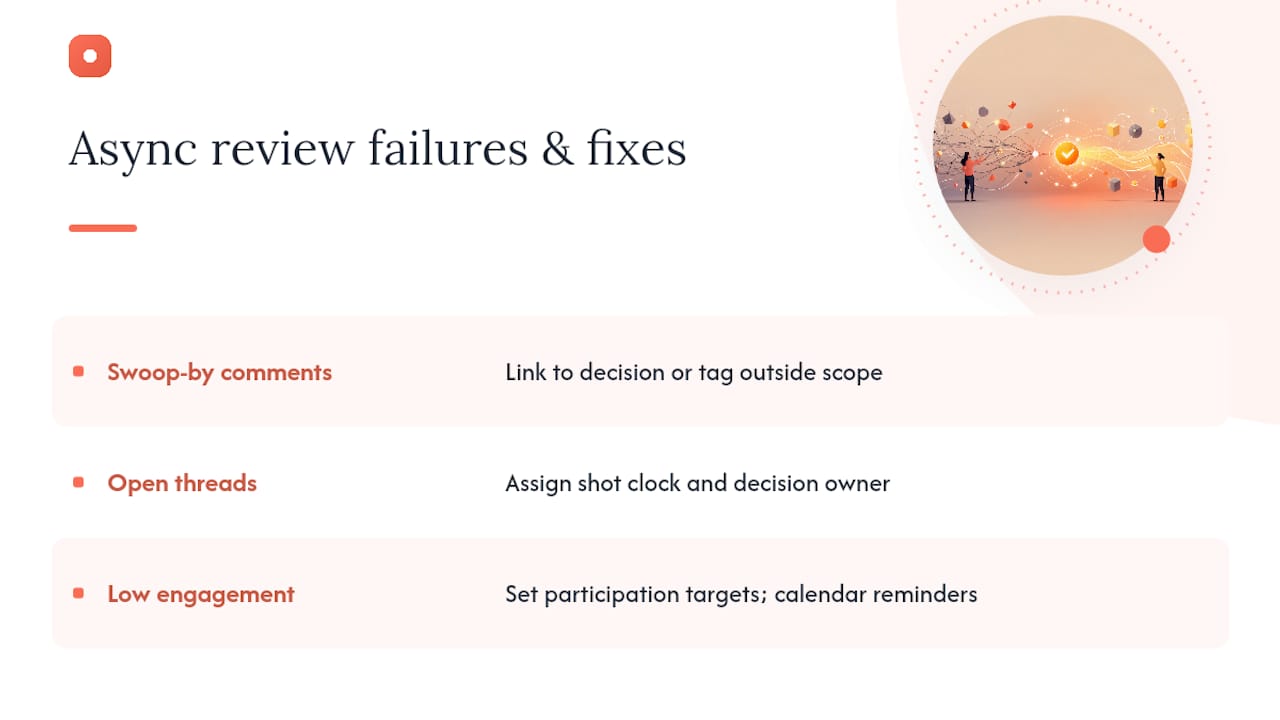
Swoop-by comments. Someone drops a comment with zero context, weeks after the thread closed. Link them back to the relevant decision and the reasoning behind it, or explicitly tag the comment as outside the current scope and move on. Don't reopen a closed decision for every late arrival.
Threads that never close. A review sits open for two weeks because nobody wants to make the final call. This is what the shot clock and the named decision owner exist to prevent. Pin the final decision directly on the artifact so anyone checking later sees the outcome without re-reading the whole thread.
Low engagement. If reviewers aren't showing up, set a participation target and follow up with the specific people who missed the window rather than sending a generic reminder to the whole channel. Put review windows on shared calendars so "I forgot" stops being a valid excuse.
How Pinhub Supports the Async Review Workflow
Some platforms build directly toward the workflow above. Pixel-anchored feedback methods attach comments to exact points on a screenshot or design, which removes the ambiguity that makes much written feedback unclear. Guest reviewers can join a thread and leave comments without creating an account, so getting a client or a stakeholder from another team into a review may not require an onboarding step.
The platform is built around the people who run this process daily: product design teams, marketing agencies, and remote collaborators who need faster iteration and a clear record of what was decided and why. For teams documenting their own process, Pinhub's blog covers remote design review workflows and broader visual collaboration practices in more depth.
Making Async Reviews Actually Stick
Rollout fails when senior designers keep defaulting to live meetings "just this once." Adopt async-first yourself before you ask anyone else to. Write the process into onboarding, show a simple before-and-after on time-to-decision, and replace one recurring live review with an async format. Iterate from there instead of converting everything at once.
— Pinhub
Try Pinhub to Speed Up Your Async Design Reviews
Some platforms are built to support workflows with anchor points for every comment, guest links for reviewers who don't have to sign up, version history to keep briefs and artifacts in sync, and AI-assisted summaries to turn scattered threads into prioritized checklists faster than manual methods.

A practical way to start is small. Post your next iteration with a 90 second walkthrough and a three-part brief, invite your guest reviewers directly through a shareable link, let the AI summary cluster the comments into themes, and close the thread yourself as the named decision owner. If you want more structure before that first post, Pinhub's feedback template guide and 30 ready-to-use feedback phrases give you language to work from immediately. Set up your first async review on Pinhub and see how much faster a closed thread feels compared to your last live critique.
Sources
- Async Design Reviews - Engineering Fundamentals Playbook
- Asynchronous Design Critique: Getting Feedback — A List Apart
- code-with-engineering-playbook — GitHub
FAQ
What Is an Async Design Review?
An async design review is a critique process where reviewers give feedback on a design over a set window of time, typically 48 hours, instead of gathering in a single live meeting.
Is Async Better Than Sync for Design Reviews?
Async is generally better for routine iterations because it raises participation and removes calendar friction, but synchronous meetings still work best for high-stakes decisions, sensitive feedback, and onboarding new team members to review norms.
What Is an Example of an Asynchronous Design Review?
A designer posts a screenshot with pinned comments, a short walkthrough video, and a three-part brief, then reviewers leave blind first-pass feedback over 48 hours before a named decision owner closes the thread. Pinhub's pixel-anchored comment system is built to run exactly this kind of review.
Is Pinhub Legit for Running Design Reviews?
Pinhub is a real feedback platform built around pixel-anchored comments, guest reviewer access without account creation, and version history, targeted specifically at product design teams, agencies, and remote collaborators running async reviews.
How Long Should an Async Design Review Take?
For routine reviews, a 48-hour shot clock from posting to a closed decision keeps feedback timely without losing the participation benefits of an asynchronous format.