
An AI feedback summary condenses hundreds or thousands of comments, tickets, and reviews into themes, representative quotes, and sometimes a ready action list. It works best for recurring jobs like weekly trend checks, sprint planning, and stakeholder updates, where reading every raw item is not realistic. Treat it as a starting point for judgment, not a replacement for it.
TL;DR:
- AI feedback summaries rely heavily on quality metadata and representative quotes to accurately reflect themes and avoid misgrouping or bias.
- Including raw feedback samples and setting a review cadence helps ensure summaries remain reliable and prevent overestimating recent issues.
- Linking identified themes directly to actionable tasks and decision-making processes maximizes the value of summaries, as standalone reports lack impact.
- Visual context, such as screen-pinned comments, significantly enhances the traceability and usefulness of design or UI feedback summaries.
- Tailoring the summary format to the audience—whether quick gist, detailed digest, or action list—improves clarity and prevents losing nuance or credibility.
Table of Contents
- How AI Feedback Summaries Work: From Raw Text to Themes
- What Types of AI Feedback Summaries Should You Generate?
- How Do You Know an AI Feedback Summary Is Accurate?
- How Do You Turn AI Feedback Summaries Into Action?
- Pinhub's Practical Checklist for AI Feedback Summaries
- Try Automated Summary Lists With Visual Context Preserved
- Selected Documentation and Research to Read Next
- Sources
- FAQ
How AI Feedback Summaries Work: From Raw Text to Themes
Every AI feedback summary follows roughly the same pipeline, whether it is running on customer reviews, support tickets, or annotated screenshots. Raw feedback comes in, gets cleaned, gets grouped by topic, and then a language model writes a condensed version of each group.
The typical sequence looks like this:
- Collect: Pull feedback from tickets, surveys, reviews, or comment threads into one dataset.
- Clean: Remove duplicates, strip formatting noise, and normalize inconsistent language.
- Cluster: Group similar comments using embeddings, a technique that converts text into numerical vectors so a model can measure how closely two comments relate in meaning.
- Extract: Pull representative quotes and counts from each cluster.
- Synthesize: Have a large language model write a short summary per cluster, sometimes pulling in extra context through retrieval augmented generation, which lets the model reference related past feedback before writing.
Demos that combine embeddings and clustering with LLM synthesis show how lightweight this pipeline can be to stand up, even for a single product surface like a storefront.
Where it breaks down is predictable. Noisy inputs, like feedback missing a date or product area, get misgrouped. Duplicate signals from the same frustrated customer posting in three channels can make a minor issue look like a major trend. Missing metadata is the single most common cause of a summary that looks confident but is quietly wrong.
What Types of AI Feedback Summaries Should You Generate?
Not every summary should look the same, and asking for the wrong format is one of the fastest ways to waste a good dataset. Match the summary type to who's going to read it.
- Gist summary: A one or two sentence overview for a quick scan, useful in a daily standup or a dashboard tile.
- Thematic digest: Grouped topics with counts and short descriptions, the format most product teams reach for during planning.
- Action list: Specific, assignable items pulled out of the feedback, best when a team needs to move straight from insight to ticket.
- Stakeholder brief: A narrative version with representative quotes, written for people outside the product team who need context, not raw data.
You control format largely through prompting or configuration. Custom instructions can set length limits, ask the model to prioritize negative sentiment, or require a fixed tone for executive audiences. NN/g's analysis of AI review summaries points to the core trade-off: pushing for shorter, punchier summaries tends to strip out nuance, while asking for completeness produces something closer to a report than a summary. Pick one goal per summary request rather than trying to optimize for both.
How Do You Know an AI Feedback Summary Is Accurate?
Recency bias is the most common accuracy problem in AI feedback summaries. If a model leans on whatever feedback came in over the last two weeks, it will overstate a trending complaint and miss a slow-burning issue that's been building for months. The fix is ingesting the full historical record or using stratified sampling across time periods and product areas, rather than only feeding the model the newest batch.
Run these checks before trusting a summary enough to act on it:
- Pull 10 to 15 raw items at random from a cluster and confirm they actually match the summary's claim.
- Compare two summaries generated a week apart on overlapping data to check for consistency.
- Sample across old and new feedback, not just the most recent week, to see whether a theme is persistent or a short spike.
- Assign a named owner for reviewing summaries on a set cadence, weekly or biweekly depending on volume.
A documented failure mode in AI summarization is treating a temporary spike as a durable trend, which sends teams chasing a problem that already resolved itself.
Pro Tip: Keep a simple acceptance checklist: does the summary cite specific counts, does it include at least one representative quote per theme, and does the sampled evidence match the claim? If any answer is no, don't ship the summary to stakeholders yet.
How Do You Turn AI Feedback Summaries Into Action?
A summary that sits in a document does nothing. The value shows up when themes turn into tickets, roadmap items, and decisions stakeholders can see.
- Auto-create tickets from action items in the summary, tagged with the source theme so engineers can trace context back to real feedback.
- Link themes to roadmap initiatives so a recurring complaint about onboarding maps directly to the initiative addressing it, a pattern product-oriented platforms build around when connecting feedback trends to planning.
- Send weekly digests to stakeholders that include quote counts and direct quotes, not just bullet points, so the summary carries evidence, not just conclusions.
- Set a review cadence (weekly for high-volume products, biweekly or monthly for lower-volume ones) with a named owner and a short list of metrics, like theme recurrence rate, to track whether summaries are actually shaping decisions.
Teams that skip the evidence step tend to see summaries lose credibility fast. A quote count attached to a theme gives a product manager something to point to in a planning meeting; a bare claim does not. Structured workflows for converting feedback into tasks work because they preserve that link between raw input and the decision made from it.
Pinhub's Practical Checklist for AI Feedback Summaries
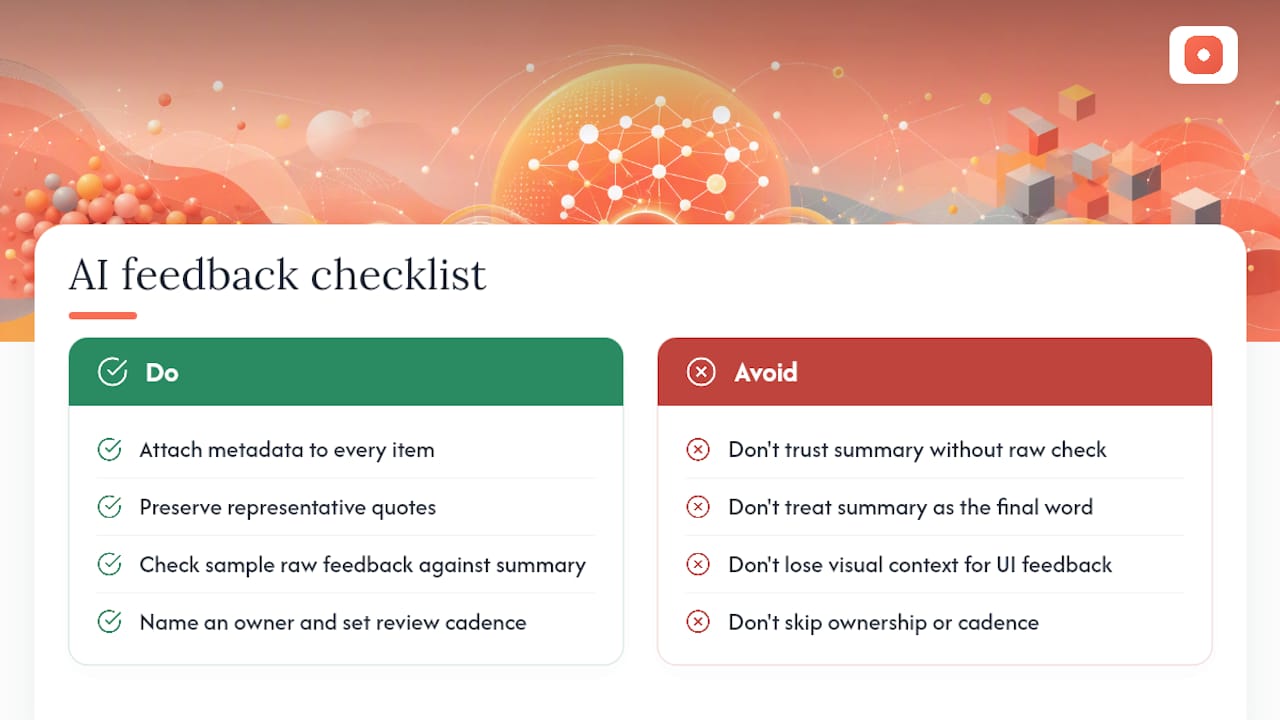
Before you trust a summary, run a short checklist: metadata attached to every item, representative quotes preserved, a sample of raw feedback checked against the summary's claims, and a named owner with a set review cadence. Skip any of those and you're trusting a plausible-sounding document instead of a validated one.
The most common trap we see is treating a summary as the final word without ever opening the raw feedback it came from. A close second is losing visual context in UI feedback. A comment saying "this button is confusing" means little without the screen it refers to. Pixel-anchored comments tie feedback to an exact point on a screen, which keeps design-related summaries traceable to a real state rather than a vague description.
— Pinhub
Try Automated Summary Lists With Visual Context Preserved
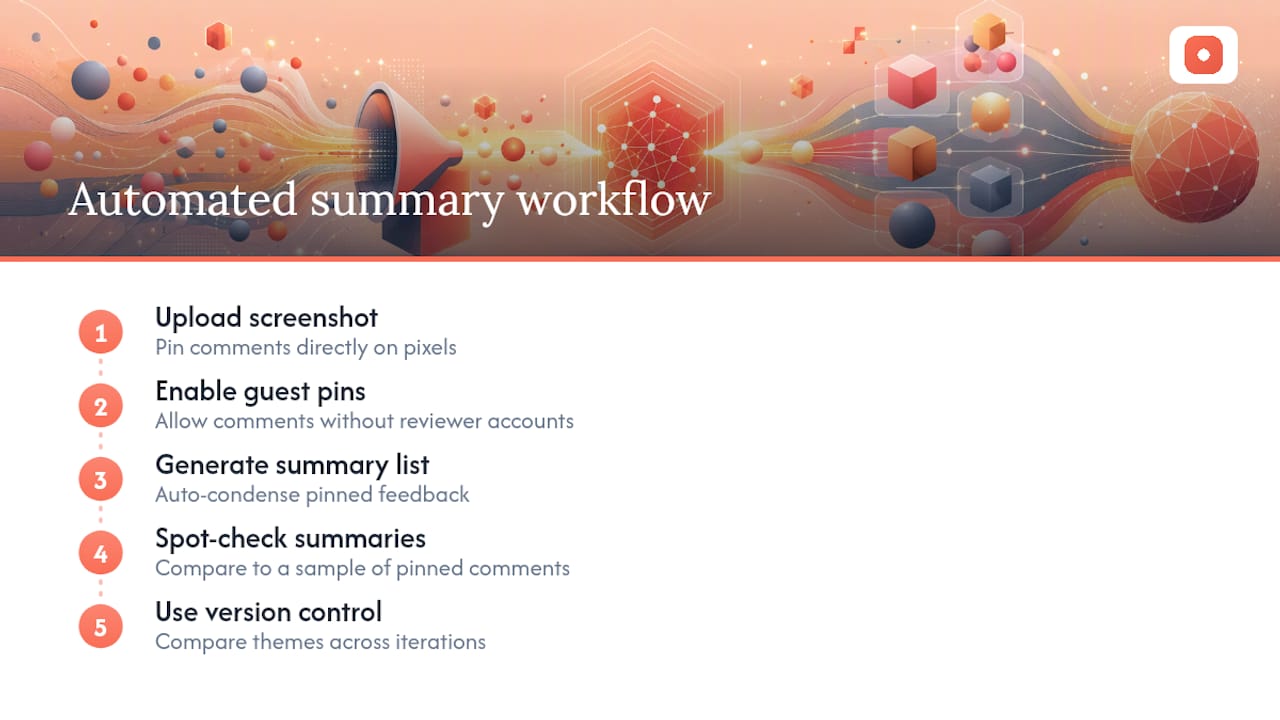
Most AI summary tools work from text alone, which means design and UI feedback loses the one thing that makes it usable: exactly where on the screen the issue lives, something enhanced by an AI Summary Generator that condenses long text fast while preserving important details. The platform anchors feedback comments to specific points on screenshots or designs, so summaries can reference exact screen areas rather than vague descriptions.

Some feedback platforms allow guest reviewers to leave pinned comments without creating accounts, enabling quick participation from clients or stakeholders. Once feedback accumulates, generate an automated summary list, then spot check it against a handful of the original pinned comments, the same validation habit covered above. Version control keeps prior rounds intact, so you can compare how themes shifted between design iterations.
If your team is buried in screenshots, comment threads, and Slack messages about the same three design issues, start by uploading your first screenshot to Usepinhub and pinning comments directly where they belong.
Selected Documentation and Research to Read Next
For enabling and configuration details, see Spark Hire's AI Evaluation Summary docs and Centercode's AI feedback summaries overview. For bias and validation, revisit the recency bias glossary entry above.
Sources
Feedback quality in, summary quality out. AI feedback summaries can ingest support tickets, product reviews, NPS verbatims, call transcripts, and annotated screenshots, but each source needs some preparation before it produces a trustworthy summary.
Follow this sequence before you run a summarization pass:
Vendor documentation for AI-generated review summaries confirms this pattern: platforms that condense reviews into short overviews also support multi-language inputs, but they lean on structured metadata to keep the output grouped correctly.
Pro Tip: Tag screenshots and design feedback with the screen or component name before summarizing. A summary that says "users are confused about checkout" is far less useful than one that ties the confusion to a specific screen state.
FAQ
What Is the 30% Rule in AI?
There's no single agreed-upon "30% rule" in AI feedback summarization. If you've seen the term, it likely refers to a specific vendor's internal sampling threshold rather than an industry standard, so check the source before applying it.
What Is a Summary of Feedback?
A feedback summary condenses raw comments, reviews, or survey responses into grouped themes with supporting evidence, letting a reader understand the main patterns without reading every individual item.
How Do I Get an AI Summary?
Feed cleaned, tagged feedback into a tool that supports AI summarization, such as Pinhub's automated summary lists for design feedback or a vendor platform's built-in summary feature, then configure the output type and length you need.
Which AI Tool Is Best for Summary?
The right tool depends on your feedback type: text-heavy review platforms suit general summarization tools, while visual and design feedback benefits more from a platform like Usepinhub that anchors summaries to exact screen locations instead of vague text descriptions.
How Do I Customize an AI Feedback Summary?
Most platforms let you set custom instructions covering length, tone, and focus area, similar to the custom summary instructions documented by Centercode, so you can request a short executive brief or a detailed thematic digest from the same dataset.